

Finelo: Master Trading

1M+
Installs
Finelo Limited
Developer
-
Productivity
Category
-
Teen
Content Rating
-
support@finelo.com
Developer Email
-
https://legal.finelo.com/privacy
Privacy Policy
Screenshots

editor reviews
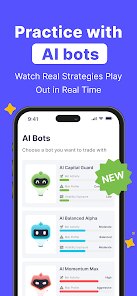
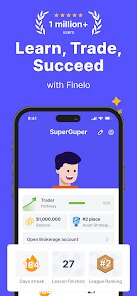
Finelo: Master Trading, created by Finelo Limited, is a mobile application designed to help users understand financial markets through structured learning and practical tools. The app is available for download on Google Play and the App Store, offering a free installation with optional premium features. It combines educational content with market tracking capabilities, making it suitable for those who want to build their trading knowledge without feeling overwhelmed. The interface keeps things straightforward, and while the free version includes ads, they don't interrupt the flow of learning too much.
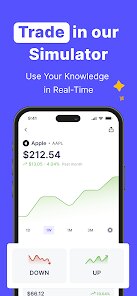
The way Finelo works revolves around bite-sized lessons and interactive modules that cover topics like technical analysis, risk management, and market psychology. After creating an account, users can access a dashboard where they track currency pairs, commodities, and indices, with charts that update regularly. I found the practice mode particularly useful—it lets you simulate trades using virtual funds, which removes the pressure of real money while you get a feel for how markets move. Navigation is smooth, and the app guides you through its features with short prompts rather than dumping everything on you at once.
When I compare Finelo to other trading education apps like Trading Academy or Investmate, the differences start to become clear. Finelo tends to focus more on visual learning, with charts and diagrams that explain concepts quickly, whereas some competitors rely heavily on text-heavy articles. It also feels less cluttered, as the design prioritizes essential tools over flashy extras. That said, it doesn't offer the same depth of community features that a few rivals include, but for someone who prefers a quieter, self-paced approach, it holds its own quite nicely.
features
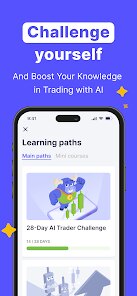
- One aspect that stands out is the adaptive quizzes that appear after each lesson. They adjust to your answers, so if you miss a question, it revisits that concept again in a slightly different way. In practice, this meant I retained more than with apps that simply show a score at the end and move on.
- The market simulator deserves attention too. Unlike some trading apps where the demo mode feels secondary, here it's woven into the core experience. You can test strategies side-by-side with real-time prices, which gives immediate feedback on whether your approach makes sense.
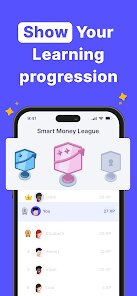
- Progress tracking is handled well, with a clean weekly report showing areas you've improved and ones that still need work. It's less detailed than what you'd find in Bloomberg's offerings, but it's far more approachable for a beginner.
- I also appreciated the economic calendar tucked into the tools section. It lists upcoming events that might move markets, and you can tap any item to see a brief explanation. Compared to Forex Factory, it's simplified, but that simplicity works in its favor on a phone screen.
pros
- Finelo saves time by condensing complex ideas into manageable lessons, so you don't have to search through multiple sources to grasp a basic concept.
- The simulated trading environment boosts confidence before any real capital is involved, which has helped me avoid costly beginner mistakes.
- Since everything syncs across devices, I can switch from my tablet to my phone without losing my place—handy when I'm on the move.
cons
- On smaller phone screens, the chart interface feels a bit cramped, especially when you're trying to view multiple indicators at once.
- Customer support replies can take a day or two, which is slow if you run into a technical hiccup during active learning sessions.
- Some advanced features, like detailed backtesting, are locked behind a premium subscription that might feel pricey for casual users.
- Occasionally, the lessons dip into jargon without fully explaining it, assuming prior knowledge that a true beginner might lack.
Articles
![]()
Guide
How to Update Google Play Store on Android 2026
![]()
Guide
How to Download Older Versions of Android Apps
![]()
Guide
How to Download Apps Without Google Play Store
![]()
Guide
What Is an APK File for Android?
If you use an Android phone, you may have seen the term APK while searching for apps or games online. Some websites offer an APK download instead of a Google Play install button. Some users also mention APK files when talking about apps that are not available in their region, older app versions, or Android games downloaded outside the Play Store.
![]()
Guide
How to Install Games from Google Play for Beginners
Installing games on an Android phone is usually simple, but for beginners, the process can still feel confusing at first. You may not know where to search, which button to tap, whether the game is safe, or why Google Play sometimes asks for account settings, storage access, or payment information. If you are using an Android phone for the first time, learning how to install games from Google Play is one of the easiest ways to get started.
![]()
Guide
How Useful Gemini Is for Everyday Questions and Quick Tasks
emini feels different from many AI apps because it is not only trying to be a chatbot. After using it for everyday questions, quick writing, image understanding, and planning, I think its biggest strength is convenience.
![]()
Guide
What to Know Before Downloading APKs
For many Android users, downloading an APK is a common way to install apps and games. Sometimes an app is not available in a certain country.
![]()
Guide
ChatGPT Review: Is It Still the Best AI App in 2026?
![]()
Guide
Seedance 2.0 vs Sora: The Future of AI Video Generation
The AI video race has intensified dramatically over the past two years. Platforms like Sora from OpenAI and Luma Dream Machine pushed the boundaries of text-to-video realism. Yet, despite their impressive outputs, most tools still operate as probabilistic generators—you describe a scene, and the model interprets it. Control remains limited. With the February 2026 release of Seedance 2.0, developed by ByteDance, the paradigm shifted. Internally known as Jimeng 2.0, Seedance does not position itself as just another video model. It positions itself as an AI Director. Rather than guessing what you want, Seedance 2.0 allows you to direct what happens. This distinction defines everything that follows.









Recommended Apps
![]()
Home Design 3D
Anuman4.2
![]()
Truth or Dare Game - Party App
Chouic4.8
![]()
Photo Collage Maker
Scoompa4.7![]()
Learn to Draw Flower
Creative APPS4.2![]()
FIFA World Cup 2026™
FIFA2.8![]()
Mirror Plus: Mirror with Light
Digitalchemy, LLC4.4![]()
Meitu- Photo Editor & AI Art
Meitu (China) Limited4.5![]()
Perplexity - Ask Anything
PerplexityAI4.7![]()
GhostTube SLS Camera Alternate
GhostTube4![]()
Boom Chip Blast: 2-Player
Black Pyramid 3D Games Studio0![]()
Healthy Benefits+
Solutran, Inc.4.5![]()
Deepcheck AI Search Assistant
rohe.ai4![]()
Idol Prank Video Call & Chat
LightCode Solutions4![]()
Face Shape - Pretty Scale
GlintTec Apps3.9![]()
Plant App - Plant Identifier
ScaleUp4.6












































