
Peacock TV: Stream TV & Movies

10,000,000+
Installs
Peacock TV LLC
Developer
-
Entertainment
Category
-
Rated for 12+
Content Rating
-
support@help.peacocktv.com
Developer Email
-
https://www.peacocktv.com/privacy
Privacy Policy
Screenshots
editor reviews
Peacock TV is a fairly comprehensive streaming service offering movies, TV shows, live sports, news, and original programming. It's developed by Peacock TV LLC and can be downloaded from Google Play or the App Store. The app itself is free to install, but the viewing experience largely depends on which tier you choose. There's a free, ad-supported version with a limited library, a Premium tier that unlocks more content but still includes ads, and a Premium Plus option that removes most commercials. In-app purchases exist for upgrading your subscription. Given that it's a major service from NBCUniversal, its install base is quite large, especially on mobile platforms.
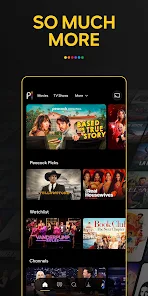
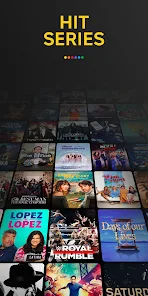
Navigating the app feels much like using other modern streaming platforms. Upon launching it, you're presented with a curated home screen that mixes trending shows, personalized recommendations based on what's popular, and rows dedicated to specific genres or live channels. Scrolling is smooth, and the interface, while dense with content tiles, is generally responsive. I found the search function to be effective for finding specific titles, though browsing by category sometimes felt a bit buried under the heavy promotion of Peacock's own originals. The playback controls are standard, and video quality adjusts reasonably well to connection speed, though the free tier caps out at 720p, which is a noticeable limitation on a tablet.
When compared to other free or ad-supported services like Pluto TV or Tubi, Peacock operates somewhat differently. Pluto TV leans very heavily into a traditional live channel guide experience, while Tubi focuses purely on an on-demand movie library. Peacock sits in the middle, offering both live channels (for news and sports) and a substantial on-demand catalog that includes recent NBC shows and classic series. Its major differentiator is the access to current season content from NBC and Bravo, something its immediate competitors lack. However, the tiered subscription model feels more complex than simply opening a purely free app. From a usability standpoint, its interface is cleaner than Pluto's but can feel a bit more cluttered than Tubi's straightforward presentation.
features
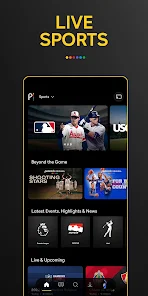
- The live sports and news integration stands out. Watching Premier League games or morning news segments directly within the app feels seamless, and the live channel guide is well-organized. It's a genuinely useful feature that distinguishes it from services that are purely on-demand, making it a decent option for cord-cutters who still want some linear TV elements.
- Content discovery can be a mixed bag. The algorithm does a fair job suggesting popular titles, but the heavy promotion of Peacock originals often overshadows less promoted gems. I occasionally had to scroll several rows down to find the "TV shows by genre" section, which felt less intuitive compared to Netflix's straightforward category sidebar.
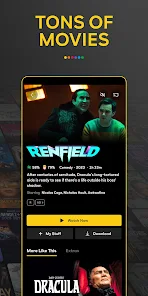
- Offline download support is limited to paying subscribers. This is a standard feature for Premium and Premium Plus users, allowing download of movies and episodes for offline viewing. It works reliably, though the selection of downloadable content is sometimes smaller than the full library, which is a minor point of frustration when preparing for a flight.
- The user interface, while visually pleasing with its dark theme and large artwork, relies heavily on horizontal scrolling. This is fine for browsing on a phone, but on a larger tablet screen, it can lead to excessive swiping. A grid view option for certain categories would be a welcome improvement to reduce navigation time.
pros
- Peacock's free tier offers a genuinely useful amount of content without requiring a credit card, making it an easy app to download and start using immediately for casual viewing.
- Having access to next-day broadcasts of current NBC shows is a significant benefit for viewers who don't have traditional cable subscriptions.
- The variety of live channels, from sports to news to classic shows, creates a more "cable-like" experience that works well in the background during daily routines.
cons
- The free tier is limited to 720p resolution, which is noticeably less sharp on modern high-resolution displays compared to paid competitors.
- Even on paid tiers, the ad load can still feel frequent during some shows, disrupting viewing flow more than I expected from a subscription service.
- Content libraries vary significantly by region, so some titles shown in promotional materials may not be available depending on your location, which can be disappointing after installing the app.
Articles
![]()
Guide
How to Update Google Play Store on Android 2026
![]()
Guide
How to Download Older Versions of Android Apps
![]()
Guide
How to Download Apps Without Google Play Store
![]()
Guide
What Is an APK File for Android?
If you use an Android phone, you may have seen the term APK while searching for apps or games online. Some websites offer an APK download instead of a Google Play install button. Some users also mention APK files when talking about apps that are not available in their region, older app versions, or Android games downloaded outside the Play Store.
![]()
Guide
How to Install Games from Google Play for Beginners
Installing games on an Android phone is usually simple, but for beginners, the process can still feel confusing at first. You may not know where to search, which button to tap, whether the game is safe, or why Google Play sometimes asks for account settings, storage access, or payment information. If you are using an Android phone for the first time, learning how to install games from Google Play is one of the easiest ways to get started.
![]()
Guide
How Useful Gemini Is for Everyday Questions and Quick Tasks
emini feels different from many AI apps because it is not only trying to be a chatbot. After using it for everyday questions, quick writing, image understanding, and planning, I think its biggest strength is convenience.
![]()
Guide
What to Know Before Downloading APKs
For many Android users, downloading an APK is a common way to install apps and games. Sometimes an app is not available in a certain country.
![]()
Guide
ChatGPT Review: Is It Still the Best AI App in 2026?
![]()
Guide
Seedance 2.0 vs Sora: The Future of AI Video Generation
The AI video race has intensified dramatically over the past two years. Platforms like Sora from OpenAI and Luma Dream Machine pushed the boundaries of text-to-video realism. Yet, despite their impressive outputs, most tools still operate as probabilistic generators—you describe a scene, and the model interprets it. Control remains limited. With the February 2026 release of Seedance 2.0, developed by ByteDance, the paradigm shifted. Internally known as Jimeng 2.0, Seedance does not position itself as just another video model. It positions itself as an AI Director. Rather than guessing what you want, Seedance 2.0 allows you to direct what happens. This distinction defines everything that follows.









Recommended Apps
![]()
Home Design 3D
Anuman4.2
![]()
Truth or Dare Game - Party App
Chouic4.8
![]()
Photo Collage Maker
Scoompa4.7![]()
Learn to Draw Flower
Creative APPS4.2![]()
FIFA World Cup 2026™
FIFA2.8![]()
Mirror Plus: Mirror with Light
Digitalchemy, LLC4.4![]()
Meitu- Photo Editor & AI Art
Meitu (China) Limited4.5![]()
Perplexity - Ask Anything
PerplexityAI4.7![]()
GhostTube SLS Camera Alternate
GhostTube4![]()
Boom Chip Blast: 2-Player
Black Pyramid 3D Games Studio0![]()
Healthy Benefits+
Solutran, Inc.4.5![]()
Deepcheck AI Search Assistant
rohe.ai4![]()
Idol Prank Video Call & Chat
LightCode Solutions4![]()
Face Shape - Pretty Scale
GlintTec Apps3.9![]()
Plant App - Plant Identifier
ScaleUp4.6











































