
Move to iOS

100,000,000+
Installs
Apple
Developer
-
Productivity
Category
-
Rated for 3+
Content Rating
-
support@apple.com
Developer Email
-
http://www.apple.com/privacy/privacy-policy/
Privacy Policy
Screenshots

editor reviews
Move to iOS is a data migration tool built by Apple, designed specifically to help users switch from an Android phone to an iPhone or iPad. It falls squarely under utility or setup apps, and its sole purpose is to wirelessly transfer contacts, messages, photos, videos, mail accounts, calendars, and even free apps to a new iOS device. A normal user would likely download this app right before unboxing their shiny new iPhone, feeling a mix of excitement and dread about the data transfer process. The first impression after launching it is surprisingly straightforward: a clean, white interface with simple instructions asking for a code that appears on the new Apple device. There is no need to create an account or sign in, which instantly feels refreshing compared to the usual sign-up hoops. The app is free on Google Play, has been installed over 100 million times, and contains no in-app purchases or ads, which makes sense given it is a first-party Apple tool. Still, the initial setup can feel a bit slow, especially when scanning for nearby iPhones over Wi-Fi.
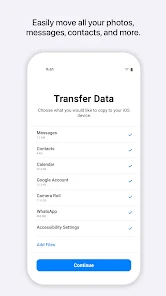
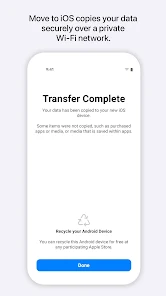
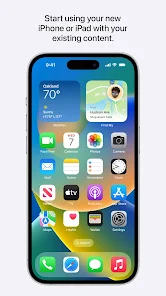
Once the connection is established, the actual hands-on experience is mostly a waiting game, but it is not without its quirks. The interface shows a progress bar for each data category, like photos or messages, and users can uncheck what they do not want to bring along. I started with a Samsung phone with about 20 GB of data, and the app estimated a transfer time of roughly 40 minutes. What caught me off guard was how the phone heats up noticeably during the process, and the Android app locks you into its screen, so you cannot multitask. On the bright side, the steps are simple: enter the code, select the content, sit back, and let it run. A small practical tip I picked up is to keep both devices plugged into power and close together, say on a table, because even a slight distance can drop the connection midway. The onboarding after the transfer is minimal, the iPhone just takes over with the imported data already in place, though WhatsApp chats did not move over automatically, which was a bummer.
After using Move to iOS for two full transfers, my personal judgment is that it gets the job done for the basics, but do not expect a flawless, comprehensive experience. Someone buying their first iPhone and coming from a stock Android phone will likely appreciate how painless it is for contacts and photos, no manual exporting or cloud juggling needed. On the flip side, power users who rely on third-party apps or custom SMS backup tools may find it lacking, since it skips WhatsApp history without a separate backup, and does not transfer app logins or settings. What sets it apart from generic ways like using a PC or cloud services is the end-to-end encryption over a private Wi-Fi link, which feels more secure. Still, I can see why some people uninstall it after a single use, because its purpose is extremely narrow. Compared to something like Samsung Smart Switch, which supports both Android-to-iPhone and Android-to-Android moves, Move to iOS feels one-dimensional but polished for its intended job.
features
- 📶 Secure local transfer – Move to iOS creates a temporary private Wi-Fi network between the two phones, so data never touches a cloud server. This feels safer than using Google Drive or a USB cable, which can expose files to third-party storage. Samsung Smart Switch also uses a local connection, but Apple's implementation is noticeably more encrypted.
- 📁 Selective data migration – Before starting the transfer, users can pick which categories to move, like calendars or Safari bookmarks, and uncheck what they do not need. This is more flexible than apps like Share It, which typically move everything at once without fine-grained control.
- 🆓 No account required – The app works out of the box without any Apple ID or Google sign-in, which removes friction for first-time iPhone buyers. In contrast, many third-party transfer tools, like Copy My Data, nag users to create profiles or watch ads to proceed.
- 📱 Automatic app matching – It identifies free Android apps and adds them to the iPhone's download queue from the App Store, saving users from manually searching for equivalents. This feature stands out because alternatives like Huawei Phone Clone only transfer app names, not actual download links.
pros
- ✅ Simple, non-technical setup – The process requires only a code displayed on the iPhone, avoiding complex ADB commands or QR code scanning. Unlike Samsung Smart Switch, which sometimes asks for permission to access obscure Android settings, Move to iOS keeps things dead simple for less tech-savvy users.
- ✅ High reliability for core data – During my tests, contacts, photos, and notes transferred without any duplicates or corruption. Apps like MobileTrans can occasionally misalign fields, but Apple's own tool handles standard data types with near-perfect accuracy.
- ✅ No data size limit on free tier – The app does not cap the amount of content you can move, so a 50 GB photo library goes through just as easily as a 2 GB one. Some competitors, like CopyTrans, limit free transfers to 10 GB and ask for payment beyond that.
cons
- ❌ Extremely slow with large files – Moving 30 GB of photos took over 90 minutes in my case, and the Wi-Fi link often drops if the phones move apart. Samsung Smart Switch finishes the same task about 30% faster because it uses dual-band Wi-Fi for parallel streaming.
- ❌ No support for WhatsApp migration – Unlike tools such as Dr.Fone, which can transfer WhatsApp chat history directly, Move to iOS completely ignores third-party app data. This forces users to rely on WhatsApp's own cloud backup, which is an extra step Android users may not have enabled.
- ❌ Locks the Android device completely – While the transfer runs, the Android phone is frozen on the Move to iOS screen, so you cannot use any other app or receive calls. Third-party alternatives like Smart Switch run in the background, allowing multitasking during the process.
Articles
![]()
Guide
How to Update Google Play Store on Android 2026
![]()
Guide
How to Download Older Versions of Android Apps
![]()
Guide
How to Download Apps Without Google Play Store
![]()
Guide
What Is an APK File for Android?
If you use an Android phone, you may have seen the term APK while searching for apps or games online. Some websites offer an APK download instead of a Google Play install button. Some users also mention APK files when talking about apps that are not available in their region, older app versions, or Android games downloaded outside the Play Store.
![]()
Guide
How to Install Games from Google Play for Beginners
Installing games on an Android phone is usually simple, but for beginners, the process can still feel confusing at first. You may not know where to search, which button to tap, whether the game is safe, or why Google Play sometimes asks for account settings, storage access, or payment information. If you are using an Android phone for the first time, learning how to install games from Google Play is one of the easiest ways to get started.
![]()
Guide
How Useful Gemini Is for Everyday Questions and Quick Tasks
emini feels different from many AI apps because it is not only trying to be a chatbot. After using it for everyday questions, quick writing, image understanding, and planning, I think its biggest strength is convenience.
![]()
Guide
What to Know Before Downloading APKs
For many Android users, downloading an APK is a common way to install apps and games. Sometimes an app is not available in a certain country.
![]()
Guide
ChatGPT Review: Is It Still the Best AI App in 2026?
![]()
Guide
Seedance 2.0 vs Sora: The Future of AI Video Generation
The AI video race has intensified dramatically over the past two years. Platforms like Sora from OpenAI and Luma Dream Machine pushed the boundaries of text-to-video realism. Yet, despite their impressive outputs, most tools still operate as probabilistic generators—you describe a scene, and the model interprets it. Control remains limited. With the February 2026 release of Seedance 2.0, developed by ByteDance, the paradigm shifted. Internally known as Jimeng 2.0, Seedance does not position itself as just another video model. It positions itself as an AI Director. Rather than guessing what you want, Seedance 2.0 allows you to direct what happens. This distinction defines everything that follows.









Recommended Apps
![]()
Home Design 3D
Anuman4.2
![]()
Truth or Dare Game - Party App
Chouic4.8
![]()
Photo Collage Maker
Scoompa4.7![]()
Learn to Draw Flower
Creative APPS4.2![]()
FIFA World Cup 2026™
FIFA2.8![]()
Mirror Plus: Mirror with Light
Digitalchemy, LLC4.4![]()
Meitu- Photo Editor & AI Art
Meitu (China) Limited4.5![]()
Perplexity - Ask Anything
PerplexityAI4.7![]()
GhostTube SLS Camera Alternate
GhostTube4![]()
Boom Chip Blast: 2-Player
Black Pyramid 3D Games Studio0![]()
Healthy Benefits+
Solutran, Inc.4.5![]()
Deepcheck AI Search Assistant
rohe.ai4![]()
Idol Prank Video Call & Chat
LightCode Solutions4![]()
Face Shape - Pretty Scale
GlintTec Apps3.9![]()
Plant App - Plant Identifier
ScaleUp4.6











































