
PlantSnap plant identification

10,000,000+
Installs
PlantSnap, Inc.
Developer
-
Education
Category
-
Rated for 3+
Content Rating
-
support@plantsnap.net
Developer Email
-
https://www.plantsnap.com/privacy-policy
Privacy Policy
Screenshots
editor reviews
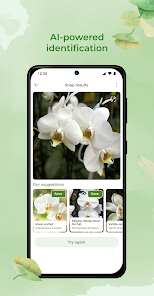
I first came across PlantSnap while trying to figure out what was taking over my backyard garden. It's a plant identification app, basically a digital field guide that uses your phone's camera to recognize flowers, trees, succulents, and even mushrooms. The idea is pretty straightforward: you snap a picture, and it tells you what you're looking at. I downloaded it from Google Play without any trouble, and it's free to install, though they do push a subscription for unlimited access. The first time I opened it, I was greeted by a clean, modern interface with a big camera button front and center. No clutter, no confusing onboarding — just point and shoot. That first impression was solid. It felt like a tool that knew exactly what it was for.
Once I actually started using it, the experience was mostly smooth, but not without a few hiccups. You tap the camera icon, line up the plant in the frame, and wait a couple seconds for the app to analyze it. Most of the time, it worked. I tested it on a rose bush from my neighbor's yard, and it came back with the correct species almost instantly. The app also shows you a gallery of similar-looking plants, which I found handy when the result wasn't 100% certain. There's a “My Snapshots” section where your past identifications are saved, which is great for keeping a personal log if you're into gardening or hiking. One thing that tripped me up at first was that the free version only lets you do a handful of identifications per day before it asks you to subscribe. That's a bit of a bummer if you're just casually curious. The interface is intuitive enough, though — swiping through the results and reading the plant descriptions feels natural. I did notice that blurry or poorly lit photos sometimes threw it off, so you need to be careful about what you're snapping.
After using PlantSnap for a few weeks, I can see why people keep it on their phones, but I also get why someone might delete it. If you're a gardener, a hiker, or just someone who likes knowing what's growing in a park, this app is genuinely useful. The accuracy surprised me on clear shots — it nailed a few obscure weeds I couldn't figure out on my own. But for someone who only needs a quick ID once in a blue moon, the daily limit and subscription push are annoying. Compared to something like PictureThis, PlantSnap feels slightly more academic, with detailed scientific names and family info, but less polished in the user experience department. PictureThis, for example, has a more forgiving free tier. I ended up keeping PlantSnap because I like the snapshot feature for tracking seasonal changes in my garden, but I can see how the paywall would turn off casual users. It's a solid app if you're committed to plant ID, but not a must-have for everyone.
features
- 📸 Camera-based identification: You point your phone at any plant or flower, take a photo, and the app matches it against a huge database. It's faster than flipping through a book and feels almost instant when the lighting is good. Compared to PictureThis, PlantSnap has a slightly larger database for mushrooms and cacti, which is rare in this category.
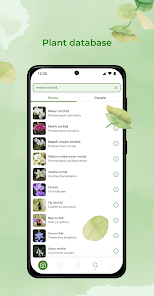
- 🌍 Global plant database: PlantSnap claims to recognize over 600,000 species, including trees, succulents, and fungi. That range beats apps like iNaturalist, which relies more on community input. I found it particularly good with tropical plants that others often miss.
- 🧠 My Snapshots feature: Every identification is saved in a personal gallery that you can sort by date or location. This is great for building a digital journal of what's in your yard or on a hike. Google Lens doesn't offer this kind of organized tracking, so it's a standout for hobbyists.
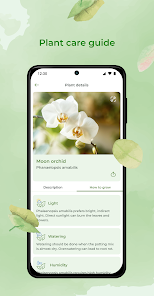
- 📚 Educational details: Beyond just naming a plant, it gives you common names, scientific names, family info, and growing tips. It's like having a mini botany textbook in your pocket, which is more thorough than the brief info you get from Seek by iNaturalist.
pros
- 🌟 Works offline: You can download a regional database and identify plants without an internet connection. That's a huge plus for hiking in remote areas, unlike PictureThis which requires a constant connection.
- 🌟 High accuracy on clear photos: When the picture is sharp and well-lit, PlantSnap's recognition engine is impressively precise. I've had success with it where Google Lens guessed wrong.
- 🌟 Broad coverage of non-flowering plants: It handles ferns, mosses, and mushrooms better than most competitors. iNaturalist often struggles with fungi, but PlantSnap rarely fails there.
- 🌟 Simple, no-nonsense interface: No clutter or confusing menus. You open it, snap a photo, and get results. That's refreshing compared to some apps that overload you with ads during use.
cons
- ⚠️ Daily limit on free version: You only get a handful of free identifications per day before it locks you out. PictureThis offers more daily tries without a subscription, which feels more generous.
- ⚠️ Poor performance in low light or blur: If your photo isn't crystal clear, the app often returns wrong or uncertain matches. Google Lens handles shaky shots better due to its AI enhancements.
- ⚠️ Subscription cost feels steep: The premium plan isn't cheap for what's essentially a niche tool. iNaturalist is completely free and community-driven, which makes it hard to justify PlantSnap's price for casual use.
- ⚠️ Occasionally slow processing: On older phones or with large photos, the analysis can take 10-15 seconds. That's slower than PictureThis, which is almost always instant.
Articles
![]()
Guide
How to Update Google Play Store on Android 2026
![]()
Guide
How to Download Older Versions of Android Apps
![]()
Guide
How to Download Apps Without Google Play Store
![]()
Guide
What Is an APK File for Android?
If you use an Android phone, you may have seen the term APK while searching for apps or games online. Some websites offer an APK download instead of a Google Play install button. Some users also mention APK files when talking about apps that are not available in their region, older app versions, or Android games downloaded outside the Play Store.
![]()
Guide
How to Install Games from Google Play for Beginners
Installing games on an Android phone is usually simple, but for beginners, the process can still feel confusing at first. You may not know where to search, which button to tap, whether the game is safe, or why Google Play sometimes asks for account settings, storage access, or payment information. If you are using an Android phone for the first time, learning how to install games from Google Play is one of the easiest ways to get started.
![]()
Guide
How Useful Gemini Is for Everyday Questions and Quick Tasks
emini feels different from many AI apps because it is not only trying to be a chatbot. After using it for everyday questions, quick writing, image understanding, and planning, I think its biggest strength is convenience.
![]()
Guide
What to Know Before Downloading APKs
For many Android users, downloading an APK is a common way to install apps and games. Sometimes an app is not available in a certain country.
![]()
Guide
ChatGPT Review: Is It Still the Best AI App in 2026?
![]()
Guide
Seedance 2.0 vs Sora: The Future of AI Video Generation
The AI video race has intensified dramatically over the past two years. Platforms like Sora from OpenAI and Luma Dream Machine pushed the boundaries of text-to-video realism. Yet, despite their impressive outputs, most tools still operate as probabilistic generators—you describe a scene, and the model interprets it. Control remains limited. With the February 2026 release of Seedance 2.0, developed by ByteDance, the paradigm shifted. Internally known as Jimeng 2.0, Seedance does not position itself as just another video model. It positions itself as an AI Director. Rather than guessing what you want, Seedance 2.0 allows you to direct what happens. This distinction defines everything that follows.









Recommended Apps
![]()
Home Design 3D
Anuman4.2
![]()
Truth or Dare Game - Party App
Chouic4.8
![]()
Photo Collage Maker
Scoompa4.7![]()
Learn to Draw Flower
Creative APPS4.2![]()
FIFA World Cup 2026™
FIFA2.8![]()
Mirror Plus: Mirror with Light
Digitalchemy, LLC4.4![]()
Meitu- Photo Editor & AI Art
Meitu (China) Limited4.5![]()
Perplexity - Ask Anything
PerplexityAI4.7![]()
GhostTube SLS Camera Alternate
GhostTube4![]()
Boom Chip Blast: 2-Player
Black Pyramid 3D Games Studio0![]()
Healthy Benefits+
Solutran, Inc.4.5![]()
Deepcheck AI Search Assistant
rohe.ai4![]()
Idol Prank Video Call & Chat
LightCode Solutions4![]()
Face Shape - Pretty Scale
GlintTec Apps3.9![]()
Plant App - Plant Identifier
ScaleUp4.6











































