

YouVersion Bible App + Audio

100M+
Installs
Life.Church
Developer
-
Books & Reference
Category
-
Teen
Content Rating
-
en.android@youversion.com
Developer Email
-
https://www.bible.com/privacy
Privacy Policy
Screenshots
editor reviews
The Bible App by YouVersion, developed by Life.Church, ranks among the most downloaded Bible applications worldwide. On the Google Play store, it holds hundreds of millions of installs, which reflects its broad reach across different Christian communities. It's free to download and install, though it contains optional in-app purchases for certain features like premium reading plans and some study resources. Advertisements are present but remain relatively unobtrusive, and the app is designed to be accessible to anyone interested in reading or listening to the Bible.
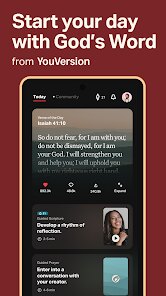
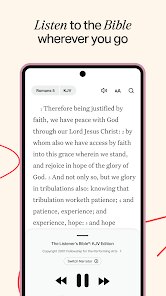
Users can choose from over a thousand Bible translations in nearly a thousand languages, which is impressive. The interface is clean and structured around tabs for reading, videos, plans, and community features. Navigating between passages feels smooth, and I discovered that long-pressing a verse lets me highlight or bookmark it easily. The audio function works well, with natural-sounding narrators; I often switch to listening during my commute. The app includes daily verses on the home screen, which adds a small but meaningful touch to the routine.
When compared to similar tools like the Bible.is app or JW Library, YouVersion stands out for its vast translation library and social features. Bible.is focuses more heavily on audio-visual content with dramatized versions, while JW Library is strictly organized around Jehovah's Witnesses publications. YouVersion feels broader, aiming to serve a general Christian audience without tying itself to a specific denomination. The social aspect—where users can share verses and see friends' reading activity—sets it apart, though it's not something I use regularly.
features
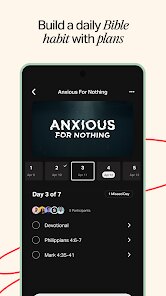
- The app's reading plans are structured well; they break passages into daily portions that take about five to ten minutes. I tried a plan on gratitude, and each day included a short reflection that gave context to the verses. It kept me consistent without feeling overwhelming.
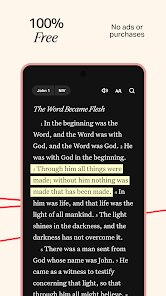
- Verses can be bookmarked with custom tags and colors, which I find more flexible than the highlighter tools in Olive Tree or Logos. Those apps offer advanced study features, but YouVersion keeps it simple—highlighting feels immediate and clutter-free.
- The audio is synced with the text, so as the narrator reads, the screen scrolls automatically. This works reliably, though I noticed a brief pause when switching between chapters. It's a minor hiccup but doesn't break the experience.
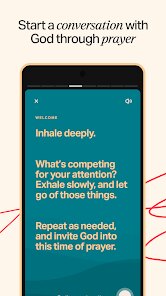
- Community prayers allow users to post requests and respond with encouragement. I used it a few times; the interactions feel genuine, but the sheer volume of posts can make it hard to follow specific threads. It's a unique feature for a Bible app, setting it apart from more solitary tools like the Blue Letter Bible.
pros
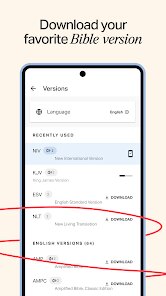
- Having multiple translations accessible offline is practical; I download the NIV and ESV for times when I'm without internet. It saves data and ensures I can read anywhere.
- The daily reminder feature gently prompts me to open the app, which helps maintain a reading habit without feeling pushy. I set it to 8 PM, and it works reliably.
- Sharing a verse as an image with background colors is a nice way to connect with friends on social media. The generated images look clean and can be posted directly without extra editing.
cons
- The app sometimes loads slowly when switching between major sections, like moving from reading plans to the video tab. It takes a few seconds on my mid-range phone, which can be a bit frustrating.
- Some Bible translations are locked behind in-app purchases, which feels limiting when a specific version is needed. The free selection is large, but premium ones cost a few dollars each.
- The social feed occasionally shows too much activity, like when multiple friends finish plans at once. It clutters the home screen, though it's possible to disable notifications for it in settings.
Articles
![]()
Guide
How to Update Google Play Store on Android 2026
![]()
Guide
How to Download Older Versions of Android Apps
![]()
Guide
How to Download Apps Without Google Play Store
![]()
Guide
What Is an APK File for Android?
If you use an Android phone, you may have seen the term APK while searching for apps or games online. Some websites offer an APK download instead of a Google Play install button. Some users also mention APK files when talking about apps that are not available in their region, older app versions, or Android games downloaded outside the Play Store.
![]()
Guide
How to Install Games from Google Play for Beginners
Installing games on an Android phone is usually simple, but for beginners, the process can still feel confusing at first. You may not know where to search, which button to tap, whether the game is safe, or why Google Play sometimes asks for account settings, storage access, or payment information. If you are using an Android phone for the first time, learning how to install games from Google Play is one of the easiest ways to get started.
![]()
Guide
How Useful Gemini Is for Everyday Questions and Quick Tasks
emini feels different from many AI apps because it is not only trying to be a chatbot. After using it for everyday questions, quick writing, image understanding, and planning, I think its biggest strength is convenience.
![]()
Guide
What to Know Before Downloading APKs
For many Android users, downloading an APK is a common way to install apps and games. Sometimes an app is not available in a certain country.
![]()
Guide
ChatGPT Review: Is It Still the Best AI App in 2026?
![]()
Guide
Seedance 2.0 vs Sora: The Future of AI Video Generation
The AI video race has intensified dramatically over the past two years. Platforms like Sora from OpenAI and Luma Dream Machine pushed the boundaries of text-to-video realism. Yet, despite their impressive outputs, most tools still operate as probabilistic generators—you describe a scene, and the model interprets it. Control remains limited. With the February 2026 release of Seedance 2.0, developed by ByteDance, the paradigm shifted. Internally known as Jimeng 2.0, Seedance does not position itself as just another video model. It positions itself as an AI Director. Rather than guessing what you want, Seedance 2.0 allows you to direct what happens. This distinction defines everything that follows.









Recommended Apps
![]()
Home Design 3D
Anuman4.2
![]()
Truth or Dare Game - Party App
Chouic4.8
![]()
Photo Collage Maker
Scoompa4.7![]()
Learn to Draw Flower
Creative APPS4.2![]()
FIFA World Cup 2026™
FIFA2.8![]()
Mirror Plus: Mirror with Light
Digitalchemy, LLC4.4![]()
Meitu- Photo Editor & AI Art
Meitu (China) Limited4.5![]()
Perplexity - Ask Anything
PerplexityAI4.7![]()
GhostTube SLS Camera Alternate
GhostTube4![]()
Boom Chip Blast: 2-Player
Black Pyramid 3D Games Studio0![]()
Healthy Benefits+
Solutran, Inc.4.5![]()
Deepcheck AI Search Assistant
rohe.ai4![]()
Idol Prank Video Call & Chat
LightCode Solutions4![]()
Face Shape - Pretty Scale
GlintTec Apps3.9![]()
Plant App - Plant Identifier
ScaleUp4.6












































