

Revive: Animation & AI Photos

1,000,000+
Installs
REFACEAI LIMITED
Developer
-
Entertainment
Category
-
Rated for 3+
Content Rating
-
hi@reviveapp.net
Developer Email
-
https://reviveapp.net/privacy
Privacy Policy
Screenshots

editor reviews
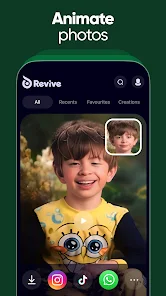
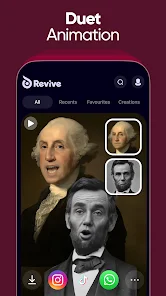
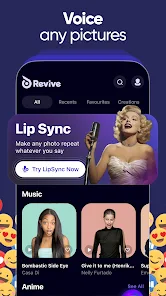
Revive is a photo animation app from the same team behind the viral face-swapping tool Reface. It focuses entirely on bringing still images to life using AI, rather than editing or filtering photos in the traditional sense. You upload a portrait or any face photo, and the app applies motion effects like subtle head turns, blinking, and even short video-like loops. For someone curious about AI tools, the first impression after opening the app is surprisingly polished. The onboarding quickly shows you examples of what it can do, and within seconds you are ready to try your own photo. It is free to download on both Google Play and the App Store, with over 10 million installs on Android alone, though you will quickly notice that some features are locked behind a paid subscription or require watching ads. There is no immediate registration required to test basic animations, which makes it easy to just jump in and see what happens.
The actual hands-on experience is straightforward but has a few trade-offs. After selecting a photo from your gallery or taking a new one, the app processes the image and generates an animated version in around 10 to 20 seconds. The interface is clean, with big buttons and minimal clutter, so you are never lost. Most of your time will be spent choosing between animation styles like "Portrait," "Smile," or "Loop," and then tweaking the crop so the AI focuses on the face properly. That cropping step is where things can feel a bit fiddly. If the photo has multiple people or an angled face, the AI sometimes picks the wrong subject or produces a glitchy result. A small tip: use close-up, front-facing portraits for the best outcome. Once the animation is ready, you can save it as a video or GIF, but saving without a watermark requires the paid plan, which is a common catch in apps like this.
After using Revive for a few days, I think it is a fun tool but not something most people will rely on daily. It feels more like a party trick or a way to surprise friends with an old photo suddenly winking at them. If you enjoy showing off AI magic or like creating short animated versions of family photos, it is worth trying. But if you are looking for practical photo editing or high-quality video generation, this is not that app. Compared to similar apps like MyHeritage's Deep Nostalgia or the more general face animation tools, Revive is faster and more playful, but the free version feels very limited. The subscription price is also on the higher side for what you get. I kept it installed for a week, animated a few old school photos, and then deleted it because the novelty wore off. It is a neat showcase of AI, but not something that sticks around on your home screen.
features
- 🎞️ Animation Styles: Unlike simpler tools like FaceApp, Revive offers more than just a single motion effect. You can choose between subtle head turns, natural blinking, and even smile animations, which gives you more control over the final result. The variety makes each photo feel less robotic.
- 🧠 AI Face Detection: The standout feature is how the AI handles partial or low-quality photos. I tried it with an old scanned photo from the 1990s, and it still managed to detect the face and animate it convincingly. Similar apps often fail with older or blurry images, but Revive handles them better than expected.
- 📱 Short Video Output: Instead of just exporting a static GIF, Revive lets you save the animation as a short MP4 video. This is useful for sharing on social media or messaging apps where GIFs may lose quality. MyHeritage only gives you a looping video for paid users, while Revive gives you more export flexibility even in the free tier.
- ⚡ Speed of Processing: Most animations complete within 15 seconds, which is noticeably faster than competing apps like Morphin or Deep Nostalgia. That speed makes it feel less like a chore and more like an instant trick you can show off right away.
pros
- ⚡ Very fast processing – While apps like Deep Nostalgia take nearly a minute per animation, Revive delivers results in under 20 seconds, which feels much snappier for casual use.
- 📷 Works with older photos – I tried it with a 1995 scanned image and it animated the face convincingly. FaceApp often struggles here, but Revive's AI seems more tolerant of lower resolution.
- 🎨 Multiple animation types – You are not stuck with one motion style. The ability to pick between blinks, smiles, and head turns makes it more versatile than simpler apps like Morphin.
- 📱 No login required for basic use – Unlike Reface or MyHeritage, you can test the core feature without signing up, which lowers the barrier to trying it out.
cons
- 💰 Expensive subscription – The free version heavily watermarks everything, and the paid plan is around $10–15 per month. That is pricier than FaceApp or Morphin, which offer more features at a lower cost.
- 🔍 Inconsistent face cropping – If the photo has multiple faces or an angled profile, the AI often picks the wrong person or fails entirely. Similar apps like Deep Nostalgia let you manually select the face, which avoids this issue.
- 📉 Limited practical use – Outside of novelty, the animations are short and basic. Apps like CapCut or Adobe Premiere Rush offer more creative control for video, making Revive feel one-dimensional after a few uses.
- 📦 No batch processing – You can only animate one photo at a time. For someone wanting to animate an entire album, apps like MyHeritage offer batch uploads, while Revive requires repetitive manual work.
Articles
![]()
Guide
How to Update Google Play Store on Android 2026
![]()
Guide
How to Download Older Versions of Android Apps
![]()
Guide
How to Download Apps Without Google Play Store
![]()
Guide
What Is an APK File for Android?
If you use an Android phone, you may have seen the term APK while searching for apps or games online. Some websites offer an APK download instead of a Google Play install button. Some users also mention APK files when talking about apps that are not available in their region, older app versions, or Android games downloaded outside the Play Store.
![]()
Guide
How to Install Games from Google Play for Beginners
Installing games on an Android phone is usually simple, but for beginners, the process can still feel confusing at first. You may not know where to search, which button to tap, whether the game is safe, or why Google Play sometimes asks for account settings, storage access, or payment information. If you are using an Android phone for the first time, learning how to install games from Google Play is one of the easiest ways to get started.
![]()
Guide
How Useful Gemini Is for Everyday Questions and Quick Tasks
emini feels different from many AI apps because it is not only trying to be a chatbot. After using it for everyday questions, quick writing, image understanding, and planning, I think its biggest strength is convenience.
![]()
Guide
What to Know Before Downloading APKs
For many Android users, downloading an APK is a common way to install apps and games. Sometimes an app is not available in a certain country.
![]()
Guide
ChatGPT Review: Is It Still the Best AI App in 2026?
![]()
Guide
Seedance 2.0 vs Sora: The Future of AI Video Generation
The AI video race has intensified dramatically over the past two years. Platforms like Sora from OpenAI and Luma Dream Machine pushed the boundaries of text-to-video realism. Yet, despite their impressive outputs, most tools still operate as probabilistic generators—you describe a scene, and the model interprets it. Control remains limited. With the February 2026 release of Seedance 2.0, developed by ByteDance, the paradigm shifted. Internally known as Jimeng 2.0, Seedance does not position itself as just another video model. It positions itself as an AI Director. Rather than guessing what you want, Seedance 2.0 allows you to direct what happens. This distinction defines everything that follows.









Recommended Apps
![]()
Home Design 3D
Anuman4.2
![]()
Truth or Dare Game - Party App
Chouic4.8
![]()
Photo Collage Maker
Scoompa4.7![]()
Learn to Draw Flower
Creative APPS4.2![]()
FIFA World Cup 2026™
FIFA2.8![]()
Mirror Plus: Mirror with Light
Digitalchemy, LLC4.4![]()
Meitu- Photo Editor & AI Art
Meitu (China) Limited4.5![]()
Perplexity - Ask Anything
PerplexityAI4.7![]()
GhostTube SLS Camera Alternate
GhostTube4![]()
Boom Chip Blast: 2-Player
Black Pyramid 3D Games Studio0![]()
Healthy Benefits+
Solutran, Inc.4.5![]()
Deepcheck AI Search Assistant
rohe.ai4![]()
Idol Prank Video Call & Chat
LightCode Solutions4![]()
Face Shape - Pretty Scale
GlintTec Apps3.9![]()
Plant App - Plant Identifier
ScaleUp4.6











































