

GoFan: Buy Tickets to Events

500K+
Installs
GoFan
Developer
-
Sports
Category
-
Everyone
Content Rating
-
service@gofan.co
Developer Email
-
https://gofan.co/privacy-policy
Privacy Policy
Screenshots


editor reviews
For anyone looking to attend high school sports, theater productions, or other local events, the GoFan app is a straightforward digital ticketing platform available for download on Google Play. The service eliminates the need for paper tickets or waiting in long lines at the box office by allowing users to purchase passes directly from their phones. The app itself is free to install, though each event ticket carries its own price set by the organizing school or venue. In my experience, most purchases go through without any extra processing fees, which sets it apart from some other event ticketing services. The app does include occasional advertisements, but they don't interrupt the purchasing flow too much.
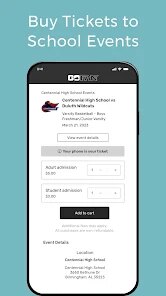
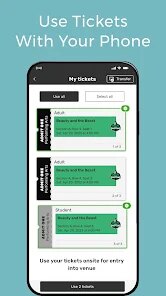
Once you've installed the app and created an account, buying tickets requires just a few taps. You search for your school or browse events by category, select the number of tickets needed, and pay through a linked card or digital wallet. The ticket then appears as a scannable QR code within the app, which the venue checks at the entrance. I found this whole process to be quite smooth, especially compared to fumbling with printed tickets or trying to remember where I saved an email confirmation. The interface keeps everything clean and minimal, so there is little confusion about which button to press next.
Compared to platforms like Ticketmaster or Eventbrite, GoFan focuses specifically on school and community events, which gives it a more narrow but targeted purpose. Those larger services often feel built for concerts or festivals, with complex seating charts and tiered pricing. GoFan keeps things simpler by treating most events as general admission, which suits high school games and plays well. While the bigger competitors might offer more filtering options or artist bios, GoFan gets the job done without overwhelming the user. For parents or community members who attend these local events regularly, the streamlined nature of the app feels like a welcome change.
features
- The QR code ticketing system works reliably even in areas with poor cellular reception. I've had moments where my signal dropped near the entrance, but the saved ticket still scanned without issue. This is a noticeable improvement over apps that require a constant live connection to validate passes.
- Event search is organized by school name and date range, making it easy to locate specific games or performances. Unlike Eventbrite which sometimes surfaces irrelevant nearby events, GoFan's focus on educational institutions means I don't have to sift through unrelated listings to find my child's basketball game.
- The purchase confirmation arrives almost instantly via email and within the app's order history. I appreciate not having to wonder whether my payment went through while standing at the gate. This real-time feedback removes a common source of pre-event anxiety.
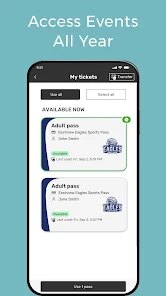
- Managing multiple tickets for a family is straightforward since the app allows you to buy several passes in a single transaction. Each person can still scan their own ticket from the same phone, which is more convenient than distributing individual digital files.
pros
- No printing or physical ticket storage is needed, which saves time on event day. I simply open the app and hold my phone up at the entrance.
- The ability to purchase tickets last-minute from anywhere means I no longer stress about arriving early just to stand in a box office line.
- Keeping all purchase history in one place has been useful for tracking what events we've attended and how much we've spent over the season.
cons
- The app occasionally displays events that have already passed without a clear indicator. I've clicked through several listings only to realize the game was yesterday.
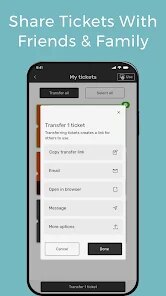
- There is no option to transfer a ticket to another person directly through the app, which would be helpful when plans change.
- Pushing notifications can sometimes feel excessive, especially during off weeks when no local events are happening. I ended up disabling them after the first month.
Articles
![]()
Guide
How to Update Google Play Store on Android 2026
![]()
Guide
How to Download Older Versions of Android Apps
![]()
Guide
How to Download Apps Without Google Play Store
![]()
Guide
What Is an APK File for Android?
If you use an Android phone, you may have seen the term APK while searching for apps or games online. Some websites offer an APK download instead of a Google Play install button. Some users also mention APK files when talking about apps that are not available in their region, older app versions, or Android games downloaded outside the Play Store.
![]()
Guide
How to Install Games from Google Play for Beginners
Installing games on an Android phone is usually simple, but for beginners, the process can still feel confusing at first. You may not know where to search, which button to tap, whether the game is safe, or why Google Play sometimes asks for account settings, storage access, or payment information. If you are using an Android phone for the first time, learning how to install games from Google Play is one of the easiest ways to get started.
![]()
Guide
How Useful Gemini Is for Everyday Questions and Quick Tasks
emini feels different from many AI apps because it is not only trying to be a chatbot. After using it for everyday questions, quick writing, image understanding, and planning, I think its biggest strength is convenience.
![]()
Guide
What to Know Before Downloading APKs
For many Android users, downloading an APK is a common way to install apps and games. Sometimes an app is not available in a certain country.
![]()
Guide
ChatGPT Review: Is It Still the Best AI App in 2026?
![]()
Guide
Seedance 2.0 vs Sora: The Future of AI Video Generation
The AI video race has intensified dramatically over the past two years. Platforms like Sora from OpenAI and Luma Dream Machine pushed the boundaries of text-to-video realism. Yet, despite their impressive outputs, most tools still operate as probabilistic generators—you describe a scene, and the model interprets it. Control remains limited. With the February 2026 release of Seedance 2.0, developed by ByteDance, the paradigm shifted. Internally known as Jimeng 2.0, Seedance does not position itself as just another video model. It positions itself as an AI Director. Rather than guessing what you want, Seedance 2.0 allows you to direct what happens. This distinction defines everything that follows.









Recommended Apps
![]()
Home Design 3D
Anuman4.2
![]()
Truth or Dare Game - Party App
Chouic4.8
![]()
Photo Collage Maker
Scoompa4.7![]()
Learn to Draw Flower
Creative APPS4.2![]()
FIFA World Cup 2026™
FIFA2.8![]()
Mirror Plus: Mirror with Light
Digitalchemy, LLC4.4![]()
Meitu- Photo Editor & AI Art
Meitu (China) Limited4.5![]()
Perplexity - Ask Anything
PerplexityAI4.7![]()
GhostTube SLS Camera Alternate
GhostTube4![]()
Boom Chip Blast: 2-Player
Black Pyramid 3D Games Studio0![]()
Healthy Benefits+
Solutran, Inc.4.5![]()
Deepcheck AI Search Assistant
rohe.ai4![]()
Idol Prank Video Call & Chat
LightCode Solutions4![]()
Face Shape - Pretty Scale
GlintTec Apps3.9![]()
Plant App - Plant Identifier
ScaleUp4.6












































