

Daily Horoscope

10M+
Installs
Horoscope by Comitic
Developer
-
Lifestyle
Category
-
Rated for 12+
Content Rating
-
android@comitic.com
Developer Email
-
http://www.comitic.com/privacy
Privacy Policy
Screenshots

editor reviews
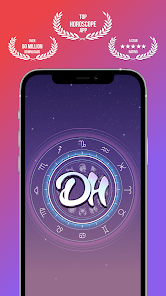
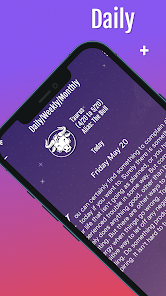
Daily Horoscope is a straightforward Android app from Horoscope by Comitic that focuses entirely on delivering daily, weekly, and monthly astrological predictions. It's a specialized utility app, not a social platform or a full lifestyle suite. You mainly use it to quickly check your zodiac sign's forecast without sifting through heavy web pages or newsletters. On Google Play, it sits comfortably above 500,000 installs and remains free to download — though there's a full-screen ad right after launching that feels a bit intrusive. First impression? The interface is bright with gradient backgrounds and faded zodiac symbols, which looks pleasant enough, but the banner at the top constantly nudging you toward a premium upgrade makes the free version feel a little cluttered from the start.
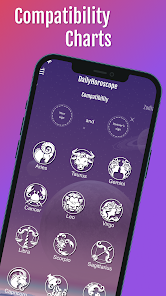
Once you get past that initial ad, the app is actually quite simple to navigate. You pick your zodiac sign — or set it during a one-time onboarding — and you're immediately shown the “Daily Overview” by default. The main action here is reading: a short paragraph on love, career, and health for the day. Scrolling down reveals a “Compatibility Check” section, which lets you type in another sign to see how they match with yours. It works smoothly, but there's no shortcut to revisit your sign later unless you go back to the main menu. What caught me off guard is the “Year at a Glance” tab — it's locked behind the premium subscription, which feels like a tease. A practical tip? Tap the hamburger menu to switch between signs quickly, rather than re-picking from the zodiac grid each time. The experience is fine for quick glances, but nothing feels polished or deeply interactive.
After using it for a week, I'd say this app works best for someone who just wants a quick horoscope fix each morning and doesn't mind trading attention for free content. It's not for anyone looking for detailed astrological charts, community features, or ad-free flow — something apps like Co-Star or The Pattern do much better. The big difference here is simplicity: Daily Horoscope gives you the raw reading without any social or journaling extras, which can be refreshing if you just want the facts. But the constant upgrade prompts and occasional full-screen ads might push casual users to uninstall after a few days. I kept it partly because it loads fast and doesn't ask for unnecessary permissions, but I can see many people replacing it with a more engaging alternative like TimePassages or simply relying on Google's built-in widget.
features
- 🔮 Daily and monthly forecasts are presented as clean, scrollable text blocks — no endless swiping or hidden menus. Tap once, and you're reading your sign within two seconds. In contrast, Co-Star buries the daily reading behind a chat-style interface that feels more like a game than a quick reference.
- 💑 The Compatibility Check is a standout because it's not just a yes/no match; it breaks down each sign pair into strengths and growth areas. Most apps like The Pattern give you personality summaries but skip the day-to-day match scoring. Daily Horoscope makes it feel like a practical tool for real relationships.
- 📅 Expanding forecasts to include “Week Ahead” and “Month Ahead” without pushing the premium upgrade immediately is a nice touch. Free users get a genuine preview rather than a walled teaser. AstrologyZone's app, by comparison, locks all forward-looking content behind a subscription.
pros
- ⚡ It loads instantly and works fully offline after the initial sync — no waiting for server responses like in TimePassages, which sometimes stalls when checking compatibility results.
- 🧭 Navigation is dead simple with a single bottom bar: Home, Compatibility, More. You won't waste time figuring out where your horoscope went, unlike Sanctuary.app that hides it inside a chat AI menu.
- 📊 The “Year at a Glance” summary is genuinely detailed when unlocked. It covers life themes for each month, which surpasses what free-tier users get from most paid horoscope services.
cons
- 📢 Full-screen video ads appear unpredictably after switching tabs, which feels jarring compared to Co-Star's subtle banner ads. It breaks the reading flow entirely.
- 🔒 Customization is almost nonexistent — you can't change the background, text size, or even the order of signs. The Pattern lets you personalize your profile and get tailored insights, while Daily Horoscope feels like a static PDF.
- 📅 The widget is missing altogether, which is odd for a “quick glance” app. Google's native horoscope widget or even AstroMatrix offers homescreen widgets, making this app less convenient for repeated daily use.
- 💰 The premium upgrade copies the same content from the free version but removes ads — so paying feels more like buying silence than getting new features. Compare that to TimePassages, where premium unlocks transit charts and birth chart interpretations that free users can't see.
Articles
![]()
Guide
How to Update Google Play Store on Android 2026
![]()
Guide
How to Download Older Versions of Android Apps
![]()
Guide
How to Download Apps Without Google Play Store
![]()
Guide
What Is an APK File for Android?
If you use an Android phone, you may have seen the term APK while searching for apps or games online. Some websites offer an APK download instead of a Google Play install button. Some users also mention APK files when talking about apps that are not available in their region, older app versions, or Android games downloaded outside the Play Store.
![]()
Guide
How to Install Games from Google Play for Beginners
Installing games on an Android phone is usually simple, but for beginners, the process can still feel confusing at first. You may not know where to search, which button to tap, whether the game is safe, or why Google Play sometimes asks for account settings, storage access, or payment information. If you are using an Android phone for the first time, learning how to install games from Google Play is one of the easiest ways to get started.
![]()
Guide
How Useful Gemini Is for Everyday Questions and Quick Tasks
emini feels different from many AI apps because it is not only trying to be a chatbot. After using it for everyday questions, quick writing, image understanding, and planning, I think its biggest strength is convenience.
![]()
Guide
What to Know Before Downloading APKs
For many Android users, downloading an APK is a common way to install apps and games. Sometimes an app is not available in a certain country.
![]()
Guide
ChatGPT Review: Is It Still the Best AI App in 2026?
![]()
Guide
Seedance 2.0 vs Sora: The Future of AI Video Generation
The AI video race has intensified dramatically over the past two years. Platforms like Sora from OpenAI and Luma Dream Machine pushed the boundaries of text-to-video realism. Yet, despite their impressive outputs, most tools still operate as probabilistic generators—you describe a scene, and the model interprets it. Control remains limited. With the February 2026 release of Seedance 2.0, developed by ByteDance, the paradigm shifted. Internally known as Jimeng 2.0, Seedance does not position itself as just another video model. It positions itself as an AI Director. Rather than guessing what you want, Seedance 2.0 allows you to direct what happens. This distinction defines everything that follows.









Recommended Apps
![]()
Home Design 3D
Anuman4.2
![]()
Truth or Dare Game - Party App
Chouic4.8
![]()
Photo Collage Maker
Scoompa4.7![]()
Learn to Draw Flower
Creative APPS4.2![]()
FIFA World Cup 2026™
FIFA2.8![]()
Mirror Plus: Mirror with Light
Digitalchemy, LLC4.4![]()
Meitu- Photo Editor & AI Art
Meitu (China) Limited4.5![]()
Perplexity - Ask Anything
PerplexityAI4.7![]()
GhostTube SLS Camera Alternate
GhostTube4![]()
Boom Chip Blast: 2-Player
Black Pyramid 3D Games Studio0![]()
Healthy Benefits+
Solutran, Inc.4.5![]()
Deepcheck AI Search Assistant
rohe.ai4![]()
Idol Prank Video Call & Chat
LightCode Solutions4![]()
Face Shape - Pretty Scale
GlintTec Apps3.9![]()
Plant App - Plant Identifier
ScaleUp4.6












































