

PhotoRoom AI Photo Editor

50M+
Installs
PhotoRoom Background Editor App
Developer
-
Video Players & Editors
Category
-
Rated for 3+
Content Rating
-
help@photoroom.com
Developer Email
-
https://photoroom.com/legal/privacy
Privacy Policy
Screenshots
editor reviews
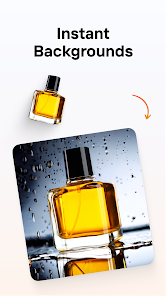
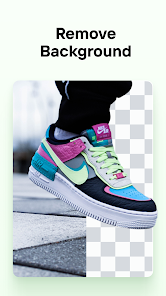
I first came across PhotoRoom while looking for a quick way to remove backgrounds from product photos for an online listing. It's an AI-powered photo editor that focuses heavily on background removal, object cleanup, and template-based product visuals. The app sits firmly in the photo editing category but is aimed more at small business owners, resellers, and casual creators than professional graphic designers. When you open it after a quick download from Google Play or the App Store, there's no forced registration, which is a relief. The first impression is clean but packed — a floating toolbar, obvious controls like a “remove background” button front and center, and a few sample images to play with. You can tell right away it's built for speed, not heavy editing. The install count is high and it's free to start, though you will run into watermarks and locked templates if you don't subscribe.
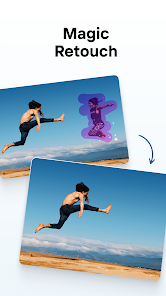
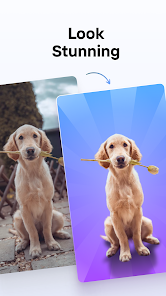
Using PhotoRoom on a day-to-day basis feels surprisingly smooth for such a specific tool. Once you snap or upload a photo, the AI automatically picks out the subject and drops the background within seconds. There is no clumsy brushing or manual masking involved unless you want to fine-tune the edges. The interface guides you step by step — background removal comes first, then you can pick from a library of preset backgrounds, solid colors, or one of their many templates designed for social media posts, Etsy listings, or eBay thumbnails. A common workflow is just: take a picture, tap remove background, then apply a template. One minor confusing part is when tools like “shadow” or “retouch” are hidden behind long press gestures or small icons. But with a bit of exploring, you learn that double tapping an object lets you delete or duplicate it. That kind of logic makes sense after a few uses.
After spending some time with it, I think PhotoRoom shines for people who need decent looking visuals fast without learning real editing software. It doesn't try to replace Photoshop or Lightroom; it more sits beside apps like Canva or Remove.bg, but with more mobile-first polish. The free version is a good trial, but the constant watermark nudging and premium template gating can get annoying. You will probably subscribe monthly if you are serious about selling online. What sets it apart is how well the AI handles hair, fur, or tricky edges compared to older background tools. While not perfect, it feels more capable than most competitors on a phone. However, if you already own Photoshop or Pixelmator, you likely won't need it. I kept it installed because it's faster than opening a PC editor for quick batch cleanup.
features
- 🎯 One-tap background removal that works on hair and fine details without needing manual masking, which is faster than manual selection in apps like Photoshop Express or Pixelmator.
- 🖼️ Built-in market-optimized templates for platforms like Poshmark, eBay, Etsy, and Instagram, so you can go from photo to post-ready image in under a minute without designing from scratch.
- 📸 Batch editing support for resizing, renaming, and removing backgrounds across multiple images in one go, a big time saver for sellers who handle dozens of products daily.
- ✨ AI generative fill and retouch brushes that can remove objects, smooth surfaces, or add realistic shadows, features usually found in desktop-grade editors like Affinity Photo or Photoshop.
pros
- ⚡ Speed is the biggest win — background removal takes 2-3 seconds on a mid-range phone, while Remove.bg or Adobe Express can lag or require a web connection for the same result.
- 📱 Mobile-first interface feels way better than Canva's cramped mobile layout; everything is thumb-friendly and designed for portrait workflow rather than a ported desktop UI.
- 🧠 AI edge detection genuinely outperforms most free background erasers, especially on tricky subjects like glass, fur, or jewelry where apps like Background Eraser or Magic Eraser fail completely.
- 📦 One subscription unlocks everything without tiered feature blocks — unlike TouchRetouch that charges per tool or Facetune that hides resolution behind premium plans.
cons
- 💧 Watermark on free exports is aggressive and stuck right in the middle, making the app nearly unusable for actual selling without paying; Remove.bg at least gives you a smaller corner mark.
- 🎨 Limited manual editing tools — you can't adjust curves, color balance, or use layer masks like in Snapseed or Photoshop Express; it's designed for one-trick workflows, not fine control.
- 📏 Resolution cap on free version forces you to subscribe if you need high-resolution exports for print or large websites; Canva's free tier handles larger canvases without a paywall.
- 📂 No proper folder or album management inside the app — projects pile up in a single list, and there's no way to sort or group images like in Lightroom mobile, which gets messy over time.
Articles
![]()
Guide
How to Update Google Play Store on Android 2026
![]()
Guide
How to Download Older Versions of Android Apps
![]()
Guide
How to Download Apps Without Google Play Store
![]()
Guide
What Is an APK File for Android?
If you use an Android phone, you may have seen the term APK while searching for apps or games online. Some websites offer an APK download instead of a Google Play install button. Some users also mention APK files when talking about apps that are not available in their region, older app versions, or Android games downloaded outside the Play Store.
![]()
Guide
How to Install Games from Google Play for Beginners
Installing games on an Android phone is usually simple, but for beginners, the process can still feel confusing at first. You may not know where to search, which button to tap, whether the game is safe, or why Google Play sometimes asks for account settings, storage access, or payment information. If you are using an Android phone for the first time, learning how to install games from Google Play is one of the easiest ways to get started.
![]()
Guide
How Useful Gemini Is for Everyday Questions and Quick Tasks
emini feels different from many AI apps because it is not only trying to be a chatbot. After using it for everyday questions, quick writing, image understanding, and planning, I think its biggest strength is convenience.
![]()
Guide
What to Know Before Downloading APKs
For many Android users, downloading an APK is a common way to install apps and games. Sometimes an app is not available in a certain country.
![]()
Guide
ChatGPT Review: Is It Still the Best AI App in 2026?
![]()
Guide
Seedance 2.0 vs Sora: The Future of AI Video Generation
The AI video race has intensified dramatically over the past two years. Platforms like Sora from OpenAI and Luma Dream Machine pushed the boundaries of text-to-video realism. Yet, despite their impressive outputs, most tools still operate as probabilistic generators—you describe a scene, and the model interprets it. Control remains limited. With the February 2026 release of Seedance 2.0, developed by ByteDance, the paradigm shifted. Internally known as Jimeng 2.0, Seedance does not position itself as just another video model. It positions itself as an AI Director. Rather than guessing what you want, Seedance 2.0 allows you to direct what happens. This distinction defines everything that follows.









Recommended Apps
![]()
Home Design 3D
Anuman4.2
![]()
Truth or Dare Game - Party App
Chouic4.8
![]()
Photo Collage Maker
Scoompa4.7![]()
Learn to Draw Flower
Creative APPS4.2![]()
FIFA World Cup 2026™
FIFA2.8![]()
Mirror Plus: Mirror with Light
Digitalchemy, LLC4.4![]()
Meitu- Photo Editor & AI Art
Meitu (China) Limited4.5![]()
Perplexity - Ask Anything
PerplexityAI4.7![]()
GhostTube SLS Camera Alternate
GhostTube4![]()
Boom Chip Blast: 2-Player
Black Pyramid 3D Games Studio0![]()
Healthy Benefits+
Solutran, Inc.4.5![]()
Deepcheck AI Search Assistant
rohe.ai4![]()
Idol Prank Video Call & Chat
LightCode Solutions4![]()
Face Shape - Pretty Scale
GlintTec Apps3.9![]()
Plant App - Plant Identifier
ScaleUp4.6












































