
Pencil Sketch

50M+
Installs
Dumpling Sandwich Software Inc.
Developer
-
Video Players & Editors
Category
-
Rated for 3+
Content Rating
-
support@dumplingsandwich.com
Developer Email
-
https://dumplingsandwich.com/privacy-policy
Privacy Policy
Screenshots

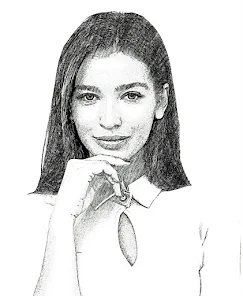
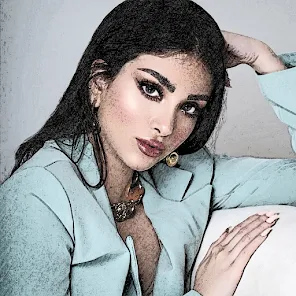
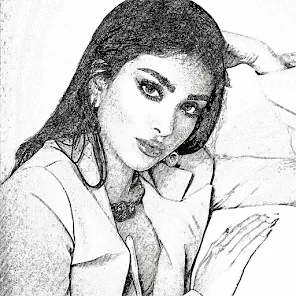
editor reviews
Pencil Sketch is an image editing tool that turns your regular photos into hand-drawn sketches, pencil drawings, and line art. It's one of those apps you stumble upon when you want to give your vacation photos or portraits a classic, artistic look without learning any complex editing software. The first time I opened it, I was surprised by how straightforward everything felt—no sign-up wall, no tutorial nagging. You just pick a picture from your gallery and start applying effects right away. The app has been downloaded over 50 million times on Google Play, and it stays free with optional premium filters you can unlock if you want more style variety. There are ads, but they weren't too pushy during my early sessions.
After using it for a few days, I got the hang of the workflow, and it's pretty simple. You choose a photo, then browse through the filter list—things like "Draft," "Colored Sketch," "Edge Glow," and "Watercolor Sketch." Each one processes the image in a few seconds and gives you a side-by-side comparison with the original. I liked that you could adjust the stroke width and brightness right there, without jumping into a second menu. The interface is clean but feels a bit dated, like something from a few Android versions ago. Still, for casual use, it's smooth enough. One small tip: if you use photos with high contrast, the sketch outlines come out much sharper. Photos with too much flat lighting tend to look muddy.
Honestly, this app is great for people who want a quick artistic effect without any effort. It's not meant for serious digital artists—you won't find layers, brushes, or fine control like in Sketchbook or Procreate. What makes it stand out from apps like Prisma is that it specifically focuses on pencil and drawing styles instead of painting. I ended up keeping it installed because it's handy for turning selfies into profile pictures with a pencil effect or spicing up a casual social media post. But if you need a full drawing studio or want more creative control, you'll probably uninstall it after a week. It does one thing well, and that's enough for some users.
features
- 🖼️ Pencil Sketch focuses strictly on turning photos into drawing-style art, while Prisma aims for painting and abstract effects. If you want a realistic pencil look, this app does it better.
- 🎛️ It offers real-time adjustment for stroke width and brightness right after applying a filter, which apps like Photoshop Express or Snapseed don't include as a dedicated step for sketch effects.
- ⚡ The processing speed is impressive—most filters take less than 3 seconds even on older phones, unlike some heavy-duty photo editors that lag or require an internet connection for similar results.
- 📦 No account creation is needed to use the core features, which is rare among free art apps. You just install, grant gallery access, and start editing immediately.
pros
- 🎨 The sketch results actually look like hand-drawn art rather than generic filters. Compared to apps like Photo Sketch Maker, the outlines feel more natural and less like edge detection.
- ⚙️ Adjusting stroke width and brightness before saving is a big plus. In many similar apps, you have to edit the photo again or use a separate editor to fix exposure.
- 📱 It works offline for the free filters. Apps like Prisma require data for processing, which is inconvenient when you're on the go or have limited mobile data.
- 🔋 It's lightweight and doesn't drain battery quickly, unlike some full-featured editors that keep the device warm after a few edits.
cons
- 🎨 The lack of batch processing is noticeable. If you have multiple photos to sketch, you have to do them one by one, unlike in apps like Snapseed where you can apply the same effect to multiple images quickly.
- ⚙️ Customization is very limited. You cannot control shading, pencil pressure, or paper texture, which is disappointing if you're used to apps like Sketchbook that give you full drawing tools.
- 📱 The app feels outdated visually, with an interface that hasn't been updated in years. Compared to the clean, modern feel of Adobe Photoshop Express, it looks clunky.
- 🔋 Some premium filters are locked behind a paywall, and the ads pop up right after saving an image, which can feel a bit aggressive compared to ad-free or less intrusive apps like PicsArt.
Articles
![]()
Guide
How to Update Google Play Store on Android 2026
![]()
Guide
How to Download Older Versions of Android Apps
![]()
Guide
How to Download Apps Without Google Play Store
![]()
Guide
What Is an APK File for Android?
If you use an Android phone, you may have seen the term APK while searching for apps or games online. Some websites offer an APK download instead of a Google Play install button. Some users also mention APK files when talking about apps that are not available in their region, older app versions, or Android games downloaded outside the Play Store.
![]()
Guide
How to Install Games from Google Play for Beginners
Installing games on an Android phone is usually simple, but for beginners, the process can still feel confusing at first. You may not know where to search, which button to tap, whether the game is safe, or why Google Play sometimes asks for account settings, storage access, or payment information. If you are using an Android phone for the first time, learning how to install games from Google Play is one of the easiest ways to get started.
![]()
Guide
How Useful Gemini Is for Everyday Questions and Quick Tasks
emini feels different from many AI apps because it is not only trying to be a chatbot. After using it for everyday questions, quick writing, image understanding, and planning, I think its biggest strength is convenience.
![]()
Guide
What to Know Before Downloading APKs
For many Android users, downloading an APK is a common way to install apps and games. Sometimes an app is not available in a certain country.
![]()
Guide
ChatGPT Review: Is It Still the Best AI App in 2026?
![]()
Guide
Seedance 2.0 vs Sora: The Future of AI Video Generation
The AI video race has intensified dramatically over the past two years. Platforms like Sora from OpenAI and Luma Dream Machine pushed the boundaries of text-to-video realism. Yet, despite their impressive outputs, most tools still operate as probabilistic generators—you describe a scene, and the model interprets it. Control remains limited. With the February 2026 release of Seedance 2.0, developed by ByteDance, the paradigm shifted. Internally known as Jimeng 2.0, Seedance does not position itself as just another video model. It positions itself as an AI Director. Rather than guessing what you want, Seedance 2.0 allows you to direct what happens. This distinction defines everything that follows.









Recommended Apps
![]()
Home Design 3D
Anuman4.2
![]()
Truth or Dare Game - Party App
Chouic4.8
![]()
Photo Collage Maker
Scoompa4.7![]()
Learn to Draw Flower
Creative APPS4.2![]()
FIFA World Cup 2026™
FIFA2.8![]()
Mirror Plus: Mirror with Light
Digitalchemy, LLC4.4![]()
Meitu- Photo Editor & AI Art
Meitu (China) Limited4.5![]()
Perplexity - Ask Anything
PerplexityAI4.7![]()
GhostTube SLS Camera Alternate
GhostTube4![]()
Boom Chip Blast: 2-Player
Black Pyramid 3D Games Studio0![]()
Healthy Benefits+
Solutran, Inc.4.5![]()
Deepcheck AI Search Assistant
rohe.ai4![]()
Idol Prank Video Call & Chat
LightCode Solutions4![]()
Face Shape - Pretty Scale
GlintTec Apps3.9![]()
Plant App - Plant Identifier
ScaleUp4.6











































