

Fake Call from Santa Claus

10M+
Installs
ThunderClap
Developer
-
Entertainment
Category
-
Rated for 3+
Content Rating
-
adminsupport@thunderclapdroid.com
Developer Email
-
https://sites.google.com/view/privacypolicythunderclap
Privacy Policy
Screenshots
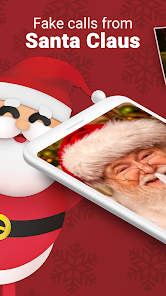

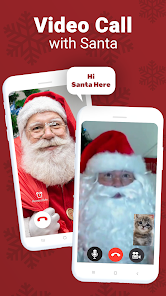

editor reviews
Fake Call from Santa Claus is exactly what it sounds like — a playful simulation app that lets you stage a fake incoming call from Santa Claus himself. It falls under the category of prank or entertainment apps, and its main purpose is to help users create a believable Santa call scenario, often to surprise kids or just get a laugh out of friends and family. A typical reason someone might download it is to add a bit of holiday magic for a child, like during Christmas morning or before a family gathering. After launching the app for the first time, the first impression is that it's very straightforward — a simple interface with a big red button labeled “Call from Santa,” almost like you're about to receive a real call. It's currently available on Google Play, though exact install numbers are not specified, and it appears to be free to download. There are no obvious forced registrations, but like many free apps, it does include ads and offers optional in-app purchases for extra features.
Once you start using it, the experience feels more like a scripted performance than a complex app. The interface is minimal: you pick a ringtone, set a timer, and then wait for the “call” to arrive. During my test run, I set the timer to 30 seconds, and when it went off, the phone vibrated and a screen popped up showing “Santa is calling” with a photo of a bearded man in a red hat. Tapping the answer button plays a prerecorded voice message from Santa — he talks about checking the naughty list, asks if the child has been good, and even mentions reindeer. It's a bit cheesy, but for a kid under 7, it's charming enough. One small tip: make sure your volume is up and you're in a quiet room, because the voice can be drowned out by background noise. The call lasts about 30 seconds, and afterward, the app gives you an option to replay it. There's no confusing menu or complicated setup — it's really just a few taps, which is perfect for non-tech-savvy users.
After playing around with it for a while, my honest take is that this app works best for parents with toddlers or young kids who still believe in Santa. For that specific audience, it's a cute little gimmick that can make Christmas morning more magical. But for anyone else — like older kids or adults just looking for a laugh — the novelty wears off fast after one or two calls. Compared to similar apps like Fake Call from God or Santa Call, this one feels more polished in terms of voice acting and screen design, but it lacks the customization options that some users might want, like adding your own message or changing Santa's voice. People who download it for a one-time event will probably uninstall it after the holidays, though some may keep it for next year. It's not a must-have app, but if you're in the right moment — like surprising a little niece or nephew — it does its job well enough.
features
- 🎅 Live caller ID simulation: The app creates a full-screen incoming call interface with Santa's photo and name, which feels surprisingly real. Compared to the prank app “Santa Call Generator,” this one includes a short, scripted voice message that actually talks back instead of just a static ringtone.
- 🎅 Customizable call timer: You can set the call to come in after 10 seconds or up to 2 minutes, which lets you time the surprise perfectly. This is a step up from “Fake Call from God,” which only offers a random delay and feels less controllable.
- 🎅 Kid-friendly voice script: The dialogue is written to be gentle and encouraging, with Santa asking about good behavior and mentioning presents. It avoids scary or sarcastic tones, which makes it safer for very young children compared to some prank apps that use adult humor.
pros
- 🌟 Very easy to set up: You don't need to create an account or connect to Wi-Fi — just open the app, set the timer, and wait. This makes it much simpler than “Fake Call from God,” which requires you to choose from multiple characters first.
- 🌟 One free call per session: The basic version lets you play the Santa call once without paying, which is enough for a single surprise. In contrast, “Santa Call Prank” limits you to a 10-second preview unless you upgrade.
- 🌟 No complex permissions: The app only asks for notification access and nothing else — no contacts, camera, or location, which is a nice privacy touch compared to some apps that request unnecessary data.
cons
- ⚠️ Limited call variety: There's only one Santa voice and one script, so after the first call, it feels repetitive. “Fake Call from God” offers multiple characters and voice options, which gives it more replay value.
- ⚠️ No custom message option: You can't record your own voice or type a personal message. This is a letdown compared to “Santa Call Studio,” which lets you input the child's name into the script.
- ⚠️ Ads interrupt the flow: After the call ends, a full-screen video ad often plays, which kills the magical moment for kids. “Santa Call 2024” shows ads less frequently and offers a cheaper ad-free purchase.
- ⚠️ No offline mode: The voice message streams online, so if you're in a basement or area with poor signal, the call might not play properly. This is not an issue with “Fake Call Deluxe,” which works fully offline.
Articles
![]()
Guide
How to Update Google Play Store on Android 2026
![]()
Guide
How to Download Older Versions of Android Apps
![]()
Guide
How to Download Apps Without Google Play Store
![]()
Guide
What Is an APK File for Android?
If you use an Android phone, you may have seen the term APK while searching for apps or games online. Some websites offer an APK download instead of a Google Play install button. Some users also mention APK files when talking about apps that are not available in their region, older app versions, or Android games downloaded outside the Play Store.
![]()
Guide
How to Install Games from Google Play for Beginners
Installing games on an Android phone is usually simple, but for beginners, the process can still feel confusing at first. You may not know where to search, which button to tap, whether the game is safe, or why Google Play sometimes asks for account settings, storage access, or payment information. If you are using an Android phone for the first time, learning how to install games from Google Play is one of the easiest ways to get started.
![]()
Guide
How Useful Gemini Is for Everyday Questions and Quick Tasks
emini feels different from many AI apps because it is not only trying to be a chatbot. After using it for everyday questions, quick writing, image understanding, and planning, I think its biggest strength is convenience.
![]()
Guide
What to Know Before Downloading APKs
For many Android users, downloading an APK is a common way to install apps and games. Sometimes an app is not available in a certain country.
![]()
Guide
ChatGPT Review: Is It Still the Best AI App in 2026?
![]()
Guide
Seedance 2.0 vs Sora: The Future of AI Video Generation
The AI video race has intensified dramatically over the past two years. Platforms like Sora from OpenAI and Luma Dream Machine pushed the boundaries of text-to-video realism. Yet, despite their impressive outputs, most tools still operate as probabilistic generators—you describe a scene, and the model interprets it. Control remains limited. With the February 2026 release of Seedance 2.0, developed by ByteDance, the paradigm shifted. Internally known as Jimeng 2.0, Seedance does not position itself as just another video model. It positions itself as an AI Director. Rather than guessing what you want, Seedance 2.0 allows you to direct what happens. This distinction defines everything that follows.









Recommended Apps
![]()
Home Design 3D
Anuman4.2
![]()
Truth or Dare Game - Party App
Chouic4.8
![]()
Photo Collage Maker
Scoompa4.7![]()
Learn to Draw Flower
Creative APPS4.2![]()
FIFA World Cup 2026™
FIFA2.8![]()
Mirror Plus: Mirror with Light
Digitalchemy, LLC4.4![]()
Meitu- Photo Editor & AI Art
Meitu (China) Limited4.5![]()
Perplexity - Ask Anything
PerplexityAI4.7![]()
GhostTube SLS Camera Alternate
GhostTube4![]()
Boom Chip Blast: 2-Player
Black Pyramid 3D Games Studio0![]()
Healthy Benefits+
Solutran, Inc.4.5![]()
Deepcheck AI Search Assistant
rohe.ai4![]()
Idol Prank Video Call & Chat
LightCode Solutions4![]()
Face Shape - Pretty Scale
GlintTec Apps3.9![]()
Plant App - Plant Identifier
ScaleUp4.6











































