
Picta Photo Print - 1h Pickup

1M+
Installs
Pictarine - Printing Photos
Developer
-
Video Players & Editors
Category
-
Rated for 3+
Content Rating
-
rose@pictarine.com
Developer Email
-
https://pictaphoto.com/privacy-policies-walgreens
Privacy Policy
Screenshots
editor reviews
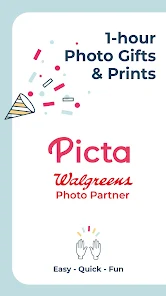
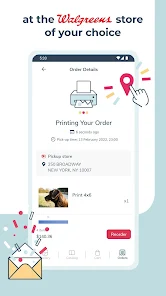
Picta Photo Print - 1h Pickup is a mobile app that lets you turn digital photos into physical prints and pick them up in as little as one hour from a local CVS or Walmart. It's essentially a photo printing service wrapped in a convenient app, perfect for anyone who wants quick prints without waiting for shipping. I downloaded it from Google Play out of curiosity after needing last-minute prints for a friend's birthday—something about same-day pickup felt like a lifesaver. The install was quick and free, no registration required upfront. When I first opened it, the interface was clean but a bit cluttered with promo banners for deals and frames. Still, the core action—select photos, choose size, pick up location—was visible right away, which made a good first impression for a utility app.
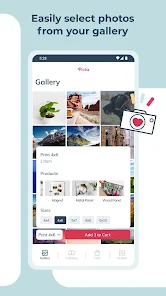
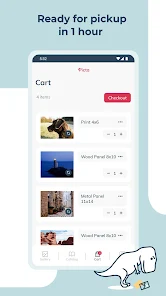
Using the app, the experience starts by granting photo access, then you pick images from your gallery or cloud storage. I selected a few 4x6 prints, which cost about $0.39 each. The app lets you crop or adjust brightness, but it's not as smooth as a dedicated photo editor—you might need to re-crop if the aspect ratio doesn't match. After selecting, you choose a CVS or Walmart nearby, and the app shows estimated pickup times. I paid via my Google account, and the order was ready in 45 minutes exactly. One tip: make sure your photos are high-res, because the app doesn't warn about blurry images well. The ordering flow is straightforward, but I hit a confusing moment when trying to cancel—you have to call the store, not use the app. Also, the app has ads for photo gifts and merchandise, which can be distracting when you just want prints.
After using it for a while, I'd recommend Picta to anyone who needs quick physical photos for scrapbooking, events, or gifts. It's especially useful if you live near a CVS or Walmart and hate waiting for online orders. But it's not for professional photographers—print quality is decent but not lab-grade, and colors can be slightly off compared to services like Snapfish or Shutterfly. What makes it stand out from apps that mail prints is the instant pickup option, which feels like a superpower for last-minute needs. I kept it installed because it's handy for impulse printing, but I might uninstall if the store near me stops offering 1-hour service. Overall, it's a niche tool that does its job well for casual users.
features
- 🖨️ Print quality is decent for quick prints, but colors can look slightly washed out compared to Snapfish's lab-tested prints—for example, a sunset photo I printed lost some warmth. For 4x6 prints at $0.39, it's fine for everyday use, but pros will notice the difference.
- 🖨️ Selection of sizes and finishes is limited: you only get glossy 4x6, 5x7, and 8x10, no matte or square options. In contrast, Shutterfly offers dozens of sizes and paper types, which makes Picta feel basic for creative projects.
- 🖨️ One-hour pickup is its standout feature—no other major photo app guarantees such fast in-store collection. I ordered at 10 AM and had prints by 11 AM, which beats Snapfish's 3-5 day shipping every time. This makes it ideal for urgent needs like party decorations.
pros
- 🔋 Instant pickup is its biggest strength—no waiting days for shipping like with Snapfish or Shutterfly. I grabbed prints for a last-minute frame gift in under an hour, which is hard to beat for convenience.
- 🔋 Low cost per print at $0.39 for 4x6 is cheaper than CVS's in-store kiosk prices and similar to Walmart's own service. It saves you the hassle of using a store computer, too.
- 🔋 Simple interface makes it quick to order without signing up for an account—just select photos and checkout. This is faster than more cluttered apps like FreePrints, which pushes subscriptions.
cons
- 🔋 Limited editing options—you can only crop or adjust brightness, no filters or text. Snapfish's app offers full editing suites with stickers and borders, making Picta feel too basic for creative users.
- 🔋 Reliant on store stock and hours—if your local CVS or Walmart stops 1-hour service, orders default to next-day. This happened to me once, and it defeated the app's main purpose.
- 🔋 No international coverage—only works in the US with CVS or Walmart. Apps like Printique ship globally, so Picta is useless for travelers or those abroad.
Articles
![]()
Guide
How to Update Google Play Store on Android 2026
![]()
Guide
How to Download Older Versions of Android Apps
![]()
Guide
How to Download Apps Without Google Play Store
![]()
Guide
What Is an APK File for Android?
If you use an Android phone, you may have seen the term APK while searching for apps or games online. Some websites offer an APK download instead of a Google Play install button. Some users also mention APK files when talking about apps that are not available in their region, older app versions, or Android games downloaded outside the Play Store.
![]()
Guide
How to Install Games from Google Play for Beginners
Installing games on an Android phone is usually simple, but for beginners, the process can still feel confusing at first. You may not know where to search, which button to tap, whether the game is safe, or why Google Play sometimes asks for account settings, storage access, or payment information. If you are using an Android phone for the first time, learning how to install games from Google Play is one of the easiest ways to get started.
![]()
Guide
How Useful Gemini Is for Everyday Questions and Quick Tasks
emini feels different from many AI apps because it is not only trying to be a chatbot. After using it for everyday questions, quick writing, image understanding, and planning, I think its biggest strength is convenience.
![]()
Guide
What to Know Before Downloading APKs
For many Android users, downloading an APK is a common way to install apps and games. Sometimes an app is not available in a certain country.
![]()
Guide
ChatGPT Review: Is It Still the Best AI App in 2026?
![]()
Guide
Seedance 2.0 vs Sora: The Future of AI Video Generation
The AI video race has intensified dramatically over the past two years. Platforms like Sora from OpenAI and Luma Dream Machine pushed the boundaries of text-to-video realism. Yet, despite their impressive outputs, most tools still operate as probabilistic generators—you describe a scene, and the model interprets it. Control remains limited. With the February 2026 release of Seedance 2.0, developed by ByteDance, the paradigm shifted. Internally known as Jimeng 2.0, Seedance does not position itself as just another video model. It positions itself as an AI Director. Rather than guessing what you want, Seedance 2.0 allows you to direct what happens. This distinction defines everything that follows.









Recommended Apps
![]()
Home Design 3D
Anuman4.2
![]()
Truth or Dare Game - Party App
Chouic4.8
![]()
Photo Collage Maker
Scoompa4.7![]()
Learn to Draw Flower
Creative APPS4.2![]()
FIFA World Cup 2026™
FIFA2.8![]()
Mirror Plus: Mirror with Light
Digitalchemy, LLC4.4![]()
Meitu- Photo Editor & AI Art
Meitu (China) Limited4.5![]()
Perplexity - Ask Anything
PerplexityAI4.7![]()
GhostTube SLS Camera Alternate
GhostTube4![]()
Boom Chip Blast: 2-Player
Black Pyramid 3D Games Studio0![]()
Healthy Benefits+
Solutran, Inc.4.5![]()
Deepcheck AI Search Assistant
rohe.ai4![]()
Idol Prank Video Call & Chat
LightCode Solutions4![]()
Face Shape - Pretty Scale
GlintTec Apps3.9![]()
Plant App - Plant Identifier
ScaleUp4.6












































