

LeafSnap Plant Identification

1M+
Installs
Appixi
Developer
-
Lifestyle
Category
-
Rated for 3+
Content Rating
-
contact@leafsnap.app
Developer Email
-
https://sites.google.com/view/plant-identification-privacy
Privacy Policy
Screenshots
editor reviews
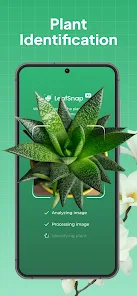
I came across LeafSnap Plant Identification while trying to figure out what that weird bush in my backyard was. It's basically a plant identifier app that uses your phone's camera to scan leaves and flowers, then tells you what species you're looking at. These days, there are quite a few plant ID apps floating around on both Google Play and the App Store, and LeafSnap is one of the more popular ones with over 10 million installs. You can download it for free, though there are some in-app purchases if you want the full experience. First time I opened it, I was honestly surprised by how clean the interface looked. No clutter, no confusing buttons. It just asked me to point my camera at a plant, and that was it. I didn't need to register or sign up right away, which was nice since I just wanted to test it out quickly.
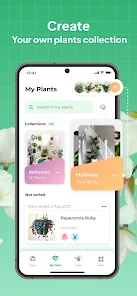
After tapping the camera button, it took maybe two or three seconds for the app to give me a result. I pointed it at a maple leaf, and it came back with a match that looked right. The app shows you a photo of the identified plant along with some basic info like its scientific name and common care tips. You can save your findings to a personal collection, which I found useful for keeping track of plants I see during walks. The navigation is pretty straightforward: you have a camera tab, a gallery for your saved IDs, and a profile section. One thing I liked was that it also works with flowers and fruits, not just leaves. I did notice that it sometimes struggles with similar-looking species, especially when the lighting is bad or the leaf is wet. Still, for casual use, it gets the job done without making you jump through hoops.
After using it for a few weeks, I'd say LeafSnap is great for people who just want a quick answer without reading through a botanical encyclopedia. It's not as detailed as something like iNaturalist, which connects you with a community of experts, but it's way faster and less intimidating. If you're a gardener, a hiker, or just someone who's curious about the plants around you, this app is a solid choice. On the other hand, if you're a serious botanist, you might find the information too surface-level. What really sets it apart is how easy it is to use. I keep it installed because it's saved me from guessing about unknown plants in my garden, though I could see someone deleting it if they only needed it for a one-time identification.
features
- 🔍 Instant scanning: You just point the camera at any leaf, flower, or fruit, and the app returns an identification in a few seconds. Compared to PlantNet, which sometimes asks you to select specific parts of the plant for better accuracy, LeafSnap takes a more straightforward approach. You don't need to pick the exact angle or part, it works with whatever you point it at, which feels more beginner-friendly.
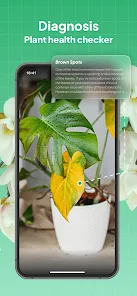
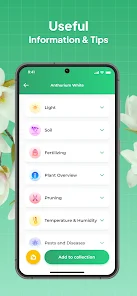
- 🌱 Care database: Once identified, you get basic care instructions like watering needs, sunlight preferences, and soil type. PictureThis offers a similar feature, but LeafSnap provides it without pushing a premium subscription right away. You can view care tips freely after identifying a plant, which is nice for someone just starting out.
- 📸 Photo gallery: The app saves your past identifications in a gallery, so you can revisit them later. This is handy when you're tracking how a plant changes through the seasons. iNaturalist also has a journal feature, but it's more community-focused, whereas LeafSnap keeps things private and simple.
pros
- ✅ Fast and simple: LeafSnap's biggest strength is how quickly it gives you an answer. Unlike PlantNet, where you sometimes have to wait for community verification, this app gives you an instant match. For someone who just wants a name and move on, that's a huge time-saver.
- ✅ No registration required: You can use the core feature without signing up. PictureThis locks some functionality behind an account, but LeafSnap lets you scan plants right away. That lowered the barrier a lot for me.
- ✅ Works offline sometimes: I've used it in areas with poor signal, and it still managed to identify some plants. Not all apps, like iNaturalist, work this well without an internet connection.
cons
- ❌ Limited accuracy with rare plants: LeafSnap has trouble with unusual or less common species. I tested it on a few wildflowers I found, and it gave me incorrect matches. PlantNet seems to handle rarer plants better because it taps into a larger database.
- ❌ Ads can be intrusive: The free version shows ads after every identification, which gets annoying fast. PictureThis does this too, but at least you can mute theirs in settings more easily.
- ❌ Basic information only: If you're looking for detailed botanical data or references, you won't find it here. iNaturalist offers links to research and expert comments, while LeafSnap just gives you the basics and nothing more.
Articles
![]()
Guide
How to Update Google Play Store on Android 2026
![]()
Guide
How to Download Older Versions of Android Apps
![]()
Guide
How to Download Apps Without Google Play Store
![]()
Guide
What Is an APK File for Android?
If you use an Android phone, you may have seen the term APK while searching for apps or games online. Some websites offer an APK download instead of a Google Play install button. Some users also mention APK files when talking about apps that are not available in their region, older app versions, or Android games downloaded outside the Play Store.
![]()
Guide
How to Install Games from Google Play for Beginners
Installing games on an Android phone is usually simple, but for beginners, the process can still feel confusing at first. You may not know where to search, which button to tap, whether the game is safe, or why Google Play sometimes asks for account settings, storage access, or payment information. If you are using an Android phone for the first time, learning how to install games from Google Play is one of the easiest ways to get started.
![]()
Guide
How Useful Gemini Is for Everyday Questions and Quick Tasks
emini feels different from many AI apps because it is not only trying to be a chatbot. After using it for everyday questions, quick writing, image understanding, and planning, I think its biggest strength is convenience.
![]()
Guide
What to Know Before Downloading APKs
For many Android users, downloading an APK is a common way to install apps and games. Sometimes an app is not available in a certain country.
![]()
Guide
ChatGPT Review: Is It Still the Best AI App in 2026?
![]()
Guide
Seedance 2.0 vs Sora: The Future of AI Video Generation
The AI video race has intensified dramatically over the past two years. Platforms like Sora from OpenAI and Luma Dream Machine pushed the boundaries of text-to-video realism. Yet, despite their impressive outputs, most tools still operate as probabilistic generators—you describe a scene, and the model interprets it. Control remains limited. With the February 2026 release of Seedance 2.0, developed by ByteDance, the paradigm shifted. Internally known as Jimeng 2.0, Seedance does not position itself as just another video model. It positions itself as an AI Director. Rather than guessing what you want, Seedance 2.0 allows you to direct what happens. This distinction defines everything that follows.









Recommended Apps
![]()
Home Design 3D
Anuman4.2
![]()
Truth or Dare Game - Party App
Chouic4.8
![]()
Photo Collage Maker
Scoompa4.7![]()
Learn to Draw Flower
Creative APPS4.2![]()
FIFA World Cup 2026™
FIFA2.8![]()
Mirror Plus: Mirror with Light
Digitalchemy, LLC4.4![]()
Meitu- Photo Editor & AI Art
Meitu (China) Limited4.5![]()
Perplexity - Ask Anything
PerplexityAI4.7![]()
GhostTube SLS Camera Alternate
GhostTube4![]()
Boom Chip Blast: 2-Player
Black Pyramid 3D Games Studio0![]()
Healthy Benefits+
Solutran, Inc.4.5![]()
Deepcheck AI Search Assistant
rohe.ai4![]()
Idol Prank Video Call & Chat
LightCode Solutions4![]()
Face Shape - Pretty Scale
GlintTec Apps3.9![]()
Plant App - Plant Identifier
ScaleUp4.6












































