
EyeEm - Sell Your Photos

10M+
Installs
EyeEm Mobile
Developer
-
Video Players & Editors
Category
-
Rated for 3+
Content Rating
-
support@eyeem.com
Developer Email
-
http://www.eyeem.com/privacy
Privacy Policy
Screenshots
editor reviews
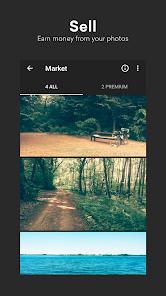
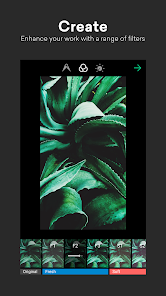
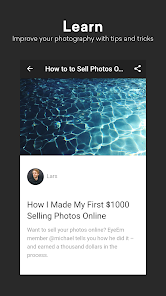
EyeEm is a photography app and marketplace that lets you sell your photos directly from your phone. It's basically a stock photo platform mixed with a social network for photographers. You can shoot, edit with their built-in filters, and upload images to a global marketplace where brands and publishers can buy them. I downloaded it from Google Play after hearing a friend mention it as an easier way to monetize mobile photography. The install count seemed decent, but I didn't dig into exact numbers. It's free to download, but you do need to sign up, and there are optional in-app purchases for extra editing tools. Once launched, the first impression was clean but busy — the feed shows popular photos, which can be intimidating if you're just starting. No forced ads right away, which was a relief.
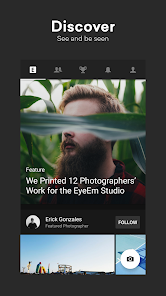
After signing in, the onboarding walks you through connecting your camera roll and tagging your first few uploads. The interface is split between a gallery for your own shots, a feed of trending work, and a store where you track sales. I started by uploading a handful of landscape shots from my last hike. The editing tools are surprisingly solid — stuff like crop, exposure, and a few filters that don't ruin the original quality. A neat trick: you can see which tags are trending and match your photos to them, which helps visibility. The process isn't instant though; approvals take a few hours, and some of my images got rejected for unclear reasons like “quality issues” without specifics. Navigating back to edit tags or check earnings is straightforward, but the app feels a bit sluggish when scrolling through the feed on an older phone.
After a few weeks, I think EyeEm works well for hobbyists who already take decent photos and want some pocket money. It's not a game-changer for pros — you'd still get better returns on Adobe Stock or Shutterstock. But for someone who just enjoys snapping shots of cityscapes or coffee cups, it's a fun side thing. What makes it stand out is the social angle: you get likes and comments, which keeps you motivated. That said, the commission split isn't amazing, and most of my sales were tiny micro-licenses. I've kept it installed because it's low-effort, but I can see power users uninstalling if they don't get traction fast. Compared to Foap, EyeEm feels more polished but less forgiving with upload standards.
features
- 📸 AI tagging helps you add relevant keywords automatically, making your photos discoverable faster than manually typing tags. Foap requires you to do all the tagging yourself, which is slower and less accurate.
- 💸 Direct sales from the app store without needing a desktop — you can upload, edit, and track earnings all on your phone. Most stock apps like Shutterstock still push you toward their website for serious uploads.
- 🏆 Built-in photo challenges and missions from brands let you shoot specific themes and earn extra cash. This is more engaging than just waiting for random sales, which is how most competitors work.
pros
- 💡 Simple upload flow: You choose images, add tags, and submit in under two minutes. Foap makes you jump through more hoops for approval.
- 🌍 Global buyer base: Brands and publishers actually browse the app, not just a web platform. Adobe Stock has more buyers, but EyeEm feels more mobile-first.
- 📉 Low barrier to entry: No portfolio review needed to start selling. Shutterstock requires a strict review before you even list photos.
cons
- 🐢 Slow approval times: Photos can sit for hours before review, and rejections come without clear reasons. Foap rejects faster but also offers less guidance.
- 💰 Low commission per sale: You only get a small cut per download, often just cents. Shutterstock pays better for the same image.
- 📱 App stability issues: Crashes or lags on older hardware, which isn't great when you're on location. Foap runs smoother on mid-range phones.
Articles
![]()
Guide
How to Update Google Play Store on Android 2026
![]()
Guide
How to Download Older Versions of Android Apps
![]()
Guide
How to Download Apps Without Google Play Store
![]()
Guide
What Is an APK File for Android?
If you use an Android phone, you may have seen the term APK while searching for apps or games online. Some websites offer an APK download instead of a Google Play install button. Some users also mention APK files when talking about apps that are not available in their region, older app versions, or Android games downloaded outside the Play Store.
![]()
Guide
How to Install Games from Google Play for Beginners
Installing games on an Android phone is usually simple, but for beginners, the process can still feel confusing at first. You may not know where to search, which button to tap, whether the game is safe, or why Google Play sometimes asks for account settings, storage access, or payment information. If you are using an Android phone for the first time, learning how to install games from Google Play is one of the easiest ways to get started.
![]()
Guide
How Useful Gemini Is for Everyday Questions and Quick Tasks
emini feels different from many AI apps because it is not only trying to be a chatbot. After using it for everyday questions, quick writing, image understanding, and planning, I think its biggest strength is convenience.
![]()
Guide
What to Know Before Downloading APKs
For many Android users, downloading an APK is a common way to install apps and games. Sometimes an app is not available in a certain country.
![]()
Guide
ChatGPT Review: Is It Still the Best AI App in 2026?
![]()
Guide
Seedance 2.0 vs Sora: The Future of AI Video Generation
The AI video race has intensified dramatically over the past two years. Platforms like Sora from OpenAI and Luma Dream Machine pushed the boundaries of text-to-video realism. Yet, despite their impressive outputs, most tools still operate as probabilistic generators—you describe a scene, and the model interprets it. Control remains limited. With the February 2026 release of Seedance 2.0, developed by ByteDance, the paradigm shifted. Internally known as Jimeng 2.0, Seedance does not position itself as just another video model. It positions itself as an AI Director. Rather than guessing what you want, Seedance 2.0 allows you to direct what happens. This distinction defines everything that follows.









Recommended Apps
![]()
Home Design 3D
Anuman4.2
![]()
Truth or Dare Game - Party App
Chouic4.8
![]()
Photo Collage Maker
Scoompa4.7![]()
Learn to Draw Flower
Creative APPS4.2![]()
FIFA World Cup 2026™
FIFA2.8![]()
Mirror Plus: Mirror with Light
Digitalchemy, LLC4.4![]()
Meitu- Photo Editor & AI Art
Meitu (China) Limited4.5![]()
Perplexity - Ask Anything
PerplexityAI4.7![]()
GhostTube SLS Camera Alternate
GhostTube4![]()
Boom Chip Blast: 2-Player
Black Pyramid 3D Games Studio0![]()
Healthy Benefits+
Solutran, Inc.4.5![]()
Deepcheck AI Search Assistant
rohe.ai4![]()
Idol Prank Video Call & Chat
LightCode Solutions4![]()
Face Shape - Pretty Scale
GlintTec Apps3.9![]()
Plant App - Plant Identifier
ScaleUp4.6











































