
PhotoFunia

10M+
Installs
Capsule Digital
Developer
-
Video Players & Editors
Category
-
Rated for 12+
Content Rating
-
support@photofunia.com
Developer Email
-
http://photofunia.com/privacy
Privacy Policy
Screenshots
editor reviews
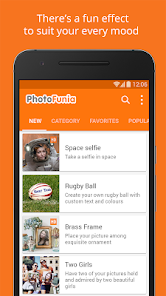
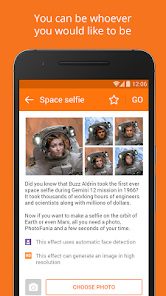
You've probably seen those social media posts where someone looks like a Renaissance painting or a classic movie poster, and chances are, that effect came from PhotoFunia. It's a photo editor and effects app that's been around for years, mostly known for its huge library of templates and filters that turn your regular snapshots into something more creative or funny. On Google Play and the App Store, it's free to download, and the install count is in the hundreds of millions, which gives you an idea of how long it's been popular. When you first open it, the layout feels a bit dated, honestly, the design hasn't changed much since the mid-2010s. But the sheer number of categories like magazine covers, movie posters, art effects, and weather scenes makes up for that first impression. You don't need to sign up to use it, which is a big plus for casual users like me.
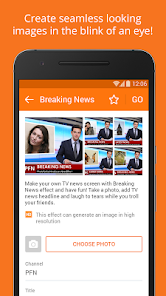
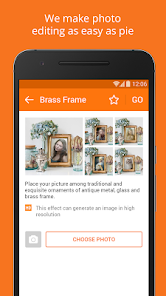
Once you start using it, the workflow is straightforward. You pick a category, choose an effect, upload a photo from your gallery or take a new one, and then the app processes it. Some effects let you adjust the face position or crop the image, but most are automatic. The real fun part is browsing through the effects and seeing what sticks. For example, I spent a good ten minutes turning my dog into a “Renaissance portrait” and then a “billboard model,” and the results were shareable instantly. The free version does have ads that pop up between effects, which can get annoying if you're trying out multiple templates in a row. But there's a nice touch: you can preview most effects before actually processing the image, so you don't waste time uploading a photo that won't fit. A small tip is to check the “new” category, because it often has seasonal templates like Christmas cards or Halloween themes that aren't in the main list.
After using it for a while, I'd say PhotoFunia is best for people who want quick, fun results without learning any editing skills. It's not for someone looking for fine-tuned controls or layers like you'd get in apps like PicsArt or Adobe Express. What sets it apart is the sheer variety of effects, especially the ones that mimic famous art styles or classic media formats. But the design feels stuck in time, and some effects look very low-resolution on modern phone screens. I ended up keeping it installed because it's a go-to for creating silly birthday posts or travel card collages, but I can see someone deleting it after a week if they're not into those kinds of photo gags. Compared to something like Canva, which is more design-focused, PhotoFunia is strictly about effects, not creation.
features
- 🔹 Unlimited template library: Unlike pricier apps like FaceApp that lock good effects behind a paywall, PhotoFunia throws hundreds of templates at you for free. You get everything from “vintage newspaper” to “space explorer,” and new ones show up each month. It feels like a whole toy box rather than a single tool. 🔹 One-tap automation: Where apps like PicsArt make you manually blend, resize, and mask, PhotoFunia handles it all in the background. You literally tap once, and your face is pasted onto a movie poster or an ancient statue. The trade-off is less control, but the speed is addictive for casual users. 🔹 No registration required: Most photo apps nowadays force you to create an account or link social media just to use basic features. PhotoFunia lets you jump straight into editing without any sign-up nonsense. That alone makes it more accessible than something like Snapseed or BeautyPlus. 🔹 Shareable fixed templates: The app's best trick is preparing finished images that are already cropped and formatted for social media cover photos. You can directly set the result as your Facebook banner or Instagram story without extra tweaking.
pros
- 🟢 Huge variety with no subscription: Compared to apps like Canva Pro or FaceApp Premium, which ask for monthly fees, PhotoFunia gives you most of its effects for free. You only see ads, not paywalls. 🟢 Better for humor than aesthetics: If you want a serious photo retouch, this isn't it. But for silly gift images, it beats more “professional” apps like Adobe Express because the templates are designed to be funny, not polished. 🟢 Works offline for cached effects: Once you've loaded a category, many templates work without internet. That's rare for this kind of app, and it saved me on a long train ride.
cons
- 🔴 Outdated user interface: Navigating the app feels like using a phone from 2015. The icons are tiny, the font looks old, and menu buttons are placed awkwardly. Apps like PicsArt have much cleaner, modern designs. 🔴 Ads interrupt the flow: After every single effect, an ad pops up. It's not overwhelming like some games, but if you're trying out ten effects in a row, it becomes tiring. Free alternatives like YouCam Perfect have fewer ads in the browsing phase. 🔴 Low-resolution final images: Some templates output images that look pixelated on modern phones. For example, the “billboard” effect looks blurry on an iPhone 15 unless you upload a very high-res photo. Apps like FaceApp keep the output crisp. 🔴 No layer or text editing: Once the effect is applied, you can't tweak it. You can't add captions, stickers, or re-size. That makes it less versatile than something like Snapseed, where you can stack adjustments.
Articles
![]()
Guide
How to Update Google Play Store on Android 2026
![]()
Guide
How to Download Older Versions of Android Apps
![]()
Guide
How to Download Apps Without Google Play Store
![]()
Guide
What Is an APK File for Android?
If you use an Android phone, you may have seen the term APK while searching for apps or games online. Some websites offer an APK download instead of a Google Play install button. Some users also mention APK files when talking about apps that are not available in their region, older app versions, or Android games downloaded outside the Play Store.
![]()
Guide
How to Install Games from Google Play for Beginners
Installing games on an Android phone is usually simple, but for beginners, the process can still feel confusing at first. You may not know where to search, which button to tap, whether the game is safe, or why Google Play sometimes asks for account settings, storage access, or payment information. If you are using an Android phone for the first time, learning how to install games from Google Play is one of the easiest ways to get started.
![]()
Guide
How Useful Gemini Is for Everyday Questions and Quick Tasks
emini feels different from many AI apps because it is not only trying to be a chatbot. After using it for everyday questions, quick writing, image understanding, and planning, I think its biggest strength is convenience.
![]()
Guide
What to Know Before Downloading APKs
For many Android users, downloading an APK is a common way to install apps and games. Sometimes an app is not available in a certain country.
![]()
Guide
ChatGPT Review: Is It Still the Best AI App in 2026?
![]()
Guide
Seedance 2.0 vs Sora: The Future of AI Video Generation
The AI video race has intensified dramatically over the past two years. Platforms like Sora from OpenAI and Luma Dream Machine pushed the boundaries of text-to-video realism. Yet, despite their impressive outputs, most tools still operate as probabilistic generators—you describe a scene, and the model interprets it. Control remains limited. With the February 2026 release of Seedance 2.0, developed by ByteDance, the paradigm shifted. Internally known as Jimeng 2.0, Seedance does not position itself as just another video model. It positions itself as an AI Director. Rather than guessing what you want, Seedance 2.0 allows you to direct what happens. This distinction defines everything that follows.









Recommended Apps
![]()
Home Design 3D
Anuman4.2
![]()
Truth or Dare Game - Party App
Chouic4.8
![]()
Photo Collage Maker
Scoompa4.7![]()
Learn to Draw Flower
Creative APPS4.2![]()
FIFA World Cup 2026™
FIFA2.8![]()
Mirror Plus: Mirror with Light
Digitalchemy, LLC4.4![]()
Meitu- Photo Editor & AI Art
Meitu (China) Limited4.5![]()
Perplexity - Ask Anything
PerplexityAI4.7![]()
GhostTube SLS Camera Alternate
GhostTube4![]()
Boom Chip Blast: 2-Player
Black Pyramid 3D Games Studio0![]()
Healthy Benefits+
Solutran, Inc.4.5![]()
Deepcheck AI Search Assistant
rohe.ai4![]()
Idol Prank Video Call & Chat
LightCode Solutions4![]()
Face Shape - Pretty Scale
GlintTec Apps3.9![]()
Plant App - Plant Identifier
ScaleUp4.6











































