
AI Photo Editor, Collage-Fotor

10M+
Installs
AI Art Photo Editor | Everimaging Ltd.
Developer
-
Video Players & Editors
Category
-
Rated for 3+
Content Rating
-
support@fotor.com
Developer Email
-
http://www.fotor.com/privacy.html
Privacy Policy
Screenshots
editor reviews
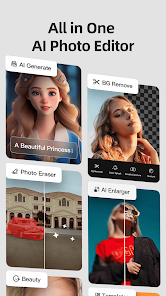
Fotor is a photo editing and collage-making app developed by Everimaging Ltd., sitting somewhere between a casual filter app and a serious image editor. You can crop, adjust colors, add text, or stitch photos together into collages, and it also tosses in some AI-powered tools like background removal and portrait retouching. A lot of people probably grab it from Google Play or the App Store because they want something more than basic phone edits but don't want to wrestle with complex desktop software. It's free to download, and after launching it, the first thing you notice is how clean and colorful everything looks—toolbars are labeled clearly, and there's no overwhelming clutter. That said, you do get hit with prompts for in-app purchases or ads here and there, which feels a bit pushy right out of the gate, but the free version still offers plenty to play with.
Once you start actually using Fotor, the experience is pretty straightforward. You tap "Edit" or "Collage," pick a photo from your gallery, and the interface pops up with sliders for brightness, contrast, saturation, and more. The onboarding doesn't force you through a tutorial, which I appreciated—I just jumped in and figured things out. For collages, you select a layout, drag your images in, and adjust borders or backgrounds. One nice touch is the "Beauty" tab, where you can smooth skin or whiten teeth with a single slider, which feels almost magical for quick fixes. However, some actions aren't as smooth: applying certain filters or effects triggers a loading spinner, and a few advanced tools like the AI cutout work well but take a few seconds to process. A practical tip is to save frequently, because if you accidentally hit the back button, unsaved progress can vanish. Overall, it's a mix of "this is easy" and "why did it just lag?" moments.
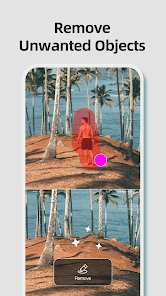
After spending some time with Fotor, I think it's a solid middle-ground app. People who want quick, polished edits for social media or simple collages will probably love it—it's faster than learning something like Photoshop Express or Snapseed, and the templates give you a head start. But if you're a power user craving granular controls like curves or layer masks, you'll feel held back. Compared to PicsArt, Fotor feels less chaotic and more focused, though PicsArt offers more creative stickers and community features. The AI tools are Fotor's standout trick—things like removing objects or changing backgrounds beat free alternatives handily. I'd keep it installed for those moments when I need a fast, decent edit, but I could see someone uninstalling it if they only use basic tools and find the ads annoying. It's not revolutionary, but it's reliable for everyday photo cleanups.
features
- 🎨 AI-Powered Background Removal: Unlike Snapseed or free editors, Fotor can cut out people or objects from photos with one tap. It's not perfect on messy backgrounds, but for portraits or product shots, it beats manually tracing edges with a brush.
- 🖼️ One-Tap Collage Maker: While Canva also does collages, Fotor's layouts are tighter and more varied for photo-only compositions. You pick from dozens of frames, adjust spacing, and the result looks clean without extra tweaking.
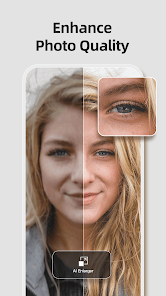
- ✨ Portrait Beauty Tools: Features like skin smoothing and teeth whitening stand out compared to basic editors like Adobe Express. They work fast and look natural, not plastic, which makes them better for casual portrait touch-ups than most competitors.
- 🔧 Batch Editing Support: You can apply the same filter, crop, or resize to multiple images at once, something that tools like VSCO or Lightroom Free don't offer. It saves a ton of time if you're editing a bunch of travel pics or social media posts.
pros
- 👍 User-Friendly Interface: Compared to GIMP or Photoshop Express, Fotor keeps everything visible without burying tools in menus. New users won't feel lost, and the learning curve is almost flat.
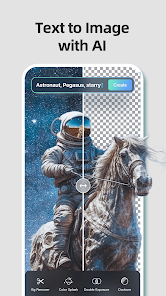
- 👍 Solid AI Features: The AI background removal and object eraser work better than free alternatives like PhotoDirector or Pixlr. They're not premium-level, but they're good enough for most non-professional needs.
- 👍 Good Collage Templates: Unlike Canva, which leans into text-heavy designs, Fotor's templates focus on photos. You get clean, stylish layouts perfect for Instagram grids or family photo books.
- 👍 Free Version Is Generous: You get access to many filters, basic edits, and collage layouts without paying. Apps like PicsArt lock more features behind a paywall or force you into frequent ads.
cons
- 👎 Frequent Ads and Upsells: Every few edits, you get pop-ups asking you to upgrade or watch a video. Snapseed and simple editors don't interrupt your workflow like this, which gets annoying fast.
- 👎 Limited Advanced Tools: There's no curves tool, no layer support, and no raw file editing. If you come from Lightroom or even VSCO, you'll miss those controls for fine-tuning exposure and color.
- 👎 Saving Can Be Tricky: Sometimes the app asks you to "Save as copy" or waits a few seconds before the button works. A few times, my edit was lost because I exited too quickly, which doesn't happen in Adobe Express.
- 👎 AI Tools Are Inconsistent: On tricky images—like a person with messy hair or a subject on a busy background—the AI cutout misses or leaves artifacts. PicsArt's equivalent tool handles these cases slightly better in my experience.
Articles
![]()
Guide
How to Update Google Play Store on Android 2026
![]()
Guide
How to Download Older Versions of Android Apps
![]()
Guide
How to Download Apps Without Google Play Store
![]()
Guide
What Is an APK File for Android?
If you use an Android phone, you may have seen the term APK while searching for apps or games online. Some websites offer an APK download instead of a Google Play install button. Some users also mention APK files when talking about apps that are not available in their region, older app versions, or Android games downloaded outside the Play Store.
![]()
Guide
How to Install Games from Google Play for Beginners
Installing games on an Android phone is usually simple, but for beginners, the process can still feel confusing at first. You may not know where to search, which button to tap, whether the game is safe, or why Google Play sometimes asks for account settings, storage access, or payment information. If you are using an Android phone for the first time, learning how to install games from Google Play is one of the easiest ways to get started.
![]()
Guide
How Useful Gemini Is for Everyday Questions and Quick Tasks
emini feels different from many AI apps because it is not only trying to be a chatbot. After using it for everyday questions, quick writing, image understanding, and planning, I think its biggest strength is convenience.
![]()
Guide
What to Know Before Downloading APKs
For many Android users, downloading an APK is a common way to install apps and games. Sometimes an app is not available in a certain country.
![]()
Guide
ChatGPT Review: Is It Still the Best AI App in 2026?
![]()
Guide
Seedance 2.0 vs Sora: The Future of AI Video Generation
The AI video race has intensified dramatically over the past two years. Platforms like Sora from OpenAI and Luma Dream Machine pushed the boundaries of text-to-video realism. Yet, despite their impressive outputs, most tools still operate as probabilistic generators—you describe a scene, and the model interprets it. Control remains limited. With the February 2026 release of Seedance 2.0, developed by ByteDance, the paradigm shifted. Internally known as Jimeng 2.0, Seedance does not position itself as just another video model. It positions itself as an AI Director. Rather than guessing what you want, Seedance 2.0 allows you to direct what happens. This distinction defines everything that follows.









Recommended Apps
![]()
Home Design 3D
Anuman4.2
![]()
Truth or Dare Game - Party App
Chouic4.8
![]()
Photo Collage Maker
Scoompa4.7![]()
Learn to Draw Flower
Creative APPS4.2![]()
FIFA World Cup 2026™
FIFA2.8![]()
Mirror Plus: Mirror with Light
Digitalchemy, LLC4.4![]()
Meitu- Photo Editor & AI Art
Meitu (China) Limited4.5![]()
Perplexity - Ask Anything
PerplexityAI4.7![]()
GhostTube SLS Camera Alternate
GhostTube4![]()
Boom Chip Blast: 2-Player
Black Pyramid 3D Games Studio0![]()
Healthy Benefits+
Solutran, Inc.4.5![]()
Deepcheck AI Search Assistant
rohe.ai4![]()
Idol Prank Video Call & Chat
LightCode Solutions4![]()
Face Shape - Pretty Scale
GlintTec Apps3.9![]()
Plant App - Plant Identifier
ScaleUp4.6











































