
Photo Collage Pro

10M+
Installs
Zentertain
Developer
-
Video Players & Editors
Category
-
Rated for 12+
Content Rating
-
Fideoapp@zentertian.net
Developer Email
-
http://getmatchnow.com/policies/privacy.html
Privacy Policy
Screenshots
editor reviews
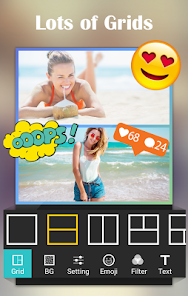
Photo Collage Pro is a straightforward collage-making tool from Zentertain that sits squarely in the photo editing and layout genre. You use it to mash up multiple pictures into a single frame, add text, stickers, and backgrounds, then share the result on social media or save it to your phone. I downloaded it from the Google Play store after seeing it had over 50 million downloads, which caught my attention because that many people usually means the basic experience works well. It's free to install, though you run into ads pretty quickly, and there's a premium version that removes them and unlocks more templates. Right after launching it, I was greeted by a banner ad at the bottom, which felt a bit pushy, but the interface itself looked clean and modern, with big, colorful icons that made it easy to understand what to tap first.
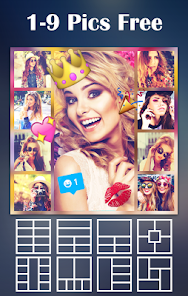
Using the app is mostly a drag-and-drop affair, which is exactly what you want from something like this. You pick a layout template first — there are grids of two to twelve photos, plus freestyle canvases if you want to get creative. From there, you just tap the empty slots to load pictures from your gallery, and the app automatically crops them into the right shape. I hit a small snag when I tried to swap two photos; it took me a second to realize you have to long-press one and drag it over the other, which isn't super obvious. The editing tools for each individual photo are basic but functional: you can adjust brightness, contrast, saturation, and apply a few filters. I spent most of my time tweaking borders and changing the background color, because the default white frame felt too plain. A nice touch is that the app remembers your last used border style, so you don't have to redo it for every new collage.
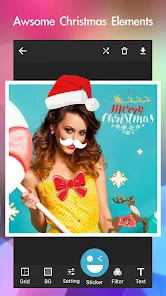
After using it for about a week, I think Photo Collage Pro is fine for quick, casual projects, but it doesn't stand out in any big way. If you just need to combine a few vacation photos and slap a "Beach Day" sticker on them, it works great. But if you want serious control over layer placement, masking, or high-resolution exports, you would be better off with something like Adobe Express or Canva, which offer more depth for free. The ads get annoying if you close out of one collage and start another, because another ad pops up each time. People who make collages often will probably upgrade to the paid version or switch to a less ad-heavy alternative. I can see myself keeping it installed for those moments when I want something quick, but it's not replacing anything else on my phone.
features
- 🖼️ Drag-and-drop layout system with over 100 grid templates, plus a freestyle mode where you can place photos and stickers anywhere. I found the freestyle mode more useful than the rigid grids because you can overlap images for a scrapbook feel. Canva's free collage feature is more restrictive here, locking most of these options behind a paywall.
- 🎨 Built-in filters and editing tools that adjust brightness, contrast, saturation, and sharpness for each individual photo. You can also tweak border width, round the corners, and change the background to any color or a gradient. Picsart's free version has more filter variety, but the controls in this app feel snappier and less laggy when applying them.
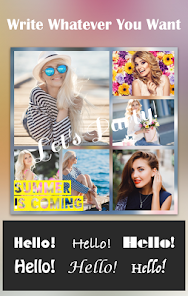
- ✨ Text overlay with a decent font library, shadow effects, and color picking. You can rotate text freely by pinching, which most collage apps handle weirdly. The standout is that the app keeps the text layer separate from the image layer, so you can move and edit it without messing up your photo arrangement, something that Layout by Instagram does not allow.
pros
- 👍 Responsive performance with no noticeable lag when loading high-resolution photos from my gallery. Even with 12 images in one collage, the app did not freeze or crash, which is more than I can say for Pic Collage Maker when I tried it last month.
- 👍 Very low learning curve compared to Adobe Express. You can create a decent-looking collage within 30 seconds of opening the app, which makes it great for older users or people who don't want to mess with layers and masking tools.
- 👍 Template updates seem to happen regularly based on the changelog. The app adds about five to ten new layouts each month, so you're not stuck with the same stale options forever. Fotor's collage templates rarely get refreshed.
cons
- 👎 Ads show up every time you save or start a new collage. It's not just a banner at the bottom — you get a full-screen video ad that takes about five seconds to skip. Pixlr Express handles ads much better by keeping them only in the menu area.
- 👎 The freestyle canvas lacks any kind of snap-to-grid or alignment guides. If you want two photos to be perfectly level, you have to eyeball it, which is frustrating. Canva's free version at least gives you dotted alignment lines.
- 👎 Export quality is capped at 1080p on one side unless you pay for premium. For printing collages or using them as wallpapers on a tablet, this feels limiting. Layout by Instagram exports at full resolution without any restrictions.
- 👎 No cloud backup or sync between devices. If you switch phones, your saved collage drafts are gone unless you export them first. Google Photos integration would fix this, but the app doesn't offer it.
Articles
![]()
Guide
How to Update Google Play Store on Android 2026
![]()
Guide
How to Download Older Versions of Android Apps
![]()
Guide
How to Download Apps Without Google Play Store
![]()
Guide
What Is an APK File for Android?
If you use an Android phone, you may have seen the term APK while searching for apps or games online. Some websites offer an APK download instead of a Google Play install button. Some users also mention APK files when talking about apps that are not available in their region, older app versions, or Android games downloaded outside the Play Store.
![]()
Guide
How to Install Games from Google Play for Beginners
Installing games on an Android phone is usually simple, but for beginners, the process can still feel confusing at first. You may not know where to search, which button to tap, whether the game is safe, or why Google Play sometimes asks for account settings, storage access, or payment information. If you are using an Android phone for the first time, learning how to install games from Google Play is one of the easiest ways to get started.
![]()
Guide
How Useful Gemini Is for Everyday Questions and Quick Tasks
emini feels different from many AI apps because it is not only trying to be a chatbot. After using it for everyday questions, quick writing, image understanding, and planning, I think its biggest strength is convenience.
![]()
Guide
What to Know Before Downloading APKs
For many Android users, downloading an APK is a common way to install apps and games. Sometimes an app is not available in a certain country.
![]()
Guide
ChatGPT Review: Is It Still the Best AI App in 2026?
![]()
Guide
Seedance 2.0 vs Sora: The Future of AI Video Generation
The AI video race has intensified dramatically over the past two years. Platforms like Sora from OpenAI and Luma Dream Machine pushed the boundaries of text-to-video realism. Yet, despite their impressive outputs, most tools still operate as probabilistic generators—you describe a scene, and the model interprets it. Control remains limited. With the February 2026 release of Seedance 2.0, developed by ByteDance, the paradigm shifted. Internally known as Jimeng 2.0, Seedance does not position itself as just another video model. It positions itself as an AI Director. Rather than guessing what you want, Seedance 2.0 allows you to direct what happens. This distinction defines everything that follows.









Recommended Apps
![]()
Home Design 3D
Anuman4.2
![]()
Truth or Dare Game - Party App
Chouic4.8
![]()
Photo Collage Maker
Scoompa4.7![]()
Learn to Draw Flower
Creative APPS4.2![]()
FIFA World Cup 2026™
FIFA2.8![]()
Mirror Plus: Mirror with Light
Digitalchemy, LLC4.4![]()
Meitu- Photo Editor & AI Art
Meitu (China) Limited4.5![]()
Perplexity - Ask Anything
PerplexityAI4.7![]()
GhostTube SLS Camera Alternate
GhostTube4![]()
Boom Chip Blast: 2-Player
Black Pyramid 3D Games Studio0![]()
Healthy Benefits+
Solutran, Inc.4.5![]()
Deepcheck AI Search Assistant
rohe.ai4![]()
Idol Prank Video Call & Chat
LightCode Solutions4![]()
Face Shape - Pretty Scale
GlintTec Apps3.9![]()
Plant App - Plant Identifier
ScaleUp4.6












































