
Pedometer - Step Counter

50M+
Installs
Simple Design Ltd.
Developer
-
Health & Fitness
Category
-
Rated for 3+
Content Rating
-
support@simpledesign.ltd
Developer Email
-
https://simpledesign.ltd/privacypolicy.html?pkg=pedometer.stepcounter.calorieburner.pedometerforwalking
Privacy Policy
Screenshots
editor reviews
Pedometer - Step Counter from Simple Design Ltd. is exactly what it sounds like — a straightforward fitness tracker that lives inside your phone. It's the kind of app you install when you want to keep an eye on your daily steps without buying a smartwatch or a fitness band. After downloading it from Google Play or the App Store, the first thing you notice is how quickly it gets going. No lengthy sign-up forms, no email verification, no social media login. You just open it, and the step counting starts automatically. That immediate sense of usability feels refreshing compared to apps that demand an account before letting you do anything. The install base is decent for a free app, and while there are in-app purchases and occasional ads, they don't slam you right from the start. For a normal person who just wants to know if they hit 10,000 steps today, this app delivers that satisfaction within seconds of launching it.
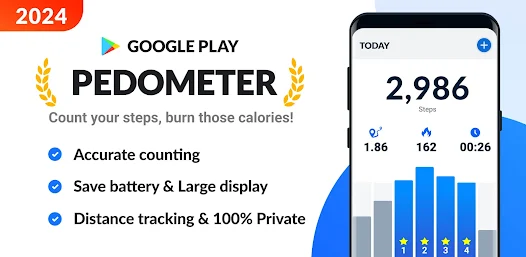
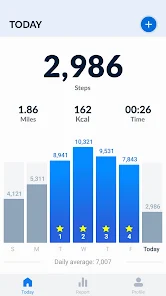
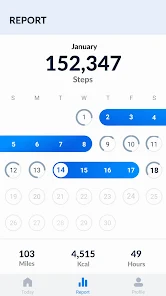
Once you start using it, the experience stays clean and simple. The main screen shows your step count in large numbers, along with distance walked, calories burned, and active time. You swipe left or right to see daily, weekly, and monthly trends. The interface uses bright colors but not in an overwhelming way, and the bar charts update smoothly. Onboarding consists of a single screen asking for your height and weight, which helps with calorie estimation. After that, it's just pick up your phone and go. A small thing I like is that the app detects walking automatically — you don't need to press a start button every time. One minor hiccup: the app counts steps even if you're just shaking your phone, which is a common issue with phone-based pedometers. But for casual use, the numbers feel close enough to my Garmin's count to trust it for daily motivation. Battery drain is noticeable if you keep it running all day with the notification widget on, but turning off background updates helps a lot.
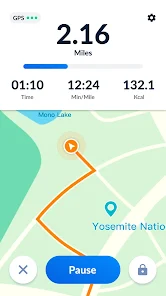
After a few weeks, I can say this app is best for people who want a no-fuss step tracker and nothing more. It works fine for a homebody who wants to check if they moved enough during a work-from-home day, or for someone curious about their walking habits before investing in a wearable. But if you need heart rate monitoring, GPS route tracking, or workout coaching, look elsewhere. Compared to Google Fit or Samsung Health, this app lacks integration with other health services — your steps stay inside this app alone. For fitness newcomers, the simplicity is a strength, but power users will outgrow it fast. I kept it installed because it does one thing well without asking for permission to access my contacts or calendar. The only reason I'd uninstall is if the ads get more intrusive in future updates. For now, it earns a spot on my home screen as a quick glance motivator.
features
- 🏆 Automatic step detection works right out of the box without needing to press start. You just carry your phone normally, and the app begins tracking. Google Fit requires manual workout logging for some activities, so this feels more effortless for daily walking.
- 🏆 Offline functionality is a big plus. The app counts steps entirely on your phone, so you can leave your data plan behind during a hike or a jog. Apps like Pacer or Stepz often nag you to sign in or sync before they work properly.
- 🏆 The daily goal notification is subtle but motivating. It reminds you how far you are from your target without sounding like a nag. Other pedometer apps like Pedometer++ sometimes overload you with achievement pop-ups and leaderboard invites that feel noisy.
- 🏆 Battery optimization is better than most step trackers I've tested. Running apps like Accupedo in the background caused noticeable drain on my old phone, but this one sips power gently. The trade-off is less accuracy, which feels fair for casual users.
pros
- ✅ No account required. You can install and start immediately without handing over an email address or phone number. Samsung Health forces you into a Samsung account, which is annoying if you just want to count steps.
- ✅ Clean, uncluttered interface. The app focuses on step data without cramming in social feed or challenges like StepSetGo does. It respects your attention span.
- ✅ Lightweight install size. The app takes up minimal space compared to bloated trackers like Runtastic Steps which pack in workout videos and community features you never asked for.
cons
- ❌ No integration with other health platforms. Your steps don't sync to Apple Health or Google Fit, so if you use multiple health apps, this one feels isolated. Free alternatives like Walkmeter offer basic syncing.
- ❌ The ads appear after every few screen swipes, especially after viewing weekly stats. While not aggressive enough to ruin the experience, they make the app feel less refined than the ad-free Fitbit mobile app.
- ❌ Step counting can be unreliable with arm swinging. If you carry your phone loosely in a pocket while cooking or clapping, you get false steps. Dedicated pedometers like Omron are more accurate in that regard.
- ❌ There's no dark mode. Using it at night strains the eyes, whereas most modern step trackers like Pedometer++ have accommodated this basic user request.
Articles
![]()
Guide
How to Update Google Play Store on Android 2026
![]()
Guide
How to Download Older Versions of Android Apps
![]()
Guide
How to Download Apps Without Google Play Store
![]()
Guide
What Is an APK File for Android?
If you use an Android phone, you may have seen the term APK while searching for apps or games online. Some websites offer an APK download instead of a Google Play install button. Some users also mention APK files when talking about apps that are not available in their region, older app versions, or Android games downloaded outside the Play Store.
![]()
Guide
How to Install Games from Google Play for Beginners
Installing games on an Android phone is usually simple, but for beginners, the process can still feel confusing at first. You may not know where to search, which button to tap, whether the game is safe, or why Google Play sometimes asks for account settings, storage access, or payment information. If you are using an Android phone for the first time, learning how to install games from Google Play is one of the easiest ways to get started.
![]()
Guide
How Useful Gemini Is for Everyday Questions and Quick Tasks
emini feels different from many AI apps because it is not only trying to be a chatbot. After using it for everyday questions, quick writing, image understanding, and planning, I think its biggest strength is convenience.
![]()
Guide
What to Know Before Downloading APKs
For many Android users, downloading an APK is a common way to install apps and games. Sometimes an app is not available in a certain country.
![]()
Guide
ChatGPT Review: Is It Still the Best AI App in 2026?
![]()
Guide
Seedance 2.0 vs Sora: The Future of AI Video Generation
The AI video race has intensified dramatically over the past two years. Platforms like Sora from OpenAI and Luma Dream Machine pushed the boundaries of text-to-video realism. Yet, despite their impressive outputs, most tools still operate as probabilistic generators—you describe a scene, and the model interprets it. Control remains limited. With the February 2026 release of Seedance 2.0, developed by ByteDance, the paradigm shifted. Internally known as Jimeng 2.0, Seedance does not position itself as just another video model. It positions itself as an AI Director. Rather than guessing what you want, Seedance 2.0 allows you to direct what happens. This distinction defines everything that follows.









Recommended Apps
![]()
Home Design 3D
Anuman4.2
![]()
Truth or Dare Game - Party App
Chouic4.8
![]()
Photo Collage Maker
Scoompa4.7![]()
Learn to Draw Flower
Creative APPS4.2![]()
FIFA World Cup 2026™
FIFA2.8![]()
Mirror Plus: Mirror with Light
Digitalchemy, LLC4.4![]()
Meitu- Photo Editor & AI Art
Meitu (China) Limited4.5![]()
Perplexity - Ask Anything
PerplexityAI4.7![]()
GhostTube SLS Camera Alternate
GhostTube4![]()
Boom Chip Blast: 2-Player
Black Pyramid 3D Games Studio0![]()
Healthy Benefits+
Solutran, Inc.4.5![]()
Deepcheck AI Search Assistant
rohe.ai4![]()
Idol Prank Video Call & Chat
LightCode Solutions4![]()
Face Shape - Pretty Scale
GlintTec Apps3.9![]()
Plant App - Plant Identifier
ScaleUp4.6












































