

MyHyundai with Bluelink

1M+
Installs
Hyundai Motor America
Developer
-
Auto & Vehicles
Category
-
Everyone
Content Rating
-
AppsTeam@hmausa.com
Developer Email
-
https://www.hyundaiusa.com/privacy-policy.aspx
Privacy Policy
Screenshots


editor reviews
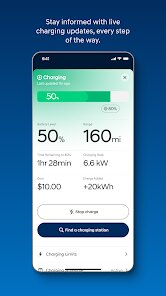
In recent years, connected car services have become a standard addition in many modern vehicles, and the MyHyundai with Bluelink app serves as the digital companion for Hyundai drivers across the United States. Available for free on Google Play, this application links directly with compatible Hyundai vehicles to offer remote access and control features from a smartphone. While the download itself costs nothing, certain advanced functions require an active subscription plan, and the app does include occasional promotional ads alongside optional in-app purchases for extended service packages. The install base has grown steadily as more Hyundai models come equipped with built-in connectivity, and the app is frequently updated to address bugs and introduce new capabilities.
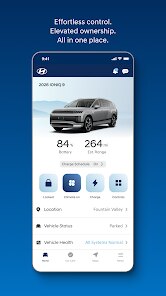
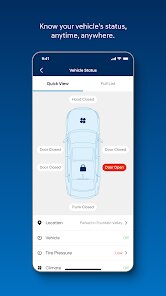
Getting started with the app is fairly straightforward after linking your vehicle through the initial setup process. Once paired, the main dashboard displays essential information such as fuel level, tire pressure, and estimated driving range. Tapping the remote start button or the climate control icon lets you precondition the cabin before entering the car, which is particularly useful during extreme weather. Locking and unlocking doors can also be done from anywhere with a cellular connection, and I have found that the response time is generally quick, usually completing within a few seconds. The interface keeps things organized with clear icons, so even someone who is not particularly tech-savvy should not feel overwhelmed trying to navigate the main functions.
When comparing MyHyundai with Bluelink to similar apps from other automakers, such as FordPass or Toyota Connected Services, the experience feels more straightforward in certain areas but slightly less polished in others. Hyundai's app tends to focus on core remote functions without adding too many extraneous features, which some may find refreshing, though it also means fewer customization options. For example, the FordPass app offers a broader set of trip-logging tools, while MyHyundai keeps things centered on vehicle control and status. After spending time with both platforms, I noticed that Hyundai's layout puts more emphasis on visual feedback, with larger buttons and color-coded status indicators making it easier to see what is happening at a glance.
features
- The remote climate control feature allows you to set an exact temperature before getting in the car, which I have found helpful on hot summer afternoons, though some other manufacturers include a heated steering wheel option that this version lacks.
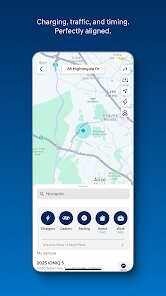
- Vehicle location tracking uses the car's built-in GPS and shows the position on a map within the app, making it easy to find where you parked, especially in crowded lots, and the accuracy has been consistent in my experience.
- Guest driver alerts and speed notifications let you set boundaries for other drivers using your car, a practical addition for families or fleet users, although the setup requires going through several menus and could be simplified.
pros
- Starting the car remotely from inside a building saves time during winter mornings, as the cabin warms up before you step outside.
- The diagnostic check runs quickly and provides cleared notifications if no issues are found, which reduces worry about hidden mechanical problems.
- Having the ability to unlock the car without using a physical key is convenient when your hands are full, and the app sends a confirmation when the action completes.
cons
- Occasionally, the app takes longer than expected to connect to the vehicle, especially in areas with weaker cellular signals, leading to repeated attempts before a command goes through.
- Subscription costs for advanced features can add up over time, and the lack of a permanent free tier beyond basic functions may feel limiting for some users.
- The interface can sometimes freeze briefly after selecting a function, and restarting the app is the quickest fix, which interrupts the flow when you are in a hurry.
Articles
![]()
Guide
How to Update Google Play Store on Android 2026
![]()
Guide
How to Download Older Versions of Android Apps
![]()
Guide
How to Download Apps Without Google Play Store
![]()
Guide
What Is an APK File for Android?
If you use an Android phone, you may have seen the term APK while searching for apps or games online. Some websites offer an APK download instead of a Google Play install button. Some users also mention APK files when talking about apps that are not available in their region, older app versions, or Android games downloaded outside the Play Store.
![]()
Guide
How to Install Games from Google Play for Beginners
Installing games on an Android phone is usually simple, but for beginners, the process can still feel confusing at first. You may not know where to search, which button to tap, whether the game is safe, or why Google Play sometimes asks for account settings, storage access, or payment information. If you are using an Android phone for the first time, learning how to install games from Google Play is one of the easiest ways to get started.
![]()
Guide
How Useful Gemini Is for Everyday Questions and Quick Tasks
emini feels different from many AI apps because it is not only trying to be a chatbot. After using it for everyday questions, quick writing, image understanding, and planning, I think its biggest strength is convenience.
![]()
Guide
What to Know Before Downloading APKs
For many Android users, downloading an APK is a common way to install apps and games. Sometimes an app is not available in a certain country.
![]()
Guide
ChatGPT Review: Is It Still the Best AI App in 2026?
![]()
Guide
Seedance 2.0 vs Sora: The Future of AI Video Generation
The AI video race has intensified dramatically over the past two years. Platforms like Sora from OpenAI and Luma Dream Machine pushed the boundaries of text-to-video realism. Yet, despite their impressive outputs, most tools still operate as probabilistic generators—you describe a scene, and the model interprets it. Control remains limited. With the February 2026 release of Seedance 2.0, developed by ByteDance, the paradigm shifted. Internally known as Jimeng 2.0, Seedance does not position itself as just another video model. It positions itself as an AI Director. Rather than guessing what you want, Seedance 2.0 allows you to direct what happens. This distinction defines everything that follows.









Recommended Apps
![]()
Home Design 3D
Anuman4.2
![]()
Truth or Dare Game - Party App
Chouic4.8
![]()
Photo Collage Maker
Scoompa4.7![]()
Learn to Draw Flower
Creative APPS4.2![]()
FIFA World Cup 2026™
FIFA2.8![]()
Mirror Plus: Mirror with Light
Digitalchemy, LLC4.4![]()
Meitu- Photo Editor & AI Art
Meitu (China) Limited4.5![]()
Perplexity - Ask Anything
PerplexityAI4.7![]()
GhostTube SLS Camera Alternate
GhostTube4![]()
Boom Chip Blast: 2-Player
Black Pyramid 3D Games Studio0![]()
Healthy Benefits+
Solutran, Inc.4.5![]()
Deepcheck AI Search Assistant
rohe.ai4![]()
Idol Prank Video Call & Chat
LightCode Solutions4![]()
Face Shape - Pretty Scale
GlintTec Apps3.9![]()
Plant App - Plant Identifier
ScaleUp4.6












































