

Tesla

5M+
Installs
Tesla, Inc.
Developer
-
Auto & Vehicles
Category
-
Everyone
Content Rating
-
customersupport@tesla.com
Developer Email
-
https://www.tesla.com/legal/privacy
Privacy Policy
Screenshots
editor reviews
Tesla, developed by Tesla, Inc., is primarily an electric vehicle manufacturer, but its ecosystem extends to energy generation and storage products. The official Tesla app, available for free on Google Play and the Apple App Store, serves as the main interface between drivers and their vehicles. With millions of installations, this application enables users to monitor battery levels, control climate settings, lock or unlock doors, and access a range of vehicle functions remotely. While the app itself is free to download and install, it requires a compatible Tesla vehicle and does not feature in-app advertisements, though optional upgrades like Full Self-Driving can be purchased through the interface.
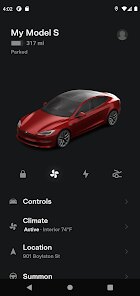
Upon launching the app, owners are greeted with a clean, minimalist dashboard displaying their vehicle's current status, including charge level, estimated range, and location. Tapping on various icons reveals deeper controls: one can honk the horn, flash lights, open the trunk, or precondition the cabin temperature before a drive. The interface also pulls up charging stations nearby and shows live camera feeds from Sentry Mode. In my experience, the navigation between sections feels responsive, and the main screen refreshes quickly when connecting to the car, though occasional delays can occur in areas with weak cellular connectivity.
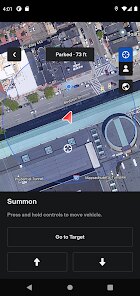
Compared with its rivals, such as FordPass or My BMW App, Tesla's mobile companion stands out for its tighter integration with the vehicle's hardware. Rival apps often struggle with slower command execution or limited functionality, whereas Tesla's app can perform firmware updates remotely, adjust suspension height, and even summon the car from a parking spot. That said, FordPass offers stronger roadside assistance integration, and My BMW App provides more detailed trip analytics from the factory. It really comes down to brand ecosystem: if you own a Tesla, this app feels indispensable, but it lacks utility outside of Tesla products.
features
- The app's Sentry Mode live view is one of its more impressive functions. Being able to check camera feeds in real time from a phone adds a layer of security that many competitors still do not offer. However, it relies heavily on a stable internet connection, and video quality can dip in low-light environments.
- Scheduling service appointments through the app is refreshingly straightforward. Instead of calling a dealership or navigating a website, I simply select the issue, describe it briefly, and the system suggests available times. A nearby mobile technician even came to my home to perform a tire rotation, which saved a trip to a service center.
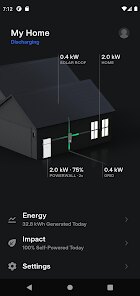
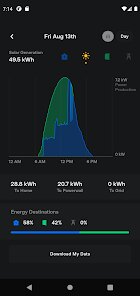
- The energy and charging tabs provide good visibility into consumption patterns. I can see how much energy I used on a trip, what percentage went to climate control versus driving, and even track charging costs over time. Other EV apps, like those from Nissan or Chevrolet, offer similar data but often with less granularity and less intuitive visualization.
pros
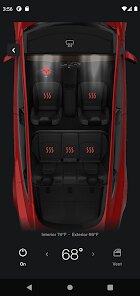
- Preconditioning the car in winter is something I use daily. Starting the heater from inside my house means I never have to scrape ice off the windshield or sit in a cold seat.
- Using the calendar sync feature has been unexpectedly handy. The app pulls events from my phone and automatically navigates to the address when departure time approaches, removing one extra step from my routine.
- Receiving instant notifications about charging status or security alerts gives me peace of mind, especially when the car is parked in an unfamiliar area or at a public charging station.
cons
- Occasionally, the app takes a few extra seconds to wake the vehicle from deep sleep. This can be frustrating when I want to quickly check the battery level or adjust climate settings before heading out.
- The user interface for controlling media and volume from the phone feels like an afterthought compared to the in-car system, offering fewer options and sometimes lagging behind what is actually playing.
- There is no guest or secondary user mode with limited permissions. If I lend my car to a friend, they will have full access to my location, driving history, and other personal data through their own app if I share access.
Articles
![]()
Guide
How to Update Google Play Store on Android 2026
![]()
Guide
How to Download Older Versions of Android Apps
![]()
Guide
How to Download Apps Without Google Play Store
![]()
Guide
What Is an APK File for Android?
If you use an Android phone, you may have seen the term APK while searching for apps or games online. Some websites offer an APK download instead of a Google Play install button. Some users also mention APK files when talking about apps that are not available in their region, older app versions, or Android games downloaded outside the Play Store.
![]()
Guide
How to Install Games from Google Play for Beginners
Installing games on an Android phone is usually simple, but for beginners, the process can still feel confusing at first. You may not know where to search, which button to tap, whether the game is safe, or why Google Play sometimes asks for account settings, storage access, or payment information. If you are using an Android phone for the first time, learning how to install games from Google Play is one of the easiest ways to get started.
![]()
Guide
How Useful Gemini Is for Everyday Questions and Quick Tasks
emini feels different from many AI apps because it is not only trying to be a chatbot. After using it for everyday questions, quick writing, image understanding, and planning, I think its biggest strength is convenience.
![]()
Guide
What to Know Before Downloading APKs
For many Android users, downloading an APK is a common way to install apps and games. Sometimes an app is not available in a certain country.
![]()
Guide
ChatGPT Review: Is It Still the Best AI App in 2026?
![]()
Guide
Seedance 2.0 vs Sora: The Future of AI Video Generation
The AI video race has intensified dramatically over the past two years. Platforms like Sora from OpenAI and Luma Dream Machine pushed the boundaries of text-to-video realism. Yet, despite their impressive outputs, most tools still operate as probabilistic generators—you describe a scene, and the model interprets it. Control remains limited. With the February 2026 release of Seedance 2.0, developed by ByteDance, the paradigm shifted. Internally known as Jimeng 2.0, Seedance does not position itself as just another video model. It positions itself as an AI Director. Rather than guessing what you want, Seedance 2.0 allows you to direct what happens. This distinction defines everything that follows.









Recommended Apps
![]()
Home Design 3D
Anuman4.2
![]()
Truth or Dare Game - Party App
Chouic4.8
![]()
Photo Collage Maker
Scoompa4.7![]()
Learn to Draw Flower
Creative APPS4.2![]()
FIFA World Cup 2026™
FIFA2.8![]()
Mirror Plus: Mirror with Light
Digitalchemy, LLC4.4![]()
Meitu- Photo Editor & AI Art
Meitu (China) Limited4.5![]()
Perplexity - Ask Anything
PerplexityAI4.7![]()
GhostTube SLS Camera Alternate
GhostTube4![]()
Boom Chip Blast: 2-Player
Black Pyramid 3D Games Studio0![]()
Healthy Benefits+
Solutran, Inc.4.5![]()
Deepcheck AI Search Assistant
rohe.ai4![]()
Idol Prank Video Call & Chat
LightCode Solutions4![]()
Face Shape - Pretty Scale
GlintTec Apps3.9![]()
Plant App - Plant Identifier
ScaleUp4.6











































