

Future Self - Old Age Filter

5M+
Installs
Vidler Koiter
Developer
-
Lifestyle
Category
-
Rated for 3+
Content Rating
-
tunabelifan@yahoo.com
Developer Email
-
http://rocketboosterapps.xyz/future_me_privacy_policy.html
Privacy Policy
Screenshots

editor reviews
Future Self - Old Age Filter is one of those amusing, curiosity-driven photo apps that lets you apply an aging effect to your face to see what you might look like decades down the road. It falls squarely into the novelty photo-editing category, alongside apps that turn you into a cartoon, a zombie, or a member of the opposite sex. People typically download it out of pure fun or mild dread—wondering how their skin will sag or where their hairline might end up. The app shows over 10 million downloads on Google Play, and it is free to install, though you will encounter the usual in-app purchases and ads. The first impression after launching it is straightforward: you snap a selfie, and within seconds, the app adds wrinkles, age spots, and a slight droop to your features. It feels like a party trick more than a serious tool, which is exactly what you expect from something called "Future Self."
Once you start using it, the experience is pretty simple and fast. The main screen has a big camera button, so you just point it at your face, and the app does the rest. There is no confusing onboarding or nagging tutorial—just a quick effect that appears after a short loading bar. You can choose between different aging filters, like "Normal Old" or "Extreme Old," which basically go from believable aging to over-the-top exaggeration. You can also add gray hair or change the lighting to make the old look more realistic. The controls are all on one screen, so moving through the app is not a hassle. A slightly confusing moment occurs when you try to save the image; sometimes the app pushes an ad before letting you download, which feels a bit intrusive. A practical tip is to use a front-facing, well-lit photo for the best results, as darker images tend to produce less convincing wrinkles. Overall, it works quickly and does not require much fiddling.
After spending some time with it, I think the app serves a specific, short-term purpose. Someone hosting a party or looking for a good laugh with friends will probably enjoy it more than someone wanting a serious "old age simulation." The app stands out from similar apps like FaceApp mainly because it focuses entirely on aging, while FaceApp does many other things. That focus makes the aging effect feel slightly more nuanced and less cartoonish, but the trade-off is that you are stuck with only one type of transformation. I could see keeping it installed if you like showing it to new friends or using it as a conversation starter, but honestly, the novelty wears off after a few uses. Most people will open it, laugh for a minute, and then forget it exists. The ads also make regular use annoying, which is why many users uninstall it fairly quickly. It is not a bad app for what it sets out to do, but it is definitely not a daily driver.
features
- 🎭 The app uses a dedicated aging engine that focuses on facial landmarks like crow's feet, forehead lines, and jawline sagging. Unlike FaceApp's aging filter, which tends to look soft and almost airbrushed, Future Self adds more rough textures like actual pores and skin patches, giving the result a grittier, more realistic feel. It does not smooth over the wrinkles, which makes the "Extreme Old" filter genuinely unsettling rather than comic.
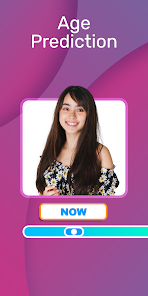
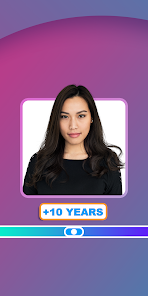
- 🎭 You can adjust the aging level in a granular way using a slider, not just preset options. This matters because most competing apps only give you three fixed stages. Here, you can go from a minor laugh-line touch-up to a full 80-year-old look, which allows you to fine-tune how much you want to scare yourself. The slider response is immediate, so you can scrub back and forth to see the progression.
- 🎭 The app includes a time-lapse feature that slowly morphs your face from young to old in a short video loop. This is the standout novelty. Other apps like Oldify or AgingBooth only give you a single static image. Watching your own face gradually wrinkle and gray over a few seconds makes the effect much more engaging and shareable on social media, adding a dynamic element that static filters lack.
pros
- 👍 The aging effect feels more natural than in apps like Oldify, which often makes users look either plastic or overly zombie-like. Future Self preserves your underlying facial structure better, so you still recognize yourself despite the added age.
- 👍 The app is incredibly fast for the quality it produces. While FaceApp often takes a few seconds to process, Future Self delivers results in under two seconds on most mid-range phones, which improves the casual, playful user experience.
- 👍 It does not require a user account or online login, which is refreshing. Many similar apps push for social sign-ups, but this one respects your privacy. You just take a photo, edit, and save locally without any data being uploaded to a server.
cons
- 👎 The free version is heavily ad-supported. You get a full-screen video ad almost every time you save a photo, and sometimes even when you switch between filters. This makes the otherwise enjoyable experience feel clunky, especially compared to FaceApp's less aggressive ad placement.
- 👎 The UI is visually dated and feels cluttered. The buttons are too small for easy tapping, and the ad banners are placed awkwardly near important controls. Apps like AgingBooth have a cleaner, more modern interface that makes navigation smoother.
- 👎 Without an internet connection, the app becomes nearly unusable for saving images. It can still apply filters offline, but the save button simply stops working until you reconnect. This is a frustrating limitation that competing apps do not share, as most allow offline saving without issue.
Articles
![]()
Guide
How to Update Google Play Store on Android 2026
![]()
Guide
How to Download Older Versions of Android Apps
![]()
Guide
How to Download Apps Without Google Play Store
![]()
Guide
What Is an APK File for Android?
If you use an Android phone, you may have seen the term APK while searching for apps or games online. Some websites offer an APK download instead of a Google Play install button. Some users also mention APK files when talking about apps that are not available in their region, older app versions, or Android games downloaded outside the Play Store.
![]()
Guide
How to Install Games from Google Play for Beginners
Installing games on an Android phone is usually simple, but for beginners, the process can still feel confusing at first. You may not know where to search, which button to tap, whether the game is safe, or why Google Play sometimes asks for account settings, storage access, or payment information. If you are using an Android phone for the first time, learning how to install games from Google Play is one of the easiest ways to get started.
![]()
Guide
How Useful Gemini Is for Everyday Questions and Quick Tasks
emini feels different from many AI apps because it is not only trying to be a chatbot. After using it for everyday questions, quick writing, image understanding, and planning, I think its biggest strength is convenience.
![]()
Guide
What to Know Before Downloading APKs
For many Android users, downloading an APK is a common way to install apps and games. Sometimes an app is not available in a certain country.
![]()
Guide
ChatGPT Review: Is It Still the Best AI App in 2026?
![]()
Guide
Seedance 2.0 vs Sora: The Future of AI Video Generation
The AI video race has intensified dramatically over the past two years. Platforms like Sora from OpenAI and Luma Dream Machine pushed the boundaries of text-to-video realism. Yet, despite their impressive outputs, most tools still operate as probabilistic generators—you describe a scene, and the model interprets it. Control remains limited. With the February 2026 release of Seedance 2.0, developed by ByteDance, the paradigm shifted. Internally known as Jimeng 2.0, Seedance does not position itself as just another video model. It positions itself as an AI Director. Rather than guessing what you want, Seedance 2.0 allows you to direct what happens. This distinction defines everything that follows.









Recommended Apps
![]()
Home Design 3D
Anuman4.2
![]()
Truth or Dare Game - Party App
Chouic4.8
![]()
Photo Collage Maker
Scoompa4.7![]()
Learn to Draw Flower
Creative APPS4.2![]()
FIFA World Cup 2026™
FIFA2.8![]()
Mirror Plus: Mirror with Light
Digitalchemy, LLC4.4![]()
Meitu- Photo Editor & AI Art
Meitu (China) Limited4.5![]()
Perplexity - Ask Anything
PerplexityAI4.7![]()
GhostTube SLS Camera Alternate
GhostTube4![]()
Boom Chip Blast: 2-Player
Black Pyramid 3D Games Studio0![]()
Healthy Benefits+
Solutran, Inc.4.5![]()
Deepcheck AI Search Assistant
rohe.ai4![]()
Idol Prank Video Call & Chat
LightCode Solutions4![]()
Face Shape - Pretty Scale
GlintTec Apps3.9![]()
Plant App - Plant Identifier
ScaleUp4.6












































