

Sun Signs: Horoscopes

1M+
Installs
horoscope.com
Developer
-
Lifestyle
Category
-
Rated for 3+
Content Rating
-
feedback@horoscope.com
Developer Email
-
https://www.ingenio.com/privacypolicy
Privacy Policy
Screenshots
editor reviews
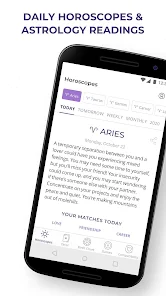
I stumbled upon the Sun Signs app on Google Play, and it's basically a daily horoscope reader from the folks at horoscope.com. It's one of those free apps you download out of curiosity, and according to the store, it's been installed over 10 million times. After launching it, I was greeted with a bright, pastel-heavy interface that immediately felt like it was designed for casual browsing rather than deep astrological study. There's no forced registration upfront, which I appreciated, though you do get hit with a banner ad right away. The app asks for your sun sign during setup, so you get personalized predictions from the get-go. I didn't see any major in-app purchase prompts at first, but later on, you can unlock extra features like detailed love compatibility or tarot draws for a fee. All in all, it feels like a lightweight, friendly entry into daily horoscopes for someone who just wants a quick read over coffee.
The hands-on experience is mostly about scrolling and tapping. Once you pick your sign, the main screen shows a daily horoscope with a short, positive paragraph. You can swipe left or right to check other signs, which is nice if you're nosy about your friend's forecast. The navigation is simple: there are tabs at the bottom for Daily, Weekly, Monthly, Love, and more. I found the love horoscope section pretty straightforward, just a few lines on romance. What surprised me was the small “Tarot” and “Numerology” side sections tucked away in the menu, which add a bit of variety. During daily use, I'd just open it, read my daily blurb in about 10 seconds, and close it. The ads pop up between sections, which can get annoying, but they're skippable after a few seconds. A practical tip: I learned to read the “Extended Daily” option inside the daily tab, which offers a slightly deeper take than the main blurb, and that felt more satisfying.
After using it for a couple of weeks, I think the app is best for casual astrology fans who want quick, feel-good forecasts without the academic jargon. It's not for someone who wants detailed transit charts or planetary aspects, because those aren't here. Compared to something like Co-Star or The Pattern, which dive into psychological profiles and data-heavy breakdowns, Sun Signs feels much lighter and more generic. The predictions are very positive and broad, which makes them easy to digest but also forgettable. I kept it installed because it's low-commitment and the daily notification can be a fun little break. That said, I could see someone uninstalling it if they prefer more personalized or science-backed astrology tools. It's not a bad app, it just plays it safe and stays shallow, which might be exactly what some people want.
features
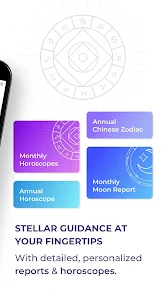
- ✨ Daily, Weekly, and Monthly Horoscopes: The core feature is straightforward, offering a forecast for different timeframes. In contrast, Co-Star focuses more on personalized daily insights based on your full birth chart, whereas Sun Signs just uses your sun sign, making it less specific but faster to consume.
- ✨ Love Compatibility Check: You can tap into a simple compatibility meter for any two signs. It's fun but superficial, unlike The Pattern, which builds a whole profile around your romantic tendencies. Here, you just get a percentage and a short description, which feels more like entertainment than insight.
- ✨ Tarot and Numerology Mini-Tools: Hidden inside the menu, there are daily tarot card pulls and numerology number explanations. This is a nice add-on that apps like Daily Horoscope don't always include. It gives you a bit more variety without needing to switch apps, though the tarot readings are just one card with a generic meaning.
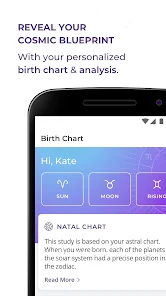
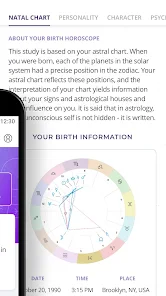
- ✨ Birth Chart Calculator: A bonus section lets you calculate your full natal chart using your birth time and location. This is surprisingly robust for a free app. Co-Star does this much deeper, but Sun Signs makes it accessible for beginners who just want to see where their planets are without the complexity.
pros
- 🌟 Super Simple Navigation: The app is incredibly easy to navigate, much more so than Co-Star's sometimes confusing interface. I could find any section within two taps, which is great for a lazy morning check.
- 🌟 No Login Required: You can start using it immediately without making an account. Apps like The Pattern force you to log in or register first, which is a barrier. Here, you just pick your sign and go, which is refreshingly low-friction.
- 🌟 Generous Free Content: The daily horoscope and even some weekly forecasts are fully free. Unlike many similar apps, you don't feel nickel-and-dimed for basic functionality. The paid extras are clearly marked but not pushed aggressively.
cons
- ⚠️ Too Generic: The horoscopes are written so broadly that they could apply to almost anyone. Co-Star, by contrast, uses your birth chart data to deliver much more targeted, sometimes eerie predictions. Sun Signs feels like a horoscope from a magazine, not a personalized tool.
- ⚠️ Ad-Heavy Experience: Between every section change, a full-screen ad pops up. This disrupts the flow, especially when you're just trying to quickly read your love horoscope. The Pattern has very few ads, making it feel more premium.
- ⚠️ Shallow Love Compatibility: The compatibility feature only uses sun signs, which is very basic. Apps like Astromatrix consider Moon and rising signs, offering a deeper analysis. Sun Signs' version feels like a fun gimmick rather than a useful tool.
Articles
![]()
Guide
How to Update Google Play Store on Android 2026
![]()
Guide
How to Download Older Versions of Android Apps
![]()
Guide
How to Download Apps Without Google Play Store
![]()
Guide
What Is an APK File for Android?
If you use an Android phone, you may have seen the term APK while searching for apps or games online. Some websites offer an APK download instead of a Google Play install button. Some users also mention APK files when talking about apps that are not available in their region, older app versions, or Android games downloaded outside the Play Store.
![]()
Guide
How to Install Games from Google Play for Beginners
Installing games on an Android phone is usually simple, but for beginners, the process can still feel confusing at first. You may not know where to search, which button to tap, whether the game is safe, or why Google Play sometimes asks for account settings, storage access, or payment information. If you are using an Android phone for the first time, learning how to install games from Google Play is one of the easiest ways to get started.
![]()
Guide
How Useful Gemini Is for Everyday Questions and Quick Tasks
emini feels different from many AI apps because it is not only trying to be a chatbot. After using it for everyday questions, quick writing, image understanding, and planning, I think its biggest strength is convenience.
![]()
Guide
What to Know Before Downloading APKs
For many Android users, downloading an APK is a common way to install apps and games. Sometimes an app is not available in a certain country.
![]()
Guide
ChatGPT Review: Is It Still the Best AI App in 2026?
![]()
Guide
Seedance 2.0 vs Sora: The Future of AI Video Generation
The AI video race has intensified dramatically over the past two years. Platforms like Sora from OpenAI and Luma Dream Machine pushed the boundaries of text-to-video realism. Yet, despite their impressive outputs, most tools still operate as probabilistic generators—you describe a scene, and the model interprets it. Control remains limited. With the February 2026 release of Seedance 2.0, developed by ByteDance, the paradigm shifted. Internally known as Jimeng 2.0, Seedance does not position itself as just another video model. It positions itself as an AI Director. Rather than guessing what you want, Seedance 2.0 allows you to direct what happens. This distinction defines everything that follows.









Recommended Apps
![]()
Home Design 3D
Anuman4.2
![]()
Truth or Dare Game - Party App
Chouic4.8
![]()
Photo Collage Maker
Scoompa4.7![]()
Learn to Draw Flower
Creative APPS4.2![]()
FIFA World Cup 2026™
FIFA2.8![]()
Mirror Plus: Mirror with Light
Digitalchemy, LLC4.4![]()
Meitu- Photo Editor & AI Art
Meitu (China) Limited4.5![]()
Perplexity - Ask Anything
PerplexityAI4.7![]()
GhostTube SLS Camera Alternate
GhostTube4![]()
Boom Chip Blast: 2-Player
Black Pyramid 3D Games Studio0![]()
Healthy Benefits+
Solutran, Inc.4.5![]()
Deepcheck AI Search Assistant
rohe.ai4![]()
Idol Prank Video Call & Chat
LightCode Solutions4![]()
Face Shape - Pretty Scale
GlintTec Apps3.9![]()
Plant App - Plant Identifier
ScaleUp4.6











































