
Learn to Draw Cartoon

5M+
Installs
Creative APPS
Developer
-
Art & Design
Category
-
Rated for 3+
Content Rating
-
Drawapp.feedback@hotmail.com
Developer Email
-
https://sites.google.com/view/draw-apps-for-free/
Privacy Policy
Screenshots
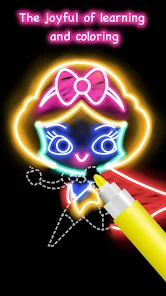
editor reviews
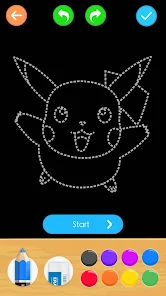
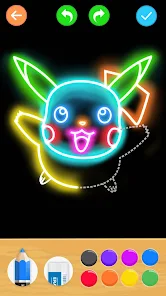
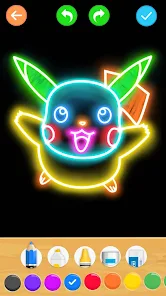
I've been messing around with Learn to Draw Cartoon, which is basically a drawing tutorial app made for people who want to pick up cartooning without any prior skill. It falls under the educational or creativity tools category, more like a guided sketchbook than a full-blown art studio. The main thing you can do is follow step-by-step lessons that break down characters into simple shapes, so even someone like me who can barely draw a straight line can end up with a recognizable figure. I found it on Google Play, and the install count seems decent for a niche app, though I'm not sure about the exact number. It's free to download, and when I first opened it, the interface felt pretty straightforward, with a clean menu and lesson packs waiting to be accessed. No forced registration popped up, which I appreciated, but later I noticed some optional in-app purchases for extra content, and a few ads here and there that weren't too intrusive. Overall, first impression was that it's approachable and doesn't demand much from you upfront.
After using it for a few days, the hands-on experience is pretty smooth if you're patient. When you start a lesson, you're shown a series of steps, each with a simple shape addition, like drawing a circle for a head or lines for arms. You basically replicate those on paper or a digital canvas yourself, since the app doesn't track your actual drawing on screen, it just guides you visually. The interface is minimal, with big buttons to move forward or backward, and there's a zoom feature that helps on smaller phone screens. I noticed that the onboarding didn't explain everything, but it's clear enough. A small tip I picked up was to focus on one step at a time instead of rushing through, because each new shape builds on the last. Some moments felt a bit confusing when the steps jumped from a line to a detail without enough intermediate stages, but overall, moving through a complete character took me about 10–15 minutes per session. The app doesn't save your progress within a lesson, so if you close it mid-draw, you'll restart, which was a minor annoyance.
After spending some real time with it, I think this app works best for absolute beginners or casual doodlers who just want to have fun without pressure. If you're already decent at drawing or looking for advanced techniques, it'll feel too basic and limiting. What sets it apart from something like Draw Cartoons 2 or How to Draw Everything is its clean, no-fuss approach, no community features or timeline, just you and the steps. That's refreshing if you hate social clutter, but it also means you're learning alone. I actually kept it installed because it's a nice stress reliever during lunch breaks, but I can see someone uninstalling after finishing the free lessons since the paid packs aren't cheap. Compared to something like Adobe Fresco, this is way less powerful, but that's not the point. It's a simple tool for a simple goal, and it delivers on that.
features
- 🎯 Step-by-step breakdowns that turn complex characters into simple shapes. Compared to How to Draw Anime, which throws full body proportions at you from the start, this app eases you in with circles and lines first. The outstanding feature is how each lesson builds so slowly that you never feel lost, even if you suck at drawing.
- 🎯 Offline access for downloaded lessons. Unlike Drawing Desk, which mostly needs internet for its tutorials, here you can grab a pack and practice anywhere, no data needed. It's great for commutes or when you're stuck without Wi-Fi.
- 🎯 Minimalist interface without distracting community feeds or rating systems. In apps like Sketch Club, you're bombarded with other users' art, which can be intimidating. Here, it's just you and the steps, which keeps the focus on learning rather than comparing.
pros
- 👍 Super low barrier to entry, especially compared to Procreate, which has a steep learning curve for beginners. You don't need any gear, just the app and a pencil, so it's easy to jump in.
- 👍 Clear visual guidance with each step written out simply. In How to Draw, some steps assume you know shading or perspective, but here it stays on basic outlines, which helps greenhorns build confidence.
- 👍 No registration wall. Unlike ArtFlow, which pushes account creation, you can start drawing immediately after install, no email or password needed.
cons
- 👎 Very limited free content, only a few characters are available without paying. Apps like How to Draw Everything give you more lessons upfront, so this feels stingy after the first few tries.
- 👎 No actual drawing canvas or tracking within the app. Compared to Tayasui Sketches, which lets you draw directly on screen, this is just a guide, so you need separate paper or another app to practice.
- 👎 Lessons can feel repetitive if you finish all free packs quickly. You're stuck seeing the same style unless you buy more, unlike SketchBook where tools are unlimited.
- 👎 Ads interrupt occasionally, which breaks the flow during practice. In comparison, How to Draw Cartoon Characters has fewer ads in its free version, making the experience smoother.
Articles
![]()
Guide
How to Update Google Play Store on Android 2026
![]()
Guide
How to Download Older Versions of Android Apps
![]()
Guide
How to Download Apps Without Google Play Store
![]()
Guide
What Is an APK File for Android?
If you use an Android phone, you may have seen the term APK while searching for apps or games online. Some websites offer an APK download instead of a Google Play install button. Some users also mention APK files when talking about apps that are not available in their region, older app versions, or Android games downloaded outside the Play Store.
![]()
Guide
How to Install Games from Google Play for Beginners
Installing games on an Android phone is usually simple, but for beginners, the process can still feel confusing at first. You may not know where to search, which button to tap, whether the game is safe, or why Google Play sometimes asks for account settings, storage access, or payment information. If you are using an Android phone for the first time, learning how to install games from Google Play is one of the easiest ways to get started.
![]()
Guide
How Useful Gemini Is for Everyday Questions and Quick Tasks
emini feels different from many AI apps because it is not only trying to be a chatbot. After using it for everyday questions, quick writing, image understanding, and planning, I think its biggest strength is convenience.
![]()
Guide
What to Know Before Downloading APKs
For many Android users, downloading an APK is a common way to install apps and games. Sometimes an app is not available in a certain country.
![]()
Guide
ChatGPT Review: Is It Still the Best AI App in 2026?
![]()
Guide
Seedance 2.0 vs Sora: The Future of AI Video Generation
The AI video race has intensified dramatically over the past two years. Platforms like Sora from OpenAI and Luma Dream Machine pushed the boundaries of text-to-video realism. Yet, despite their impressive outputs, most tools still operate as probabilistic generators—you describe a scene, and the model interprets it. Control remains limited. With the February 2026 release of Seedance 2.0, developed by ByteDance, the paradigm shifted. Internally known as Jimeng 2.0, Seedance does not position itself as just another video model. It positions itself as an AI Director. Rather than guessing what you want, Seedance 2.0 allows you to direct what happens. This distinction defines everything that follows.









Recommended Apps
![]()
Home Design 3D
Anuman4.2
![]()
Truth or Dare Game - Party App
Chouic4.8
![]()
Photo Collage Maker
Scoompa4.7![]()
Learn to Draw Flower
Creative APPS4.2![]()
FIFA World Cup 2026™
FIFA2.8![]()
Mirror Plus: Mirror with Light
Digitalchemy, LLC4.4![]()
Meitu- Photo Editor & AI Art
Meitu (China) Limited4.5![]()
Perplexity - Ask Anything
PerplexityAI4.7![]()
GhostTube SLS Camera Alternate
GhostTube4![]()
Boom Chip Blast: 2-Player
Black Pyramid 3D Games Studio0![]()
Healthy Benefits+
Solutran, Inc.4.5![]()
Deepcheck AI Search Assistant
rohe.ai4![]()
Idol Prank Video Call & Chat
LightCode Solutions4![]()
Face Shape - Pretty Scale
GlintTec Apps3.9![]()
Plant App - Plant Identifier
ScaleUp4.6











































