

Face Swap

10M+
Installs
Wombatica Software
Developer
-
Entertainment
Category
-
Rated for 7+
Content Rating
-
apps@wombatica.app
Developer Email
-
https://wombatica.app/android-app-privacy-policy/
Privacy Policy
Screenshots
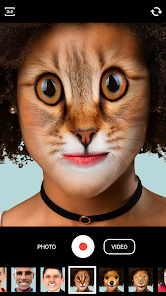
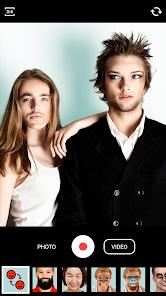
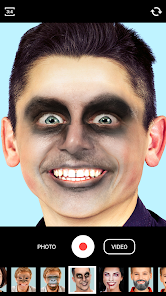
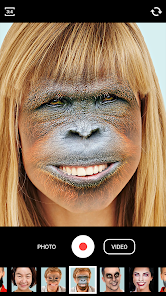
editor reviews
Face Swap, made by Wombatica Software, is one of those apps you see on the Google Play Store that promises a bit of fun without asking for much in return. It's essentially a photo editing tool, but instead of adjusting brightness or adding filters, it lets you swap faces between people in pictures. You just pick two photos, mark the faces, and the app does the rest. I downloaded it because I saw a friend messing around with a similar idea and wanted to try it myself without paying anything upfront. My first impression after launching it was that it felt a bit plain, like a tool that gets straight to the point without any flashy introductions or tutorials. It has a solid number of installs, but the download was free, though I did notice a few pop-ups for in-app purchases and ads right away, which made me think it might be one of those apps that nudges you toward spending money if you want the full experience.
Using the app was straightforward, maybe even too simple at first. The interface is basic, with large buttons that guide you through picking photos from your gallery. After selecting two images, you tap on the faces you want to swap, and the app processes it in a few seconds. The onboarding is practically instant, no sign-up or account creation needed, which I appreciated since I just wanted to test it quickly. In daily use, I found that the face detection worked well with clear, front-facing photos, but it struggled with side profiles or images where faces were partly obscured. A small tip I picked up was to use well-lit pictures, as the results looked much more natural then. Occasionally, the app would stutter or freeze for a moment, especially when handling high-resolution images, but it never crashed completely. The whole process feels like a fun party trick rather than a serious editing tool, so I didn't mind the occasional hiccup.
After using Face Swap for a while, I can see why someone might enjoy it, especially for casual laughs with friends or family. It's not something you'd rely on for professional work, and that's fine. Compared to apps like Reface or Snapchat, which offer smoother animations and more filters, Face Swap feels more like a basic utility. It gets the job done, but it lacks the polish and extra features that make other apps addictive. I'd say it's best for someone who wants a quick, no-fuss face swap without signing up for anything. However, the ads can be annoying, and the app pushes you toward the paid version after a few free swaps. I ended up keeping it installed for the occasional joke, but I can see others uninstalling it if they find the ads too intrusive or if they just want a more refined experience elsewhere.
features
- 😊 Face Swap's core feature is exactly what it sounds like, swapping faces between two photos with just a few taps. You pick two images, mark the faces manually, and the app blends them together. It works well for casual fun, but it doesn't add any animations or video support, which apps like Reface excel at. The standout aspect here is its simplicity, there's no learning curve, just pick and swap.
- 😊 The app's face detection is decent for straightforward, front-facing portraits, but it falters with angles or group shots. In comparison, Snapchat's face filters detect and track faces in real time, which is much more advanced. Face Swap's reliance on manual marking makes it feel old-school, though some might prefer the control it offers over automatic swaps.
- 😊 One unique feature is the ability to save swapped images directly to your gallery without watermarks in the free version, which is a nice touch. However, the free version limits the number of swaps you can do before prompting you to buy the pro version. In contrast, apps like FaceApp offer a few free filters daily without such aggressive limits, making Face Swap feel a bit restrictive for long-term use.
pros
- 👍 Face Swap is completely free to download and use for basic swaps, which is great for a quick laugh without committing money upfront. Compared to Reface, which requires a subscription for high-quality results, Face Swap lets you test the waters without any cost.
- 👍 The app doesn't require any registration or account creation, so you can start swapping faces immediately after installation. This is a big plus over apps like Snapchat, where you need to create an account first. It feels private and hassle-free.
- 👍 Its straightforward interface means anyone can use it, from kids to grandparents. There's no clutter or confusing menus, just a simple tool that does one thing well. This makes it more accessible than professional editing apps like Photoshop Express, which can be overwhelming.
cons
- 👎 The free version is filled with ads, which pop up frequently after each swap. It disrupts the experience, especially compared to apps like Snapchat that have minimal ads during basic use. You can remove them with a purchase, but that feels unfair for such a simple tool.
- 👎 Face detection is unreliable with side profiles or low-light photos, often requiring multiple attempts. In contrast, Reface handles more complex poses smoothly. It's a clear downgrade if you're used to more forgiving face recognition.
- 👎 The app lacks any editing options beyond the swap itself. You can't adjust the blend, add filters, or fix mismatched skin tones. FaceApp, for example, lets you tweak age, gender, and more, so Face Swap feels barebones by comparison.
- 👎 There's a limit on free swaps, usually around five, before you're forced to buy the pro version. This is frustrating when you just want to play around a bit more. Free competitors like Snapchat offer unlimited face swaps for free, making this restriction feel stingy.
Articles
![]()
Guide
How to Update Google Play Store on Android 2026
![]()
Guide
How to Download Older Versions of Android Apps
![]()
Guide
How to Download Apps Without Google Play Store
![]()
Guide
What Is an APK File for Android?
If you use an Android phone, you may have seen the term APK while searching for apps or games online. Some websites offer an APK download instead of a Google Play install button. Some users also mention APK files when talking about apps that are not available in their region, older app versions, or Android games downloaded outside the Play Store.
![]()
Guide
How to Install Games from Google Play for Beginners
Installing games on an Android phone is usually simple, but for beginners, the process can still feel confusing at first. You may not know where to search, which button to tap, whether the game is safe, or why Google Play sometimes asks for account settings, storage access, or payment information. If you are using an Android phone for the first time, learning how to install games from Google Play is one of the easiest ways to get started.
![]()
Guide
How Useful Gemini Is for Everyday Questions and Quick Tasks
emini feels different from many AI apps because it is not only trying to be a chatbot. After using it for everyday questions, quick writing, image understanding, and planning, I think its biggest strength is convenience.
![]()
Guide
What to Know Before Downloading APKs
For many Android users, downloading an APK is a common way to install apps and games. Sometimes an app is not available in a certain country.
![]()
Guide
ChatGPT Review: Is It Still the Best AI App in 2026?
![]()
Guide
Seedance 2.0 vs Sora: The Future of AI Video Generation
The AI video race has intensified dramatically over the past two years. Platforms like Sora from OpenAI and Luma Dream Machine pushed the boundaries of text-to-video realism. Yet, despite their impressive outputs, most tools still operate as probabilistic generators—you describe a scene, and the model interprets it. Control remains limited. With the February 2026 release of Seedance 2.0, developed by ByteDance, the paradigm shifted. Internally known as Jimeng 2.0, Seedance does not position itself as just another video model. It positions itself as an AI Director. Rather than guessing what you want, Seedance 2.0 allows you to direct what happens. This distinction defines everything that follows.









Recommended Apps
![]()
Home Design 3D
Anuman4.2
![]()
Truth or Dare Game - Party App
Chouic4.8
![]()
Photo Collage Maker
Scoompa4.7![]()
Learn to Draw Flower
Creative APPS4.2![]()
FIFA World Cup 2026™
FIFA2.8![]()
Mirror Plus: Mirror with Light
Digitalchemy, LLC4.4![]()
Meitu- Photo Editor & AI Art
Meitu (China) Limited4.5![]()
Perplexity - Ask Anything
PerplexityAI4.7![]()
GhostTube SLS Camera Alternate
GhostTube4![]()
Boom Chip Blast: 2-Player
Black Pyramid 3D Games Studio0![]()
Healthy Benefits+
Solutran, Inc.4.5![]()
Deepcheck AI Search Assistant
rohe.ai4![]()
Idol Prank Video Call & Chat
LightCode Solutions4![]()
Face Shape - Pretty Scale
GlintTec Apps3.9![]()
Plant App - Plant Identifier
ScaleUp4.6












































