
Doodle Art: Magic Drawing App

5M+
Installs
Peaksel Games
Developer
-
Art & Design
Category
-
Rated for 3+
Content Rating
-
support@peaksel.email
Developer Email
-
https://www.peaksel.com/privacy-policy-for-free-apps/
Privacy Policy
Screenshots
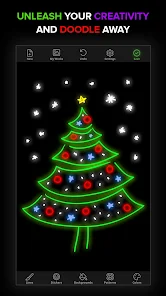
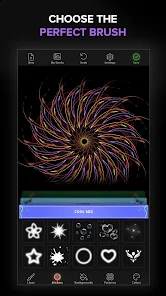
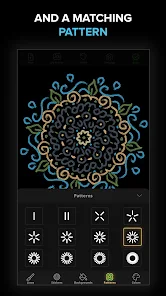
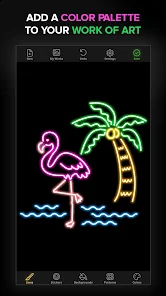
editor reviews
Doodle Art: Magic Drawing App is a casual coloring and doodling game from Peaksel Games, designed for anyone who wants to unwind by filling in intricate patterns and whimsical illustrations. You can download it for free on both Google Play and the App Store, and based on the install count, it's clearly found a solid audience. The first time you launch the app, the interface feels bright and welcoming, with a clear emphasis on relaxing creativity rather than competitive scores or time limits. That initial impression is quite pleasant, especially if you're just looking for a low-pressure way to pass time without overthinking.
Once you start using it, the experience is pretty straightforward. After a quick, optional registration, you're dropped into a gallery of black-and-white outlines waiting for color. The onboarding shows you a few basic controls, like tapping a section to fill it with a chosen shade from a generous palette. In daily use, you simply browse through categories like mandalas, animals, or fantasy scenes, select a drawing, and start tapping away. The touch responses are smooth, and the auto-fill feature saves a lot of tedium. A small tip: the app highlights missing spots in the outline, which helps avoid accidental gaps. However, navigating back to the menu can feel slightly clunky if you're deep into a complex piece.
After spending some time with it, I'd say this app shines for casual doodlers and stress-relief seekers. It's not the most feature-rich coloring app out there, but it has a charming, uncluttered feel that makes it easy to pick up and put down. Compared to something like Colorify, it offers fewer advanced tools but feels more accessible for quick, mindless fun. People who want deep customization or social features might get bored, but if you just want to zone out for ten minutes while coloring a cute dragon, it works great. I could see keeping it installed as a go-to for commutes or breaks, though the occasional ad might nudge some users toward uninstalling after a while.
features
- 🎨 One standout feature is the "magic brush" mode, which lets you fill an entire region with a gradient or pattern in a single tap. This is way faster than the manual coloring in similar apps like Recolor, where you often have to zoom in and tap each tiny section one by one.
- 🎨 The app includes a "relax mode" that plays soft background music and hides all UI buttons while you color. This is a nice touch for focus, something that apps like Color Therapy don't offer as seamlessly.
- 🎨 You can zoom in and out with pinch gestures, and the app remembers your last color choice even after closing it. This makes it simple to continue where you left off, unlike some free versions of Happy Color that reset your palette every session.
pros
- 👍 The free tier gives you access to a large library of drawings without forcing a subscription, unlike Color by Number where many premium designs are locked behind a paywall.
- 👍 It runs smoothly on older devices, even with complex mandalas. I've tried it on a low-end Android phone, and it didn't lag or crash, which is better than my experience with Pigment on the same hardware.
- 👍 The color palette is vibrant and well-curated, with plenty of pastels and neons to choose from. It feels more inspired than the default set in uDraw, which looks a bit washed out.
cons
- 👎 Ads pop up quite often between drawings, sometimes after every save. This breaks the flow more than in apps like Recolor, which space out their ads better.
- 👎 The undo button only works for the last action, so if you accidentally fill a large area with the wrong color, you're stuck undoing everything you did afterward. Colorify handles this more gracefully with a layer system.
- 👎 There's no way to export your finished piece in high resolution without paying, which is frustrating compared to Lake Coloring, which allows free high-quality saves.
- 👎 The selection of new drawings updates slowly, so after a few weeks, you might feel like you've seen everything. Happy Color refreshes its library much more frequently.
Articles
![]()
Guide
How to Update Google Play Store on Android 2026
![]()
Guide
How to Download Older Versions of Android Apps
![]()
Guide
How to Download Apps Without Google Play Store
![]()
Guide
What Is an APK File for Android?
If you use an Android phone, you may have seen the term APK while searching for apps or games online. Some websites offer an APK download instead of a Google Play install button. Some users also mention APK files when talking about apps that are not available in their region, older app versions, or Android games downloaded outside the Play Store.
![]()
Guide
How to Install Games from Google Play for Beginners
Installing games on an Android phone is usually simple, but for beginners, the process can still feel confusing at first. You may not know where to search, which button to tap, whether the game is safe, or why Google Play sometimes asks for account settings, storage access, or payment information. If you are using an Android phone for the first time, learning how to install games from Google Play is one of the easiest ways to get started.
![]()
Guide
How Useful Gemini Is for Everyday Questions and Quick Tasks
emini feels different from many AI apps because it is not only trying to be a chatbot. After using it for everyday questions, quick writing, image understanding, and planning, I think its biggest strength is convenience.
![]()
Guide
What to Know Before Downloading APKs
For many Android users, downloading an APK is a common way to install apps and games. Sometimes an app is not available in a certain country.
![]()
Guide
ChatGPT Review: Is It Still the Best AI App in 2026?
![]()
Guide
Seedance 2.0 vs Sora: The Future of AI Video Generation
The AI video race has intensified dramatically over the past two years. Platforms like Sora from OpenAI and Luma Dream Machine pushed the boundaries of text-to-video realism. Yet, despite their impressive outputs, most tools still operate as probabilistic generators—you describe a scene, and the model interprets it. Control remains limited. With the February 2026 release of Seedance 2.0, developed by ByteDance, the paradigm shifted. Internally known as Jimeng 2.0, Seedance does not position itself as just another video model. It positions itself as an AI Director. Rather than guessing what you want, Seedance 2.0 allows you to direct what happens. This distinction defines everything that follows.









Recommended Apps
![]()
Home Design 3D
Anuman4.2
![]()
Truth or Dare Game - Party App
Chouic4.8
![]()
Photo Collage Maker
Scoompa4.7![]()
Learn to Draw Flower
Creative APPS4.2![]()
FIFA World Cup 2026™
FIFA2.8![]()
Mirror Plus: Mirror with Light
Digitalchemy, LLC4.4![]()
Meitu- Photo Editor & AI Art
Meitu (China) Limited4.5![]()
Perplexity - Ask Anything
PerplexityAI4.7![]()
GhostTube SLS Camera Alternate
GhostTube4![]()
Boom Chip Blast: 2-Player
Black Pyramid 3D Games Studio0![]()
Healthy Benefits+
Solutran, Inc.4.5![]()
Deepcheck AI Search Assistant
rohe.ai4![]()
Idol Prank Video Call & Chat
LightCode Solutions4![]()
Face Shape - Pretty Scale
GlintTec Apps3.9![]()
Plant App - Plant Identifier
ScaleUp4.6












































