
DeepArtEffects AI Photo Editor

1M+
Installs
Deep Art AI GmbH
Developer
-
Video Players & Editors
Category
-
Rated for 3+
Content Rating
-
support@deepart.ai
Developer Email
-
https://www.deeparteffects.com/dataprivacy
Privacy Policy
Screenshots
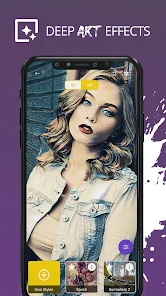
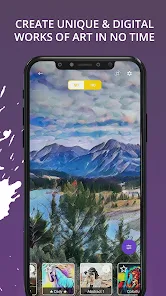
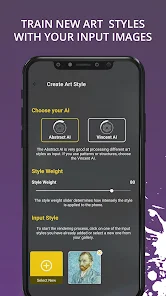
editor reviews
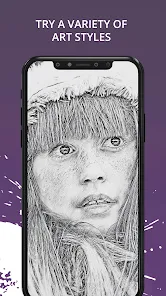
I first stumbled across DeepArtEffects AI Photo Editor while scrolling through the Play Store, looking for something to give my vacation photos a bit more personality. It's basically an AI-powered photo filter app, but instead of just slapping on a vintage look or a black-and-white filter, it transforms your pictures into stylized artworks that mimic famous painting techniques or artistic styles. You can upload any photo from your camera roll, and the app processes it to look like it was painted by Van Gogh, drawn in a comic book style, or rendered as a watercolor piece. Right after downloading it (it's free to install, though some premium styles are locked behind a paywall), I launched it and was greeted with a pretty clean layout with a big "Upload Photo" button front and center. First impressions were decent—no annoying tutorial pop-ups forcing me through a tour, just a straightforward gallery access request.
Actually using the app feels smoother than I expected for a free tool. You pick a photo, and it immediately shows you a grid of thumbnail previews with different styles applied, so you can swipe through and see roughly what each one will do before committing. The processing time varies—some simpler cartoon-like filters finish in about five seconds, while the more detailed oil painting emulations can take closer to twenty seconds, which felt a bit slow but not unbearable. What I found handy was the slider adjustment after processing, letting you tone down the effect strength so your original photo still shines through a bit. Onboarding is almost nonexistent, which I actually liked; you just tap and experiment. The only mildly confusing moment was figuring out that the "Save" button sometimes hides within a tiny menu icon in the corner instead of being obvious on the preview screen.
After using DeepArtEffects for a couple of weeks, I think it fills a specific niche well. If you enjoy turning casual selfies or travel shots into conversation-piece wallpapers or social media posts, this app is worth a spot on your phone. But if you're looking for precise editing tools—like adjusting exposure, cropping, or removing blemishes—you'll be disappointed because it's purely an artistic filter app. Compared to something like Prisma or PicsArt's art filters, DeepArtEffects feels more focused on the "painting" aesthetic rather than general photo enhancement. I've kept it installed mainly because it produces genuinely unique results that I haven't seen in other free apps, but I can see someone uninstalling it after a week if the novelty of stylized filters wears off. It's not a daily driver, but it's a fun occasional tool.
features
- 🎨 The app's standout ability is turning any photo into a convincing digital painting that mimics real art movements—like impressionism or pointillism—rather than just applying a generic blur or color shift.
- ⚡ Live preview thumbnails let you see how different styles will look on your specific photo before processing, which saves a ton of time compared to apps that force you to apply and undo repeatedly.
- 🔧 The intensity slider after processing is rare among similar tools; most competitors like Prisma don't let you dial back the effect, so you're stuck with the full transformation or nothing.
- 📦 The batch processing option is surprisingly robust for a free app—you can queue up multiple photos to apply the same style in one go, which beats doing each one manually in something like Deep Dream Generator.
pros
- 👍 DeepArtEffects handles portrait photos really well, preserving facial features better than Prisma, which sometimes distorts eyes and mouth into weird brushstroke blobs.
- 👍 The free version gives you a generous selection of styles—around 20 filters available without paying—while apps like Dreamscope or Artisto lock most decent options behind a subscription.
- 👍 It doesn't watermark your output images unless you use the super high-resolution export, which is refreshing compared to other free editors that plaster their logo all over your saved work.
cons
- 👎 Processing speed is noticeably slower than competitors like Prisma, especially when using the more complex art styles; you'll wait 20-30 seconds per image on older phones.
- 👎 The app crashes occasionally when you try to apply a second style to a photo that's already been processed, forcing you to restart and lose your work—something I rarely experience with PicsArt's filter tool.
- 👎 Compared to something like Snapseed, DeepArtEffects lacks basic editing controls like brightness, contrast, or cropping, so you can't refine your photo before applying the art effect.
- 👎 The "unlock all styles" premium purchase feels overpriced for what you get—about $10 for some extra filters that other apps offer for half that price or as a one-time smaller fee.
Articles
![]()
Guide
How to Update Google Play Store on Android 2026
![]()
Guide
How to Download Older Versions of Android Apps
![]()
Guide
How to Download Apps Without Google Play Store
![]()
Guide
What Is an APK File for Android?
If you use an Android phone, you may have seen the term APK while searching for apps or games online. Some websites offer an APK download instead of a Google Play install button. Some users also mention APK files when talking about apps that are not available in their region, older app versions, or Android games downloaded outside the Play Store.
![]()
Guide
How to Install Games from Google Play for Beginners
Installing games on an Android phone is usually simple, but for beginners, the process can still feel confusing at first. You may not know where to search, which button to tap, whether the game is safe, or why Google Play sometimes asks for account settings, storage access, or payment information. If you are using an Android phone for the first time, learning how to install games from Google Play is one of the easiest ways to get started.
![]()
Guide
How Useful Gemini Is for Everyday Questions and Quick Tasks
emini feels different from many AI apps because it is not only trying to be a chatbot. After using it for everyday questions, quick writing, image understanding, and planning, I think its biggest strength is convenience.
![]()
Guide
What to Know Before Downloading APKs
For many Android users, downloading an APK is a common way to install apps and games. Sometimes an app is not available in a certain country.
![]()
Guide
ChatGPT Review: Is It Still the Best AI App in 2026?
![]()
Guide
Seedance 2.0 vs Sora: The Future of AI Video Generation
The AI video race has intensified dramatically over the past two years. Platforms like Sora from OpenAI and Luma Dream Machine pushed the boundaries of text-to-video realism. Yet, despite their impressive outputs, most tools still operate as probabilistic generators—you describe a scene, and the model interprets it. Control remains limited. With the February 2026 release of Seedance 2.0, developed by ByteDance, the paradigm shifted. Internally known as Jimeng 2.0, Seedance does not position itself as just another video model. It positions itself as an AI Director. Rather than guessing what you want, Seedance 2.0 allows you to direct what happens. This distinction defines everything that follows.









Recommended Apps
![]()
Home Design 3D
Anuman4.2
![]()
Truth or Dare Game - Party App
Chouic4.8
![]()
Photo Collage Maker
Scoompa4.7![]()
Learn to Draw Flower
Creative APPS4.2![]()
FIFA World Cup 2026™
FIFA2.8![]()
Mirror Plus: Mirror with Light
Digitalchemy, LLC4.4![]()
Meitu- Photo Editor & AI Art
Meitu (China) Limited4.5![]()
Perplexity - Ask Anything
PerplexityAI4.7![]()
GhostTube SLS Camera Alternate
GhostTube4![]()
Boom Chip Blast: 2-Player
Black Pyramid 3D Games Studio0![]()
Healthy Benefits+
Solutran, Inc.4.5![]()
Deepcheck AI Search Assistant
rohe.ai4![]()
Idol Prank Video Call & Chat
LightCode Solutions4![]()
Face Shape - Pretty Scale
GlintTec Apps3.9![]()
Plant App - Plant Identifier
ScaleUp4.6












































