

Fontmaker - Font Keyboard App

5M+
Installs
Sociaaal LLC
Developer
-
Productivity
Category
-
Everyone
Content Rating
-
contact@takeoff-labs.com
Developer Email
-
https://link.fontmaker.app/privacy/
Privacy Policy
Screenshots
editor reviews
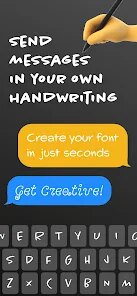
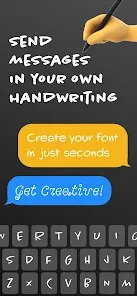
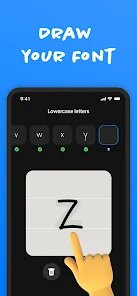
I've been using Fontmaker for a few weeks now. It's a keyboard app, one of those secondary keyboards you can add in your phone settings. The basic idea is that it lets you type in all sorts of fancy fonts directly inside any other app—text messages, social media captions, emails, you name it. You download and install it from the Google Play or App Store. After launching it, the first screen walks you through enabling the keyboard in your system settings, which is pretty standard for this type of thing. It's free to download, though there are in-app purchases for extra font packs and a subscription to remove ads. My first impression was that it looked clean and modern, not cluttered like some of the other keyboard apps I've tried. It didn't ask me to create an account, which I really appreciated.
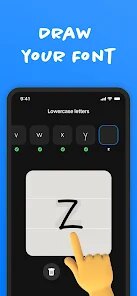
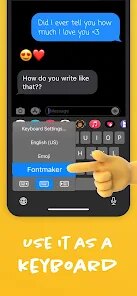
Getting it set up was straightforward. You have to go into your phone's general settings, tap on "Keyboard," and then enable "Fontmaker." The app gives you a step-by-step guide with arrows and screenshots, so even if you're not tech-savvy, you can manage it. Once it's on, switching to it is as simple as tapping the globe icon on your regular keyboard. The interface is a row of font style thumbnails at the top. You just scroll through them, tap the one you want, and then start typing. The text pops up in that style in the text field. I found the preview to be almost instant, which was nice. The only slightly confusing part is that the font styles are listed by their full names (like "Black Bubble" or "Handwriting") instead of showing a sample of the actual font, so I found myself tapping through a few to find the one I wanted at first.
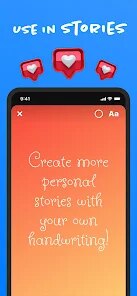
After a while, I started appreciating Fontmaker more for specific scenarios. For example, I use it all the time for Instagram bios or Twitter posts where I want something that stands out. It makes your text look different without having to copy and paste from a website. But I also ran into a small annoyance: the keyboard doesn't have a number row by default, and switching back to my main keyboard just for a number feels clumsy. Who would like this? People who mess around with their social media profiles and want a quick way to look unique without downloading an entirely different full keyboard app. Who might not? People who just type normally and don't care about font gimmicks. Compared to something like "Fonts," this one feels more tailored and less spammy. I keep it installed because it's lightweight and does one thing well, but I can see myself uninstalling it if the ads in the free version become too frequent.
features
- 🎨 Live Preview Typing: Unlike many font apps that only let you generate text in a separate box and then copy-paste, Fontmaker actually replaces your keyboard. You can see the fancy letters appear directly in your chat or note as you type. This is a big step up from apps like "Fancy Text" where you have to exit your chat, generate the text, copy it, and come back.
- 🔤 No Account Required: This is a massive plus. I cannot stand apps that force you to sign up with an email or a Google account just to change some letters. Fontmaker is ready to go the second you turn it on in settings. Popular competitors like "Stylish Text" often throw a login screen at you, which is just unnecessary friction.
- 💬 Direct Integration in Any App: Because it works at the system keyboard level, you can use these fonts in any text field on your phone. You aren't locked into the app's own environment. This is way more useful than web-based generators, which usually break on more restrictive platforms like WhatsApp or Signal. Fontmaker works everywhere your default keyboard works.
pros
- ✨ Extremely Clean and Minimalist Interface: Compared to apps like "Fonts Art" which feel cluttered with ads and flashy buttons, Fontmaker keeps it simple. The font picker is a clean scroll bar. It doesn't beg you to rate it every time you open it.
- ⏱️ Super Fast Loading: Once the keyboard is active, tapping the globe icon switches to Fontmaker instantly. I've used other keyboard apps, like "GO Keyboard," where there's a noticeable lag or a loading screen before fonts appear. Fontmaker just pops up immediately.
- 🧩 Easy Onboarding: The setup guide inside the app is short but perfectly clear. It tells you exactly which settings to tap, which is more than I can say for some competitors that just dump you into a confusing settings menu without a guide.
cons
- 🔢 No Number Row or Punctuation Shortcuts: This is my biggest pet peeve. If I need to type a number or a simple symbol, I have to switch back to my main keyboard (usually Gboard or SwiftKey) and then switch back to Fontmaker. It breaks the flow entirely. Most standard keyboards have a number row option, but this one skips it to save space.
- 📡 Feels a Bit Gimmicky for Regular Use: For everyday typing, like sending a work email or a quick "on my way" message, it's just extra steps. You have to select a font, make sure it looks right, and then switch away. For the 5% of the time you want fancy text, it's great, but the other 95% it's just an extra step in the way.
- 📈 Limited Font Preview: As I mentioned, the list shows names like "Bold Gothic" but doesn't show you what the font looks like until you tap on it. Competing apps like "HiFont" often have a sample preview of the font right in the list, which saves a lot of scrolling and tapping. Fontmaker makes you tap through each one to see it.
Articles
![]()
Guide
How to Update Google Play Store on Android 2026
![]()
Guide
How to Download Older Versions of Android Apps
![]()
Guide
How to Download Apps Without Google Play Store
![]()
Guide
What Is an APK File for Android?
If you use an Android phone, you may have seen the term APK while searching for apps or games online. Some websites offer an APK download instead of a Google Play install button. Some users also mention APK files when talking about apps that are not available in their region, older app versions, or Android games downloaded outside the Play Store.
![]()
Guide
How to Install Games from Google Play for Beginners
Installing games on an Android phone is usually simple, but for beginners, the process can still feel confusing at first. You may not know where to search, which button to tap, whether the game is safe, or why Google Play sometimes asks for account settings, storage access, or payment information. If you are using an Android phone for the first time, learning how to install games from Google Play is one of the easiest ways to get started.
![]()
Guide
How Useful Gemini Is for Everyday Questions and Quick Tasks
emini feels different from many AI apps because it is not only trying to be a chatbot. After using it for everyday questions, quick writing, image understanding, and planning, I think its biggest strength is convenience.
![]()
Guide
What to Know Before Downloading APKs
For many Android users, downloading an APK is a common way to install apps and games. Sometimes an app is not available in a certain country.
![]()
Guide
ChatGPT Review: Is It Still the Best AI App in 2026?
![]()
Guide
Seedance 2.0 vs Sora: The Future of AI Video Generation
The AI video race has intensified dramatically over the past two years. Platforms like Sora from OpenAI and Luma Dream Machine pushed the boundaries of text-to-video realism. Yet, despite their impressive outputs, most tools still operate as probabilistic generators—you describe a scene, and the model interprets it. Control remains limited. With the February 2026 release of Seedance 2.0, developed by ByteDance, the paradigm shifted. Internally known as Jimeng 2.0, Seedance does not position itself as just another video model. It positions itself as an AI Director. Rather than guessing what you want, Seedance 2.0 allows you to direct what happens. This distinction defines everything that follows.









Recommended Apps
![]()
Home Design 3D
Anuman4.2
![]()
Truth or Dare Game - Party App
Chouic4.8
![]()
Photo Collage Maker
Scoompa4.7![]()
Learn to Draw Flower
Creative APPS4.2![]()
FIFA World Cup 2026™
FIFA2.8![]()
Mirror Plus: Mirror with Light
Digitalchemy, LLC4.4![]()
Meitu- Photo Editor & AI Art
Meitu (China) Limited4.5![]()
Perplexity - Ask Anything
PerplexityAI4.7![]()
GhostTube SLS Camera Alternate
GhostTube4![]()
Boom Chip Blast: 2-Player
Black Pyramid 3D Games Studio0![]()
Healthy Benefits+
Solutran, Inc.4.5![]()
Deepcheck AI Search Assistant
rohe.ai4![]()
Idol Prank Video Call & Chat
LightCode Solutions4![]()
Face Shape - Pretty Scale
GlintTec Apps3.9![]()
Plant App - Plant Identifier
ScaleUp4.6












































