
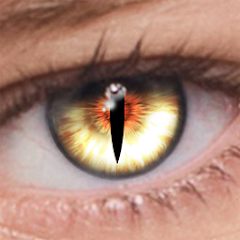
FoxEyes - Change Eye Color

5M+
Installs
GameSmileStudio
Developer
-
Video Players & Editors
Category
-
Rated for 3+
Content Rating
-
gamesmilestudio@gmail.com
Developer Email
-
https://gamesmilesstudio.blogspot.com/2024/01/privacy-policy-privacy-policy-please.html
Privacy Policy
Screenshots
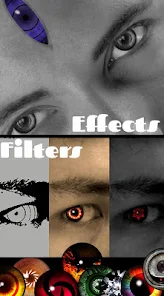
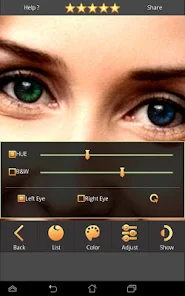
editor reviews
I stumbled upon FoxEyes - Change Eye Color on the Google Play store one evening, mostly out of curiosity. It's a photo-editing utility that specifically focuses on altering eye color in portraits, something a lot of general editors touch on but rarely do well. The app has been downloaded over a million times, which surprised me given its niche focus. After installing it, I launched it and was greeted by a simple camera roll interface asking for permission to access my photos. No nagging registration or forced account creation, which was a relief. The first impression is that it looks like a tool made by someone who actually uses photo editors, not a corporate product crammed with bloatware. It feels lightweight, almost like a single-purpose tool that does exactly what it says on the tin.
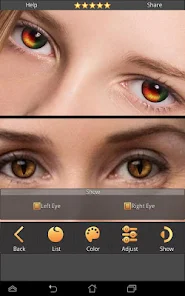
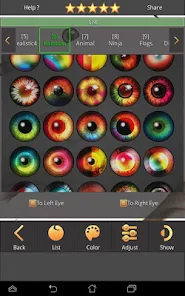
Once you pick a photo, the app does a decent job of automatically detecting the iris region in the eyes. You can adjust the selection manually if the auto-detection fails, which happened with my very dark brown eyes in dim lighting. From there, you pick a color from a basic palette that includes blue, green, hazel, gray, and even fantasy shades like violet and red. The slider for intensity is the main tool here, letting you dial in how natural the change looks. I found that lower intensity worked better for realism, while higher settings gave that striking model-on-a-magazine-cover look. The app applies the color in real time, so you can turn your head or adjust lighting to see how it catches light differently. There's no undo button though, so if you mess up, you have to restart from the original photo. After you're satisfied, you can export with or without a watermark, which is free but slightly annoying.
After playing with FoxEyes for about a week, I think it's perfect for someone who posts selfies on social media and wants a quick, dramatic effect without diving into complex apps like Adobe Photoshop or Lightroom. If you're a casual user, you'll likely keep it installed for occasional fun. However, if you're a photographer or someone who edits portraits professionally, you'll find it too limited because it only handles eye color and nothing else like skin tone or background adjustments. Compared to portrait-mode editors like FaceApp or YouCam Perfect, FoxEyes is far more focused but also far less versatile. I uninstalled it after a week because I don't post selfies often, but I can see why someone who does would keep it. It's a one-trick pony, but it performs that trick surprisingly well for a free app.
features
- 🎨 Precise iris detection – Unlike general editors where you have to manually mask the eye area, FoxEyes uses built-in AI to find and isolate the iris automatically. I compared it to the eye-color tool in Adobe Photoshop Express, and FoxEyes was faster and more accurate in most lighting conditions, though it struggled a bit with side profiles.
- 🎨 Real-time color preview – The color change happens instantly as you slide the intensity bar, so you see the effect on your actual skin tone and lighting. Apps like YouCam Perfect require you to apply and then undo if it looks weird, which gets tedious. FoxEyes makes trial and error feel fluid.
- 🎨 Fantasy color options – Beyond natural shades like hazel and gray, you get violet, red, and silver for cosplay or artistic edits. PicsArt has similar colors but buries them in a cluttered interface. FoxEyes keeps it simple: pick a color, adjust intensity, done.
- 🎨 No subscription lock – Every color option, including fantasy ones, is free with only a small watermark on export. Most similar tools on the Play Store lock premium colors behind a paywall or force a subscription, like the eye-color feature in AirBrush which costs $5 a month.
pros
- 👀 Faster than general editors – I compared FoxEyes to editing eye color in Lightroom Mobile, which requires you to use a brush tool and manually desaturate the original color, then overlay a new hue. FoxEyes takes seconds per eye, while Lightroom takes minutes of careful brushing.
- 👀 Better automatic detection than FaceApp – FaceApp's eye-color feature sometimes changes the entire eye area including the white part, making the face look fake. FoxEyes keeps the sclera untouched, which keeps the portrait looking natural unless you crank the intensity too high.
- 👀 Clean interface without clutter – Apps like BeautyPlus bury the eye-color tool in a menu of 50 other filters and facial adjustments. FoxEyes shows you just the photo and the color picker. That simplicity matters when you're in a hurry.
cons
- 📉 Only changes eye color – If you want to adjust skin tone, whiten teeth, or change background, you need another app. FaceApp can do all of that in one place, so you have to switch tools if you're editing a full portrait.
- 📉 No batch editing or undo button – Once you apply the color, there's no way to revert without starting over from the original photo. Adobe Photoshop Express has a proper undo history, which saved me a lot of time when testing different shades.
- 📉 Poor performance on low-light photos – In photos taken indoors or at night, the iris detection frequently missed the mark or selected part of the pupil. YouCam Perfect handled the same photos better, albeit with slightly less color accuracy.
- 📉 Watermark on free exports – The small "FoxEyes" watermark at the bottom is fine for social media, but if you want to print or use the image professionally, you have to pay. PicsArt's free version lets you save without a watermark if you watch an ad, which feels less restrictive.
Articles
![]()
Guide
How to Update Google Play Store on Android 2026
![]()
Guide
How to Download Older Versions of Android Apps
![]()
Guide
How to Download Apps Without Google Play Store
![]()
Guide
What Is an APK File for Android?
If you use an Android phone, you may have seen the term APK while searching for apps or games online. Some websites offer an APK download instead of a Google Play install button. Some users also mention APK files when talking about apps that are not available in their region, older app versions, or Android games downloaded outside the Play Store.
![]()
Guide
How to Install Games from Google Play for Beginners
Installing games on an Android phone is usually simple, but for beginners, the process can still feel confusing at first. You may not know where to search, which button to tap, whether the game is safe, or why Google Play sometimes asks for account settings, storage access, or payment information. If you are using an Android phone for the first time, learning how to install games from Google Play is one of the easiest ways to get started.
![]()
Guide
How Useful Gemini Is for Everyday Questions and Quick Tasks
emini feels different from many AI apps because it is not only trying to be a chatbot. After using it for everyday questions, quick writing, image understanding, and planning, I think its biggest strength is convenience.
![]()
Guide
What to Know Before Downloading APKs
For many Android users, downloading an APK is a common way to install apps and games. Sometimes an app is not available in a certain country.
![]()
Guide
ChatGPT Review: Is It Still the Best AI App in 2026?
![]()
Guide
Seedance 2.0 vs Sora: The Future of AI Video Generation
The AI video race has intensified dramatically over the past two years. Platforms like Sora from OpenAI and Luma Dream Machine pushed the boundaries of text-to-video realism. Yet, despite their impressive outputs, most tools still operate as probabilistic generators—you describe a scene, and the model interprets it. Control remains limited. With the February 2026 release of Seedance 2.0, developed by ByteDance, the paradigm shifted. Internally known as Jimeng 2.0, Seedance does not position itself as just another video model. It positions itself as an AI Director. Rather than guessing what you want, Seedance 2.0 allows you to direct what happens. This distinction defines everything that follows.









Recommended Apps
![]()
Home Design 3D
Anuman4.2
![]()
Truth or Dare Game - Party App
Chouic4.8
![]()
Photo Collage Maker
Scoompa4.7![]()
Learn to Draw Flower
Creative APPS4.2![]()
FIFA World Cup 2026™
FIFA2.8![]()
Mirror Plus: Mirror with Light
Digitalchemy, LLC4.4![]()
Meitu- Photo Editor & AI Art
Meitu (China) Limited4.5![]()
Perplexity - Ask Anything
PerplexityAI4.7![]()
GhostTube SLS Camera Alternate
GhostTube4![]()
Boom Chip Blast: 2-Player
Black Pyramid 3D Games Studio0![]()
Healthy Benefits+
Solutran, Inc.4.5![]()
Deepcheck AI Search Assistant
rohe.ai4![]()
Idol Prank Video Call & Chat
LightCode Solutions4![]()
Face Shape - Pretty Scale
GlintTec Apps3.9![]()
Plant App - Plant Identifier
ScaleUp4.6











































