
Ghost Photo Prank

5M+
Installs
Nachosware Prank Games
Developer
-
Entertainment
Category
-
Rated for 12+
Content Rating
-
nachosware@gmail.com
Developer Email
-
http://freeandroidappsprank.blogspot.com.es/2013/04/privacy-policy-politica-de-privacidad.html
Privacy Policy
Screenshots
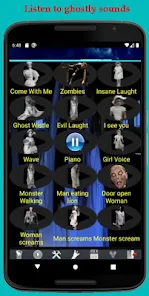
editor reviews
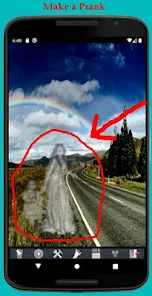
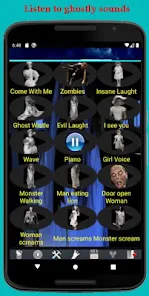
Ghost Photo Prank is one of those silly little apps you stumble upon when you are just messing around on Google Play, looking for something to make your friends jump. It belongs to the prank genre, and the whole point is to fake a ghost photo on someone else's phone so they think they accidentally captured something creepy. You download and install it for free, and right after you open it, the app looks pretty basic — like a simple photo editor mixed with a prank tool. The first impression is honestly nothing fancy. It feels like an app thrown together for a laugh, not for actual photography. There are no crazy sign-ups or permissions asking for your soul, which is nice. You just launch it and get right to the point: scaring someone.
Once you actually start using Ghost Photo Prank, the experience is pretty straightforward. The interface is clean but a little outdated, with big buttons and text that tells you exactly what to do. First, you take a photo of your victim — I mean, your friend — or pick one from your gallery. Then the app lets you add ghostly effects, like translucent overlays, glowing eyes, or shadowy figures floating behind them. It looks cheesy if you look closely, but in a quick glance, it can fool someone. The whole process takes maybe 30 seconds. You save the edited photo, wait for the right moment, and show it to your friend like you were just scrolling through your camera roll. The fun part is their reaction. Some effects look better than others, and the lighting in the original photo really matters. If the room is too bright, the ghost looks fake. In darker shots, it blends in nicely.
After using Ghost Photo Prank for a while, I think it works best for sleepovers, camping trips, or just messing with your younger siblings. It is not an app you will use every day, but it is fun to have around when you want a quick laugh. Compared to other prank apps like Fake Call or Prank Bomb, this one is more visual and depends on timing and the person falling for it. It feels different because it creates a moment instead of just making a sound or notification. The app is free but does show ads after saving a photo, which can kill the mood if you are trying to show someone quickly. Some users might uninstall it after a few uses because it is not really a tool you need often. But for specific situations, it is genuinely entertaining and worth a download.
features
- 👻 Ghost Photo Prank lets you add spooky overlays to any photo, while popular apps like PicsArt also have ghost effects, but they are buried under too many tools and editing layers. This app keeps it simple: you take a picture, pick a ghost, and save it. No extra fluff.
- 👻 The app stands out because of its instant scare factor. You can create a fake paranormal photo in under a minute and show it to someone right away. Other photo editors take too long, and the prank loses its surprise. This one is designed for speed.
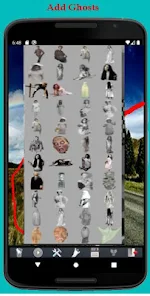
- 👻 It also has a bunch of different ghost styles, from classic white sheets to creepy shadow figures. That gives you variety without overwhelming you. Apps like Ghost Lens have fewer options, so you end up reusing the same effect, which gets boring fast.
pros
- 👍 The biggest strength is how easy it is to use. Compared to heavier apps like Snapseed, you do not need any editing skills. You just tap a few buttons, and the ghost blends into the background naturally, especially in low-light photos.
- 👍 It loads quickly and does not drain your battery. Some prank apps freeze or crash when you try to save the image. Ghost Photo Prank works consistently on older phones too, which is a relief.
- 👍 Another plus is that it does not ask for unnecessary permissions. Unlike some free apps that want access to your contacts or location, this one just needs camera and storage access. That makes it feel less sketchy.
cons
- 👎 The ads are annoying. After you save each prank photo, a full-screen ad pops up, and it ruins the flow if you are trying to show someone the image immediately. Prank Bomb handles ads better by showing them less frequently.
- 👎 The ghost effects look fake in well-lit photos. If you take a picture in daylight, the transparent overlays just look like bad editing. Apps like FaceApp have better blending technology, even for silly effects.
- 👎 There is no way to remove the watermark unless you pay, which feels unnecessary for a prank app. Most users just want a quick laugh, not to pay for premium ghost features. Other free prank apps do not force you into that.
Articles
![]()
Guide
How to Update Google Play Store on Android 2026
![]()
Guide
How to Download Older Versions of Android Apps
![]()
Guide
How to Download Apps Without Google Play Store
![]()
Guide
What Is an APK File for Android?
If you use an Android phone, you may have seen the term APK while searching for apps or games online. Some websites offer an APK download instead of a Google Play install button. Some users also mention APK files when talking about apps that are not available in their region, older app versions, or Android games downloaded outside the Play Store.
![]()
Guide
How to Install Games from Google Play for Beginners
Installing games on an Android phone is usually simple, but for beginners, the process can still feel confusing at first. You may not know where to search, which button to tap, whether the game is safe, or why Google Play sometimes asks for account settings, storage access, or payment information. If you are using an Android phone for the first time, learning how to install games from Google Play is one of the easiest ways to get started.
![]()
Guide
How Useful Gemini Is for Everyday Questions and Quick Tasks
emini feels different from many AI apps because it is not only trying to be a chatbot. After using it for everyday questions, quick writing, image understanding, and planning, I think its biggest strength is convenience.
![]()
Guide
What to Know Before Downloading APKs
For many Android users, downloading an APK is a common way to install apps and games. Sometimes an app is not available in a certain country.
![]()
Guide
ChatGPT Review: Is It Still the Best AI App in 2026?
![]()
Guide
Seedance 2.0 vs Sora: The Future of AI Video Generation
The AI video race has intensified dramatically over the past two years. Platforms like Sora from OpenAI and Luma Dream Machine pushed the boundaries of text-to-video realism. Yet, despite their impressive outputs, most tools still operate as probabilistic generators—you describe a scene, and the model interprets it. Control remains limited. With the February 2026 release of Seedance 2.0, developed by ByteDance, the paradigm shifted. Internally known as Jimeng 2.0, Seedance does not position itself as just another video model. It positions itself as an AI Director. Rather than guessing what you want, Seedance 2.0 allows you to direct what happens. This distinction defines everything that follows.









Recommended Apps
![]()
Home Design 3D
Anuman4.2
![]()
Truth or Dare Game - Party App
Chouic4.8
![]()
Photo Collage Maker
Scoompa4.7![]()
Learn to Draw Flower
Creative APPS4.2![]()
FIFA World Cup 2026™
FIFA2.8![]()
Mirror Plus: Mirror with Light
Digitalchemy, LLC4.4![]()
Meitu- Photo Editor & AI Art
Meitu (China) Limited4.5![]()
Perplexity - Ask Anything
PerplexityAI4.7![]()
GhostTube SLS Camera Alternate
GhostTube4![]()
Boom Chip Blast: 2-Player
Black Pyramid 3D Games Studio0![]()
Healthy Benefits+
Solutran, Inc.4.5![]()
Deepcheck AI Search Assistant
rohe.ai4![]()
Idol Prank Video Call & Chat
LightCode Solutions4![]()
Face Shape - Pretty Scale
GlintTec Apps3.9![]()
Plant App - Plant Identifier
ScaleUp4.6











































