

Emoji background changer

10M+
Installs
Judi Studio
Developer
-
Video Players & Editors
Category
-
Rated for 3+
Content Rating
-
judi.contact2@gmail.com
Developer Email
-
https://sites.google.com/view/emojibackgroundchangerprivatep/home
Privacy Policy
Screenshots


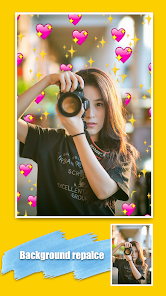

editor reviews
Emoji Background Changer, made by Judi Studio, is a niche photo editing tool that focuses specifically on modifying the backgrounds behind emoji stickers or icons in your images. It's not your all-in-one photo editor like Photoshop Express or Snapseed; it's more of a utility app for people who love customizing their chats, social media posts, or digital stickers. You download it from Google Play or the App Store, and it's free to install with optional in-app purchases and some ads. After launching it, the first thing that hits you is how straightforward the interface looks—clean, no clutter, and the app immediately prompts you to pick a photo or an emoji to start editing. For a normal user, the initial impression is that it's a specialized tool that does one thing and does it simply, without overwhelming you with a hundred buttons.
When you actually start using it, the experience is quite hands-on. After selecting an image that contains an emoji, the app asks you to crop or outline the emoji you want to keep. The background removal tool is fairly decent; you can tap to erase or restore parts, and the brush size adjusts easily. Once the emoji is isolated, you pick a new background from a gallery of solid colors, gradients, or preset patterns. There's even a small selection of seasonal themes. The common steps are: pick an emoji, remove its original background, choose a new backdrop, and then save or share. A practical tip is to use a clear, high-contrast image for the best cutout; fuzzy or low-res photos often leave messy edges. The onboarding is quick—no sign-up required—and the app moves smoothly, though sometimes the ad placement can feel a bit intrusive when you're about to save your creation.
After spending a week with Emoji Background Changer, I think it's a solid pick for casual users who love personalizing their digital stickers or making custom emojis for texting. It's not something a professional graphic designer would rely on, but for someone who just wants to make their WhatsApp or Instagram emojis pop with a fun new background, it does the job. The standout bit is that it's laser-focused—you don't get distracted by a dozen other editing tools. Compared to something like PicsArt, which can do similar background changes but feels like a Swiss Army knife, this app feels more like a dedicated screwdriver. Some users might uninstall it after a handful of uses because the novelty wears off, but if you frequently send custom stickers or enjoy digital scrapbooking, it's worth keeping around. The simple interface and zero learning curve are its biggest draws, though the limited background library and occasional ads hold it back from being a daily driver.
features
- 🎨 Focused Background Replacement: Unlike apps like PicsArt that offer a hundred tools, Emoji Background Changer does one thing—background swapping for emojis—and does it without extra clutter. It's ideal when you just want to quickly change a sticker's backdrop without wading through filters, text overlays, or blend modes.
- 🖌️ Simple Isolation Tools: The cutout feature uses a tap-and-brush approach that feels intuitive. Compared to Adobe Express, which sometimes requires precise lasso or magnetic selection, here you just erase what you don't want. It's less accurate for complex images but much faster for basic emoji edits.
- 🎨 Preset Themes: The app includes themed backgrounds like holidays, neon gradients, and pastel patterns. This is a small but nice touch—while Canva has endless templates, this app's curated sets save time if you're making a quick themed emoji for a birthday chat or Halloween post.
pros
- 👍 Quick and Lightweight: The app launches and processes edits in seconds. It's much faster than loading up a full editor like Photoshop Express just to change a sticker background.
- 👍 No Account Required: You can start editing immediately without signing up or logging in. That's a big plus compared to apps like PicsArt that push registration before letting you do anything.
- 👍 Easy Sharing: After editing, you can save directly to your camera roll or share to apps like WhatsApp, Messenger, or Instagram with one tap. No extra steps.
cons
- 👎 Limited Background Library: The app offers only a few dozen backgrounds. Apps like Canva or PicsArt let you import custom images or choose from thousands, but here you're stuck with what's included unless you buy packs.
- 👎 Ads Can Be Annoying: A full-screen ad pops up almost every time you save an image. While it's free, the frequency feels higher than in similar tools like Background Eraser.
- 👎 Accuracy on Complex Edits: If the emoji has thin lines or overlaps with a busy background, the automatic cutout often leaves rough edges. You'll need to manually tweak, which takes more time than in tools like Remove.bg.
Articles
![]()
Guide
How to Update Google Play Store on Android 2026
![]()
Guide
How to Download Older Versions of Android Apps
![]()
Guide
How to Download Apps Without Google Play Store
![]()
Guide
What Is an APK File for Android?
If you use an Android phone, you may have seen the term APK while searching for apps or games online. Some websites offer an APK download instead of a Google Play install button. Some users also mention APK files when talking about apps that are not available in their region, older app versions, or Android games downloaded outside the Play Store.
![]()
Guide
How to Install Games from Google Play for Beginners
Installing games on an Android phone is usually simple, but for beginners, the process can still feel confusing at first. You may not know where to search, which button to tap, whether the game is safe, or why Google Play sometimes asks for account settings, storage access, or payment information. If you are using an Android phone for the first time, learning how to install games from Google Play is one of the easiest ways to get started.
![]()
Guide
How Useful Gemini Is for Everyday Questions and Quick Tasks
emini feels different from many AI apps because it is not only trying to be a chatbot. After using it for everyday questions, quick writing, image understanding, and planning, I think its biggest strength is convenience.
![]()
Guide
What to Know Before Downloading APKs
For many Android users, downloading an APK is a common way to install apps and games. Sometimes an app is not available in a certain country.
![]()
Guide
ChatGPT Review: Is It Still the Best AI App in 2026?
![]()
Guide
Seedance 2.0 vs Sora: The Future of AI Video Generation
The AI video race has intensified dramatically over the past two years. Platforms like Sora from OpenAI and Luma Dream Machine pushed the boundaries of text-to-video realism. Yet, despite their impressive outputs, most tools still operate as probabilistic generators—you describe a scene, and the model interprets it. Control remains limited. With the February 2026 release of Seedance 2.0, developed by ByteDance, the paradigm shifted. Internally known as Jimeng 2.0, Seedance does not position itself as just another video model. It positions itself as an AI Director. Rather than guessing what you want, Seedance 2.0 allows you to direct what happens. This distinction defines everything that follows.









Recommended Apps
![]()
Home Design 3D
Anuman4.2
![]()
Truth or Dare Game - Party App
Chouic4.8
![]()
Photo Collage Maker
Scoompa4.7![]()
Learn to Draw Flower
Creative APPS4.2![]()
FIFA World Cup 2026™
FIFA2.8![]()
Mirror Plus: Mirror with Light
Digitalchemy, LLC4.4![]()
Meitu- Photo Editor & AI Art
Meitu (China) Limited4.5![]()
Perplexity - Ask Anything
PerplexityAI4.7![]()
GhostTube SLS Camera Alternate
GhostTube4![]()
Boom Chip Blast: 2-Player
Black Pyramid 3D Games Studio0![]()
Healthy Benefits+
Solutran, Inc.4.5![]()
Deepcheck AI Search Assistant
rohe.ai4![]()
Idol Prank Video Call & Chat
LightCode Solutions4![]()
Face Shape - Pretty Scale
GlintTec Apps3.9![]()
Plant App - Plant Identifier
ScaleUp4.6











































