
Simple Calendar - easy planner

5M+
Installs
Komorebi Inc.
Developer
-
Productivity
Category
-
Everyone
Content Rating
-
support@komorebi-studio.com
Developer Email
-
https://komorebi-studio.com/policyredirect.html
Privacy Policy
Screenshots
editor reviews
Simple Calendar - easy planner by Komorebi Inc. sits in the Google Play productivity category, offering a straightforward scheduling tool for Android users. The app is free to download and install, though it includes ads and optional in-app purchases for removing them. Its core purpose is providing a clean, uncluttered interface where users can manage daily events without unnecessary visual noise or complex setups.
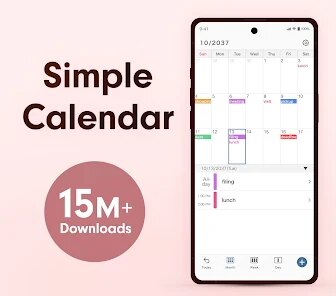
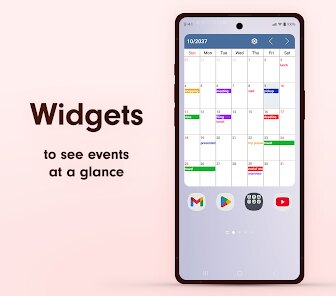
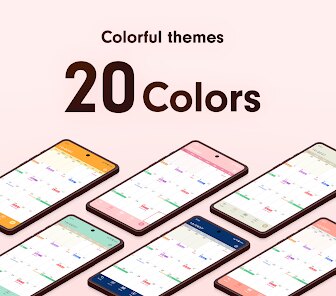
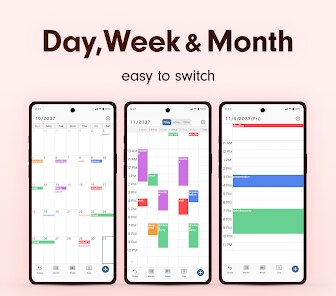
Opening the app presents a month view with gentle color coding for each task. Tapping a date reveals a list of events, and adding a new one requires just a title and time. The widget on the home screen shows upcoming items, which I find practical for quick glances. Unlike some calendars that bury settings in submenus, this one keeps preferences accessible through a simple gear icon. The ad placement is noticeable but not intrusive, appearing as a small banner at the bottom.
In comparison with Google Calendar, this app feels lighter and less overwhelming. It strips away features like automatic event syncing or smart suggestions, focusing purely on manual entries. Samsung Calendar offers similar simplicity but is tied to brand devices, while this one works universally. I have noticed the color coding is less flexible than DigiCal, where you can assign custom hues per category, but for basic needs it works well.
features
- The week view displays seven days horizontally with thin bars indicating event durations, making it easy to see overlapping tasks. Dragging events between days works smoothly, though I sometimes miss a vertical layout option.
- Setting recurring events is simple: you choose daily, weekly, or monthly patterns in two taps. Compared to Business Calendar, it lacks advanced repetition rules like every second Tuesday, but for normal use it feels adequate.
- Dark mode changes the background to deep gray with light text, reducing eye strain in low light. The transition is immediate, unlike Calendar Widgets where you need to restart the app. This small touch improves nighttime usage noticeably.
- Syncing with Google Tasks took a few minutes to set up via a settings toggle. After that, tasks from other apps appeared here automatically, though I found updates slower than on the original Tasks interface.
pros
- It saves time by showing what matters without extra taps. I can add an event in under ten seconds from opening the app.
- The list view helps during busy days by grouping all appointments chronologically, which prevents me from missing deadlines.
- Notification reminders appear five minutes before events by default, and I can adjust this per entry. This reduces my reliance on checking the phone repeatedly.
cons
- Searching for past events sometimes brings up blank results if the date range is too wide. I have to narrow the timeframe manually.
- The calendar does not sync with Outlook or Apple Calendar, limiting cross-platform use for people with multiple devices.
- Ads occasionally cover part of the event list when scrolling, requiring an extra tap to close. This interrupts the flow during quick checks.
Articles
![]()
Guide
How to Update Google Play Store on Android 2026
![]()
Guide
How to Download Older Versions of Android Apps
![]()
Guide
How to Download Apps Without Google Play Store
![]()
Guide
What Is an APK File for Android?
If you use an Android phone, you may have seen the term APK while searching for apps or games online. Some websites offer an APK download instead of a Google Play install button. Some users also mention APK files when talking about apps that are not available in their region, older app versions, or Android games downloaded outside the Play Store.
![]()
Guide
How to Install Games from Google Play for Beginners
Installing games on an Android phone is usually simple, but for beginners, the process can still feel confusing at first. You may not know where to search, which button to tap, whether the game is safe, or why Google Play sometimes asks for account settings, storage access, or payment information. If you are using an Android phone for the first time, learning how to install games from Google Play is one of the easiest ways to get started.
![]()
Guide
How Useful Gemini Is for Everyday Questions and Quick Tasks
emini feels different from many AI apps because it is not only trying to be a chatbot. After using it for everyday questions, quick writing, image understanding, and planning, I think its biggest strength is convenience.
![]()
Guide
What to Know Before Downloading APKs
For many Android users, downloading an APK is a common way to install apps and games. Sometimes an app is not available in a certain country.
![]()
Guide
ChatGPT Review: Is It Still the Best AI App in 2026?
![]()
Guide
Seedance 2.0 vs Sora: The Future of AI Video Generation
The AI video race has intensified dramatically over the past two years. Platforms like Sora from OpenAI and Luma Dream Machine pushed the boundaries of text-to-video realism. Yet, despite their impressive outputs, most tools still operate as probabilistic generators—you describe a scene, and the model interprets it. Control remains limited. With the February 2026 release of Seedance 2.0, developed by ByteDance, the paradigm shifted. Internally known as Jimeng 2.0, Seedance does not position itself as just another video model. It positions itself as an AI Director. Rather than guessing what you want, Seedance 2.0 allows you to direct what happens. This distinction defines everything that follows.









Recommended Apps
![]()
Home Design 3D
Anuman4.2
![]()
Truth or Dare Game - Party App
Chouic4.8
![]()
Photo Collage Maker
Scoompa4.7![]()
Learn to Draw Flower
Creative APPS4.2![]()
FIFA World Cup 2026™
FIFA2.8![]()
Mirror Plus: Mirror with Light
Digitalchemy, LLC4.4![]()
Meitu- Photo Editor & AI Art
Meitu (China) Limited4.5![]()
Perplexity - Ask Anything
PerplexityAI4.7![]()
GhostTube SLS Camera Alternate
GhostTube4![]()
Boom Chip Blast: 2-Player
Black Pyramid 3D Games Studio0![]()
Healthy Benefits+
Solutran, Inc.4.5![]()
Deepcheck AI Search Assistant
rohe.ai4![]()
Idol Prank Video Call & Chat
LightCode Solutions4![]()
Face Shape - Pretty Scale
GlintTec Apps3.9![]()
Plant App - Plant Identifier
ScaleUp4.6












































