

AI Kiss & Hug Video - DreamVid

500K+
Installs
Shenzhen iMyfone Technology Co., Ltd.
Developer
-
Generative AI
Category
-
Rated for 12+
Content Rating
-
ultrarepair@imyfone.com
Developer Email
-
https://www.imyfone.com/company/privacy-policy-2018-05/
Privacy Policy
Screenshots
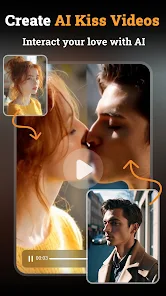
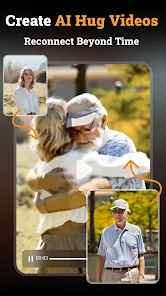
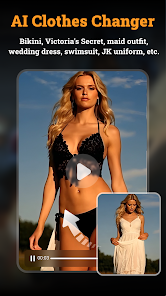

editor reviews
AI Kiss & Hug Video - DreamVid is a mobile app that sits somewhere between a photo editor and a novelty AI generator. You basically upload a picture of a person, and the app uses AI to animate them into short video clips where they appear to kiss, hug, or make other affectionate gestures. I came across it on Google Play while browsing for something fun to mess around with. It's free to download, though like most apps of this kind, you quickly find that the best results or more advanced actions are locked behind in-app purchases. The install count seems decent for a niche tool, so it's not completely unknown. The first impression after launching is a bit mixed. The interface is simple enough, just pick a photo and choose a gesture, but the UI feels a little cluttered with ads and upgrade prompts. I remember thinking, okay, let's just see if this actually works like the demo videos show.
Using the app is straightforward once you get past the initial pop-ups. You either take a new photo or pick one from your gallery. Then you select from a list of preset actions like kiss, hug, or wink. The processing takes maybe 15 to 30 seconds, which feels reasonable. The resulting video is short, usually just a few seconds long. I tried it with a clear front-facing headshot, and the animation was smooth enough to look convincing at first glance, though the mouth and eyes can get a little weird if the lighting in the original photo is poor. A tip I picked up is that photos with a plain background give much cleaner results. The app also includes some basic editing tools to crop or adjust the video length, but nothing too advanced. It's clearly built for quick, shareable content for social media rather than serious video editing.
After using it for a while, I think this app is best for people who want a quick laugh or someone looking to make a personalized, emotional gesture video for a friend. If you care about realistic human movement or high resolution, you'll be disappointed. Compared to stuff like Reface or other face-swapping AI apps, DreamVid focuses specifically on these romantic or affectionate gestures, which makes it feel more specialized. I kept it installed because it's a fun party trick, but I can see why someone would uninstall it after a day. The ads get annoying, and the free options are limited. Overall, it's a playful tool, not a serious one. You get what you pay for, and in this case, that's a few giggles and maybe a cringe or two.
features
- 💋 The core draw is the gesture-based AI animation, specifically kiss and hug actions. Unlike apps like Reface that focus on face swaps in existing videos, DreamVid lets you generate new movements from a single still photo. It's a much more specific use case, but when it works, it feels surprisingly personal.
- 💋 Processing speed is a standout. Most similar tools take a minute or more, but DreamVid usually finishes in under 25 seconds on a decent connection. That speed makes it feel less like a chore and more like a quick experiment.
- 💋 The export quality is fine for social media. You can save in standard resolutions without watermarks if you watch an ad or pay, which is fairly typical. Other apps like Avatarify often force watermarks even after payment, so DreamVid is slightly more forgiving in that regard.
- 💋 A small but nice feature is the ability to choose from multiple preset gestures instead of just a single animation. While Reface gives you one output per input, DreamVid offers a few variations like cheek kiss or full hug, which adds a bit of flexibility for the novelty.
pros
- 👍 DreamVid is much faster than Avatarify when generating similar gesture-based outputs. You don't wait around as long, which is a big plus for quick sharing.
- 👍 The focus on romantic gestures makes it more unique than general face-swap apps like Reface. If you specifically want a hug or kiss animation, DreamVid delivers that without extra fluff.
- 👍 The interface is simpler and less overwhelming than something like DeepFaceLab. You don't need any technical knowledge. Just pick a photo and a gesture, and it's done.
cons
- 👎 Facial realism can be hit or miss, especially with side profiles or photos with shadows. Reface handles lighting variations much better and produces more natural-looking results overall.
- 👎 Free users are limited to only a few gestures per day, and ads pop up after almost every export. Avatarify gives more free daily actions, which feels less restrictive.
- 👎 The app lacks any customization. You can't adjust the intensity of the hug or the angle of the kiss. Reface and similar apps offer more control over the final output, even for basic animations.
- 👎 The app only works with human faces. If you try a pet or a cartoon character, it just fails silently. Other apps like FaceApp at least attempt to handle non-human inputs, even if poorly.
Articles
![]()
Guide
How to Update Google Play Store on Android 2026
![]()
Guide
How to Download Older Versions of Android Apps
![]()
Guide
How to Download Apps Without Google Play Store
![]()
Guide
What Is an APK File for Android?
If you use an Android phone, you may have seen the term APK while searching for apps or games online. Some websites offer an APK download instead of a Google Play install button. Some users also mention APK files when talking about apps that are not available in their region, older app versions, or Android games downloaded outside the Play Store.
![]()
Guide
How to Install Games from Google Play for Beginners
Installing games on an Android phone is usually simple, but for beginners, the process can still feel confusing at first. You may not know where to search, which button to tap, whether the game is safe, or why Google Play sometimes asks for account settings, storage access, or payment information. If you are using an Android phone for the first time, learning how to install games from Google Play is one of the easiest ways to get started.
![]()
Guide
How Useful Gemini Is for Everyday Questions and Quick Tasks
emini feels different from many AI apps because it is not only trying to be a chatbot. After using it for everyday questions, quick writing, image understanding, and planning, I think its biggest strength is convenience.
![]()
Guide
What to Know Before Downloading APKs
For many Android users, downloading an APK is a common way to install apps and games. Sometimes an app is not available in a certain country.
![]()
Guide
ChatGPT Review: Is It Still the Best AI App in 2026?
![]()
Guide
Seedance 2.0 vs Sora: The Future of AI Video Generation
The AI video race has intensified dramatically over the past two years. Platforms like Sora from OpenAI and Luma Dream Machine pushed the boundaries of text-to-video realism. Yet, despite their impressive outputs, most tools still operate as probabilistic generators—you describe a scene, and the model interprets it. Control remains limited. With the February 2026 release of Seedance 2.0, developed by ByteDance, the paradigm shifted. Internally known as Jimeng 2.0, Seedance does not position itself as just another video model. It positions itself as an AI Director. Rather than guessing what you want, Seedance 2.0 allows you to direct what happens. This distinction defines everything that follows.









Recommended Apps
![]()
Home Design 3D
Anuman4.2
![]()
Truth or Dare Game - Party App
Chouic4.8
![]()
Photo Collage Maker
Scoompa4.7![]()
Learn to Draw Flower
Creative APPS4.2![]()
FIFA World Cup 2026™
FIFA2.8![]()
Mirror Plus: Mirror with Light
Digitalchemy, LLC4.4![]()
Meitu- Photo Editor & AI Art
Meitu (China) Limited4.5![]()
Perplexity - Ask Anything
PerplexityAI4.7![]()
GhostTube SLS Camera Alternate
GhostTube4![]()
Boom Chip Blast: 2-Player
Black Pyramid 3D Games Studio0![]()
Healthy Benefits+
Solutran, Inc.4.5![]()
Deepcheck AI Search Assistant
rohe.ai4![]()
Idol Prank Video Call & Chat
LightCode Solutions4![]()
Face Shape - Pretty Scale
GlintTec Apps3.9![]()
Plant App - Plant Identifier
ScaleUp4.6












































