

ZipLock - Zipper Lock Screen

1M+
Installs
SuperApps Global
Developer
-
Productivity
Category
-
Everyone
Content Rating
-
appwave333@gmail.com
Developer Email
-
https://superapps.site/policy.html
Privacy Policy
Screenshots
editor reviews
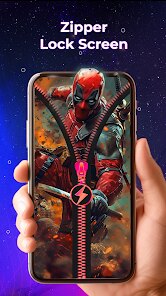
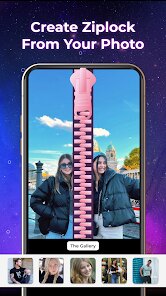
ZipLock snagged my attention because I was tired of boring lock screens that do nothing but sit there. It's a personalization-slash-utility app from SuperApps Global, and the whole idea is to swap out that dull default screen for something that actually looks like it belongs to you. You can choose from a bunch of flashy animated backgrounds or upload your own photo, and there's also a built-in zipper effect that makes swiping to unlock feel a bit more tactile. The app has been downloaded over a million times on Google Play and sits comfortably in the free section, though you will bump into ads fairly often during setup. When I first opened it, the interface hit me as a bit busy, honestly, with pop-ups asking for permissions and a wall of themes right away. But after I got past that initial noise, I could see what it's trying to do, which is just make unlocking your phone less of a drag.
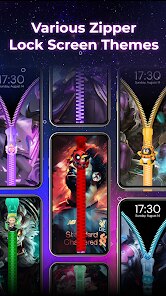
Once you get into the app, the first job is picking a lock screen style. You scroll through categories like neon, animal, or minimal, and each one previews the zipper animation. For example, I chose a space theme where stars drift around, and the zipper is a glowing metallic line running across the bottom. Setting it up took maybe a minute, and the app walks you through enabling the necessary accessibility permissions, which is a bit annoying but standard for these kinds of apps. After that, every time I locked my phone, I got to see that animation and flick the zipper up to get in. The main actions are simple: browse themes, apply one, maybe set a wallpaper to match. What I liked was that you can also add a mini widget for the date or battery right on the lock screen without digging deep into settings. One small tip, if you double-tap the screen, it sometimes skips the animation and unlocks directly, which was handy when I was in a rush. It's not perfectly smooth, though, I noticed a slight lag once every few unlocks, but nothing that ruins the experience.
After using ZipLock for about a week, I think it's a solid pick for anyone who gets a kick out of customizing their phone on a deeper level or just wants to break the monotony of stare-at-glass-swiping. It's not a must-have app, really, more of a fun accessory like a phone case that makes you smile. On the downside, the constant ads can get grating, and you'll need to tolerate some battery drain if you enable heavy animations. Compared to something like Kustom Lock Screen or Microsoft's Next Lock Screen, ZipLock is flashier but less feature-rich; those let you add custom shortcuts or interact with notifications, while this one prioritizes visual flair over utility. I'll probably keep it installed because that zipper swipe gives me a tiny dopamine hit each time, but I can see someone who values speed or minimalism uninstalling it within a day. It's a trade-off between personality and practicality, and for now, I'm leaning toward the zipper side.
features
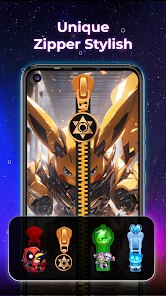
- 🔒 The zipper unlock animation is what sold me. Instead of just tapping or swiping, you drag a virtual zipper across the screen, and the visual feedback makes the whole action feel satisfying. It's a small gimmick, but it adds a layer of tactile fun that apps like Go Locker don't quite nail.
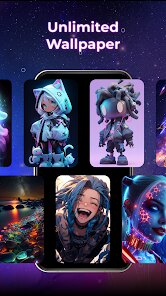
- 🎨 Theme variety is decent. You get dozens of categories from retro TVs to abstract art, and the previews show you exactly how the zipper and background move together. Compared to ZUI Locker, which feels more static, ZipLock lets you mix and match animations more freely.
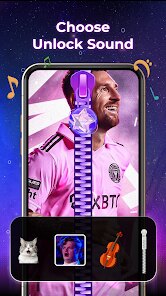
- 🖼️ Custom photo support is a big plus. You can use your own images as the lock screen background, and the app automatically applies a filter to make the zipper stand out. This beats many competitors that lock custom images behind a paywall or crop them awkwardly.
pros
- ✅ Free to start with solid customization. Unlike ZEDGE, which pushes premium themes hard, ZipLock gives you a good chunk of content without spending a cent.
- ✅ Battery usage is reasonable. I was worried about drain, but the app only uses power when the screen is on, so it's not a background hog like some live wallpaper apps.
- ✅ No forced account signup. You can browse and apply themes instantly, which is a breath of fresh air compared to apps like Lock Screen 2024 that nag you to log in.
cons
- ❌ Ads are irritating and frequent. Every time you change a theme or preview a new zipper style, you get a video ad. It's worse than what I've seen in ZUI Locker, which at least spaces them out.
- ❌ Accessibility permission feels invasive. The app needs it for the lock screen to work, but it also makes you worry about security, something other apps like Next Lock Screen handle more transparently.
- ❌ Notification interference is real. If you have multiple notifications, they sometimes overlap with the zipper area, making you swipe twice or mess up the animation. Microsoft's lock screen does a better job stacking them cleanly.
- ❌ Limited control over zipper speed. You can't slow it down or speed it up; it's one pace fits all. Custom launchers like Nova offer more granular tweaks if that matters to you.
Articles
![]()
Guide
How to Update Google Play Store on Android 2026
![]()
Guide
How to Download Older Versions of Android Apps
![]()
Guide
How to Download Apps Without Google Play Store
![]()
Guide
What Is an APK File for Android?
If you use an Android phone, you may have seen the term APK while searching for apps or games online. Some websites offer an APK download instead of a Google Play install button. Some users also mention APK files when talking about apps that are not available in their region, older app versions, or Android games downloaded outside the Play Store.
![]()
Guide
How to Install Games from Google Play for Beginners
Installing games on an Android phone is usually simple, but for beginners, the process can still feel confusing at first. You may not know where to search, which button to tap, whether the game is safe, or why Google Play sometimes asks for account settings, storage access, or payment information. If you are using an Android phone for the first time, learning how to install games from Google Play is one of the easiest ways to get started.
![]()
Guide
How Useful Gemini Is for Everyday Questions and Quick Tasks
emini feels different from many AI apps because it is not only trying to be a chatbot. After using it for everyday questions, quick writing, image understanding, and planning, I think its biggest strength is convenience.
![]()
Guide
What to Know Before Downloading APKs
For many Android users, downloading an APK is a common way to install apps and games. Sometimes an app is not available in a certain country.
![]()
Guide
ChatGPT Review: Is It Still the Best AI App in 2026?
![]()
Guide
Seedance 2.0 vs Sora: The Future of AI Video Generation
The AI video race has intensified dramatically over the past two years. Platforms like Sora from OpenAI and Luma Dream Machine pushed the boundaries of text-to-video realism. Yet, despite their impressive outputs, most tools still operate as probabilistic generators—you describe a scene, and the model interprets it. Control remains limited. With the February 2026 release of Seedance 2.0, developed by ByteDance, the paradigm shifted. Internally known as Jimeng 2.0, Seedance does not position itself as just another video model. It positions itself as an AI Director. Rather than guessing what you want, Seedance 2.0 allows you to direct what happens. This distinction defines everything that follows.









Recommended Apps
![]()
Home Design 3D
Anuman4.2
![]()
Truth or Dare Game - Party App
Chouic4.8
![]()
Photo Collage Maker
Scoompa4.7![]()
Learn to Draw Flower
Creative APPS4.2![]()
FIFA World Cup 2026™
FIFA2.8![]()
Mirror Plus: Mirror with Light
Digitalchemy, LLC4.4![]()
Meitu- Photo Editor & AI Art
Meitu (China) Limited4.5![]()
Perplexity - Ask Anything
PerplexityAI4.7![]()
GhostTube SLS Camera Alternate
GhostTube4![]()
Boom Chip Blast: 2-Player
Black Pyramid 3D Games Studio0![]()
Healthy Benefits+
Solutran, Inc.4.5![]()
Deepcheck AI Search Assistant
rohe.ai4![]()
Idol Prank Video Call & Chat
LightCode Solutions4![]()
Face Shape - Pretty Scale
GlintTec Apps3.9![]()
Plant App - Plant Identifier
ScaleUp4.6











































