

Astroscope: Astrology Guide

100K+
Installs
Astroscope App
Developer
-
Lifestyle
Category
-
Everyone
Content Rating
-
hi@astroscope-app.com
Developer Email
-
https://astroscope-app.com/privacy-policy/
Privacy Policy
Screenshots
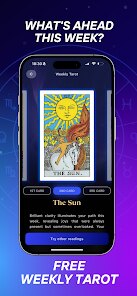
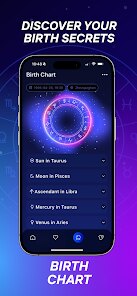
editor reviews
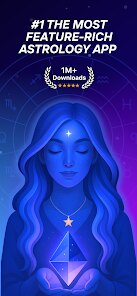
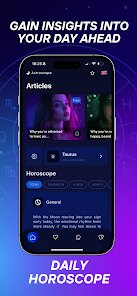
Astroscope: Astrology Guide is a mobile app focused on daily horoscopes, zodiac sign details, and astrological insights. It's a lifestyle tool rather than a hard science reference, so it fits right into the category for people who casually check their stars. You can look up your sign's general traits, get a quick read on what the day might bring, and even explore how different planets move through the houses. A normal user would probably download this after seeing a friend post something about Mercury retrograde or after a curious Google search. The first impression heading into the app is clean enough — a nice dark background with some glowing celestial icons — but it does feel like just another horoscope app among hundreds. The install count is decent on Google Play, and it's free to download with some in-app purchases if you want more than surface-level readings. No major registration barriers; you can jump right in.
After logging in for the first time, the app asks for your birth details, which is standard for any astrology tool. The interface is mostly smooth: you pick your sign from a carousel, and your daily horoscope appears instantly. Navigating between the different tabs makes sense — one for your personal readings, another for all signs, and a section for deeper astrological events. The onboarding does not drag, which I appreciated. A common use scenario would be checking your daily horoscope during your morning commute. There is a small practical tip here: the app lets you compare signs quickly, which is handy when you're trying to understand why you and your partner bump heads. One mildly confusing moment came when I tried to interpret the transit charts — the terms are not explained well for beginners, so be prepared to search for some definitions on your own.
After using Astroscope for a month, I can say it feels tailored for the casual zodiac enthusiast who wants something a bit more polished than a free website but does not need an astrologer's deep dive. Honestly, if you love detailed transit tracking like what you get with TimePassages or Co–Star, this one might feel light. Astroscope stands out because it keeps the reading simple and bright — no overwhelming data dumping. On the flip side, I could see someone uninstalling this if they quickly realize the predictions feel too generic. I think the people who would keep it installed are those who enjoy the daily ritual and the clean layout. It is not a bad app, just not the one for hardcore astrology nuts.
features
- 🔮 Daily horoscopes that update each morning without requiring a premium subscription, unlike some competitors that lock timely readings.
- 🔮 A clean zodiac sign overview page, making it easy to compare sign traits side-by-side in seconds.
- 🔮 A transit calendar that shows current planetary positions, though less interactive than the one found in AstroFuture.
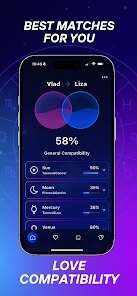
- 🔮 The standout feature is the simplified love compatibility meter, which gives a quick percentage match and brief advice for any two signs.
pros
- 👍 Faster load times than Co–Star, which can sometimes lag when pulling up transit data.
- 👍 No intrusive pop-up ads during readings, a clear advantage over the free version of Daily Horoscope.
- 👍 The design feels modern and uncluttered compared to the older layout of AstroMatrix.
cons
- 👎 Transit explanations are too shallow for anyone used to the depth of TimePassages or AstroGold.
- 👎 The in-app purchases feel expensive for what you get — paid reports do not reveal much more than the free sections.
- 👎 Birth chart accuracy depends a lot on manual input, unlike Chani which can pull data from your Apple Health profile.
Articles
![]()
Guide
How to Update Google Play Store on Android 2026
![]()
Guide
How to Download Older Versions of Android Apps
![]()
Guide
How to Download Apps Without Google Play Store
![]()
Guide
What Is an APK File for Android?
If you use an Android phone, you may have seen the term APK while searching for apps or games online. Some websites offer an APK download instead of a Google Play install button. Some users also mention APK files when talking about apps that are not available in their region, older app versions, or Android games downloaded outside the Play Store.
![]()
Guide
How to Install Games from Google Play for Beginners
Installing games on an Android phone is usually simple, but for beginners, the process can still feel confusing at first. You may not know where to search, which button to tap, whether the game is safe, or why Google Play sometimes asks for account settings, storage access, or payment information. If you are using an Android phone for the first time, learning how to install games from Google Play is one of the easiest ways to get started.
![]()
Guide
How Useful Gemini Is for Everyday Questions and Quick Tasks
emini feels different from many AI apps because it is not only trying to be a chatbot. After using it for everyday questions, quick writing, image understanding, and planning, I think its biggest strength is convenience.
![]()
Guide
What to Know Before Downloading APKs
For many Android users, downloading an APK is a common way to install apps and games. Sometimes an app is not available in a certain country.
![]()
Guide
ChatGPT Review: Is It Still the Best AI App in 2026?
![]()
Guide
Seedance 2.0 vs Sora: The Future of AI Video Generation
The AI video race has intensified dramatically over the past two years. Platforms like Sora from OpenAI and Luma Dream Machine pushed the boundaries of text-to-video realism. Yet, despite their impressive outputs, most tools still operate as probabilistic generators—you describe a scene, and the model interprets it. Control remains limited. With the February 2026 release of Seedance 2.0, developed by ByteDance, the paradigm shifted. Internally known as Jimeng 2.0, Seedance does not position itself as just another video model. It positions itself as an AI Director. Rather than guessing what you want, Seedance 2.0 allows you to direct what happens. This distinction defines everything that follows.









Recommended Apps
![]()
Home Design 3D
Anuman4.2
![]()
Truth or Dare Game - Party App
Chouic4.8
![]()
Photo Collage Maker
Scoompa4.7![]()
Learn to Draw Flower
Creative APPS4.2![]()
FIFA World Cup 2026™
FIFA2.8![]()
Mirror Plus: Mirror with Light
Digitalchemy, LLC4.4![]()
Meitu- Photo Editor & AI Art
Meitu (China) Limited4.5![]()
Perplexity - Ask Anything
PerplexityAI4.7![]()
GhostTube SLS Camera Alternate
GhostTube4![]()
Boom Chip Blast: 2-Player
Black Pyramid 3D Games Studio0![]()
Healthy Benefits+
Solutran, Inc.4.5![]()
Deepcheck AI Search Assistant
rohe.ai4![]()
Idol Prank Video Call & Chat
LightCode Solutions4![]()
Face Shape - Pretty Scale
GlintTec Apps3.9![]()
Plant App - Plant Identifier
ScaleUp4.6












































