

Call Santa Claus: Prank Call

50K+
Installs
Jaadoo Studio
Developer
-
Entertainment
Category
-
Everyone
Content Rating
-
jaadoostudio@gmail.com
Developer Email
-
https://jaadoostudio.com/privacy-policy/call-santa/
Privacy Policy
Screenshots


editor reviews
Call Santa Claus: Prank Call is one of those playful simulation apps you grab just for a laugh, especially around the holidays. It belongs to the entertainment and prank call genre, letting you fake a call with Santa Claus himself. After downloading and installing it from the Play Store, my first impression was pretty straightforward: the app launches quickly with a simple, cartoonish interface that feels aimed at kids and anyone with a sense of humor. There's no registration required, which is a relief, and it's free to download with some optional in-app purchases for extra features or ad removal. The install count seems modest, so it's not a massive hit, but it definitely fills a niche for festive fun.
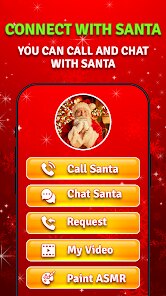
Once you open the app, the hands-on experience is fairly intuitive. You're greeted with a big red button that says "Call Santa," and tapping it triggers a simulated video call. The screen shows a cartoon Santa moving around on his sleigh, and he speaks in a cheerful, slightly robotic voice. You can interact by tapping preset questions like "Are you real?" or "Where are my presents?" and Santa responds with pre-recorded lines. The onboarding is almost nonexistent - just tap and go - which makes it perfect for kids who might get impatient with tutorials. If you're not enjoying the voice, you can switch between different Santa characters or even record your own voice for a more personalized prank. A small tip: mute your phone's actual ringer before using it to avoid interruptions from real calls.
After using it for a while, I think this app is best for young children or anyone looking for a quick seasonal distraction. It's not something you'd use daily - more of a once-a-year novelty that brings a smile during Christmas prep. Compared to similar prank call simulators like "Prank Call Santa Claus" or "Call Santa Video Call," this one stands out because of the multiple Santa avatars and the voice recording feature, which adds a personal twist. However, the ads can be annoying, and the responses feel limited after a few calls. I'd keep it installed for future holidays, but I can see why someone might uninstall it once the festive buzz fades. It's a charming little app, but it doesn't offer much beyond the initial laugh.
features
- 🎅 Multiple Santa Avatars: Unlike many other prank call apps that offer just one generic Santa, this one lets you choose from different cartoon Santas, like a traditional red-suited one or a more modern, funny version. This adds variety and keeps the call feeling fresh even after multiple uses.
- 🎅 Voice Recording Feature: This is the standout element. You can record your own voice to replace Santa's responses, which is perfect for creating custom pranks for friends or family. Competitors like "Santa Video Call" don't offer this level of personalization.
- 🎅 Simple, Kid-Friendly Interface: The app is designed with big buttons and minimal text, making it easy for toddlers or young children to navigate without help. The bright colors and cheerful animations also make it more inviting compared to text-heavy alternatives.
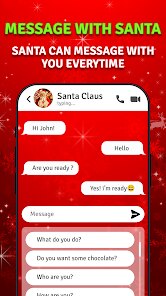
- 🎅 Preset Interactive Questions: Instead of free-form talking, you get a list of fun, kid-safe questions to ask Santa, like "Do you like cookies?" This removes awkwardness and keeps the call flowing naturally, which is better than apps that force random silence.
pros
- ✨ Festive Atmosphere: The app nails the holiday spirit with cheerful music, snowy backgrounds, and Santa's jolly voice. It feels more polished than "Prank Call Santa Claus," which often has generic backgrounds and less lively audio.
- ✨ No Registration Needed: You can jump in instantly without signing up or giving personal info. This is a huge plus over apps like "Call Santa Video Call" that sometimes ask for email or location.
- ✨ Regular Updates: The developers seem to add new Santa voices or seasonal tweaks each year, so it doesn't get stale. Some similar apps stop updating after a single release.
cons
- 💢 Frequent Ads: The free version has intrusive ads that pop up between calls or after a few interactions. Competitors like "Prank Call Santa Claus" have fewer ads, making the experience smoother.
- 💢 Limited Response Variety: Even with multiple Santas, the replies are pre-recorded and repeat after 3-4 calls. This gets boring fast compared to "Santa Video Call" which uses a more dynamic response system.
- 💢 Voice Recording Quality Issues: The custom voice recording feature can sound robotic or laggy, which ruins the prank effect. Other apps handle audio more cleanly.
- 💢 No Free-Form Chat: The preset questions are fine for kids, but older users might feel restricted. Apps like "Call Santa Prank" let you talk freely, which feels more realistic.
Articles
![]()
Guide
How to Update Google Play Store on Android 2026
![]()
Guide
How to Download Older Versions of Android Apps
![]()
Guide
How to Download Apps Without Google Play Store
![]()
Guide
What Is an APK File for Android?
If you use an Android phone, you may have seen the term APK while searching for apps or games online. Some websites offer an APK download instead of a Google Play install button. Some users also mention APK files when talking about apps that are not available in their region, older app versions, or Android games downloaded outside the Play Store.
![]()
Guide
How to Install Games from Google Play for Beginners
Installing games on an Android phone is usually simple, but for beginners, the process can still feel confusing at first. You may not know where to search, which button to tap, whether the game is safe, or why Google Play sometimes asks for account settings, storage access, or payment information. If you are using an Android phone for the first time, learning how to install games from Google Play is one of the easiest ways to get started.
![]()
Guide
How Useful Gemini Is for Everyday Questions and Quick Tasks
emini feels different from many AI apps because it is not only trying to be a chatbot. After using it for everyday questions, quick writing, image understanding, and planning, I think its biggest strength is convenience.
![]()
Guide
What to Know Before Downloading APKs
For many Android users, downloading an APK is a common way to install apps and games. Sometimes an app is not available in a certain country.
![]()
Guide
ChatGPT Review: Is It Still the Best AI App in 2026?
![]()
Guide
Seedance 2.0 vs Sora: The Future of AI Video Generation
The AI video race has intensified dramatically over the past two years. Platforms like Sora from OpenAI and Luma Dream Machine pushed the boundaries of text-to-video realism. Yet, despite their impressive outputs, most tools still operate as probabilistic generators—you describe a scene, and the model interprets it. Control remains limited. With the February 2026 release of Seedance 2.0, developed by ByteDance, the paradigm shifted. Internally known as Jimeng 2.0, Seedance does not position itself as just another video model. It positions itself as an AI Director. Rather than guessing what you want, Seedance 2.0 allows you to direct what happens. This distinction defines everything that follows.









Recommended Apps
![]()
Home Design 3D
Anuman4.2
![]()
Truth or Dare Game - Party App
Chouic4.8
![]()
Photo Collage Maker
Scoompa4.7![]()
Learn to Draw Flower
Creative APPS4.2![]()
FIFA World Cup 2026™
FIFA2.8![]()
Mirror Plus: Mirror with Light
Digitalchemy, LLC4.4![]()
Meitu- Photo Editor & AI Art
Meitu (China) Limited4.5![]()
Perplexity - Ask Anything
PerplexityAI4.7![]()
GhostTube SLS Camera Alternate
GhostTube4![]()
Boom Chip Blast: 2-Player
Black Pyramid 3D Games Studio0![]()
Healthy Benefits+
Solutran, Inc.4.5![]()
Deepcheck AI Search Assistant
rohe.ai4![]()
Idol Prank Video Call & Chat
LightCode Solutions4![]()
Face Shape - Pretty Scale
GlintTec Apps3.9![]()
Plant App - Plant Identifier
ScaleUp4.6











































