

HairApp: Hair Styler App, Bald

1M+
Installs
Lyrebird Studio Teknoloji Limited Şirketi
Developer
-
Video Players & Editors
Category
-
Everyone
Content Rating
-
lyrebirdstudio@gmail.com
Developer Email
-
https://lyretech.com/privacy_policy.htm
Privacy Policy
Screenshots
editor reviews
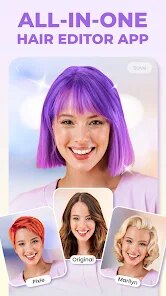
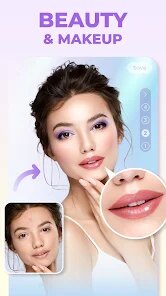
HairApp: Hair Styler App, Bald (yes, that's the full name on the store) comes from Lyrebird Studio Teknoloji Limited Şirketi. It's a grooming and hairstyle try-on tool, basically a virtual barbershop in your pocket. You download it from Google Play or the App Store, fire it up, and instantly you're staring at a camera viewfinder with a bunch of hair overlays waiting to be slapped onto your head. The first impression is pretty straightforward: no sign-up nagging, just a “let's see how you'd look bald or bearded” vibe. It's free to install, though I noticed some in-app purchases for extra styles and a few ads popping up after a few tries. Nothing too aggressive, but they're there.
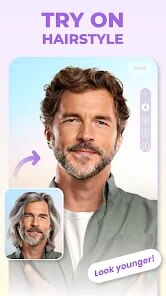
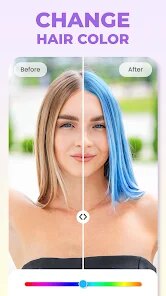
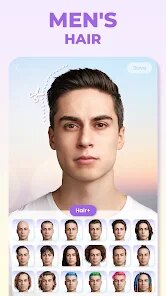
Using the app feels a bit like playing a dress-up game but for your face. You snap a selfie or pick one from your gallery, then the app auto-detects your head shape and drops a hairstyle onto it. The interface is clean but a little basic, with a row of thumbnails across the bottom. Tapping one instantly swaps the hair on your preview. The real hands-on moment comes when you try different styles: short crops, long flows, even baldness. The tracking is decent, but it stumbles if you tilt your head or have messy background lighting. You can adjust the hair position manually, which saved me when the app thought my ear was a cheekbone. A tip: use a front-facing photo with good lighting, it makes the overlay stick far better. The app includes a shave tool too, letting you simulate a totally bald look, which is surprisingly fun. For a free tool, it's smooth enough for casual browsing, but pros might find the lack of fine-tuning limiting.
After spending a week with it, I'd say this app is perfect for someone curious about a drastic style change, especially if you're considering going bald or trying a bold cut. It's not for stylists or people wanting ultra-realistic renders though, the hair textures look a bit plasticky up close. Comparing it to something like YouCam Makeup, which has more precise face mapping, HairApp feels more niche and less polished. What keeps me coming back is the sheer simplicity and the novelty of seeing myself with no hair at all. But I can see someone uninstalling it quickly if ads bother them or if they just wanted a one-time laugh. For a free download with no commitment, it scratches that “what if?” itch well enough to stick around on my phone for a while.
features
- 💇 Virtual Hairstyle Try-On: The core feature here is the real-time hairstyle preview. You pick a style, and the app overlays it onto your photo or live camera feed. Compared to something like Hair Zapp, which focuses more on salon-style catalog browsing, HairApp lets you swap looks instantly without a heavy gallery navigation. The bald simulation tool is the standout gimmick, it's not just a hair removal filter; it actually smooths the scalp texture believably under good light. Other apps like YouCam Makeup offer similar tried-on tech but bury it under makeup tools, while HairApp keeps it laser-focused on haircuts and facial hair.
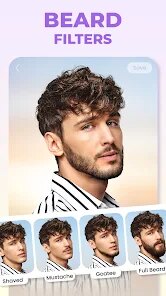
- 🪒 Beard and Bald Simulation: Beyond hairstyles, the app includes beard overlays and a dedicated bald preview mode. This sets it apart from apps like Style My Hair, which mostly stick to longer hairstyles and ignore the shaved look. The beard options feel less realistic, but the bald effect is what my friends kept raving about. You can literally see yourself with a full shave or a stubble beard in seconds, which is a conversation starter at parties.
- 🔧 Manual Adjustment Controls: After the auto-detect places the hair, you can drag, scale, or rotate the overlay to fit your head better. This is a lifesaver when the AI misses your hairline. Competitors like Hairstyle Try On often lock adjustments behind paywalls or limit them to preset positions. Here, it's free for basic tweaking, which makes a big difference for real-world selfies where lighting isn't perfect.
pros
- 👍 Free and Low-Friction Start: You open the app, snap a photo, and start trying styles immediately. No account creation or subscription trial needed. That's a big plus over YouCam Makeup, which pushes a premium plan hard. HairApp just works out of the box, ads or not, for the curious user.
- 👍 Unique Bald/Niche Focus: Most hair try-on apps assume you want a full head of hair. HairApp embraces the opposite, helping you visualize going completely bald or adding a beard. For men considering hair loss treatments or a shaved look, this fills a gap that Style My Hair completely ignores.
- 👍 Simple, Uncluttered Interface: The layout is minimalist; you see your face, a style grid, and a few tools. No confusing layers or editing timelines. Compared to Hair Zapp, which feels like a photo editor first, HairApp feels more like a casual mirror, which is exactly what I wanted for a quick decision.
cons
- 👎 Limited Realism in Hairstyles: The hair textures look flat and a bit too perfect, like a video game character's hair. If you compare it to YouCam Makeup's more natural hair flow and shading, HairApp's overlays break the illusion when you zoom in. It works for a rough idea but not for a polished preview.
- 👎 Inconsistent Face Tracking: The auto-detection for head mapping is hit or miss. If you wear glasses, have a beard already, or take a photo with uneven lighting, the app might place the hair on your forehead or cheek. Apps like Style My Hair have more robust facial landmark tracking that handles side angles better.
- 👎 Ads and Limited Free Styles: The free version includes a moderate number of hairstyles, but you'll hit a paywall quickly if you want trendy cuts like fades or curls. Plus, ads pop up after every few style changes, which gets annoying during a long browsing session. Hairstyle Try On offers a wider free library with fewer interruptions.
Articles
![]()
Guide
How to Update Google Play Store on Android 2026
![]()
Guide
How to Download Older Versions of Android Apps
![]()
Guide
How to Download Apps Without Google Play Store
![]()
Guide
What Is an APK File for Android?
If you use an Android phone, you may have seen the term APK while searching for apps or games online. Some websites offer an APK download instead of a Google Play install button. Some users also mention APK files when talking about apps that are not available in their region, older app versions, or Android games downloaded outside the Play Store.
![]()
Guide
How to Install Games from Google Play for Beginners
Installing games on an Android phone is usually simple, but for beginners, the process can still feel confusing at first. You may not know where to search, which button to tap, whether the game is safe, or why Google Play sometimes asks for account settings, storage access, or payment information. If you are using an Android phone for the first time, learning how to install games from Google Play is one of the easiest ways to get started.
![]()
Guide
How Useful Gemini Is for Everyday Questions and Quick Tasks
emini feels different from many AI apps because it is not only trying to be a chatbot. After using it for everyday questions, quick writing, image understanding, and planning, I think its biggest strength is convenience.
![]()
Guide
What to Know Before Downloading APKs
For many Android users, downloading an APK is a common way to install apps and games. Sometimes an app is not available in a certain country.
![]()
Guide
ChatGPT Review: Is It Still the Best AI App in 2026?
![]()
Guide
Seedance 2.0 vs Sora: The Future of AI Video Generation
The AI video race has intensified dramatically over the past two years. Platforms like Sora from OpenAI and Luma Dream Machine pushed the boundaries of text-to-video realism. Yet, despite their impressive outputs, most tools still operate as probabilistic generators—you describe a scene, and the model interprets it. Control remains limited. With the February 2026 release of Seedance 2.0, developed by ByteDance, the paradigm shifted. Internally known as Jimeng 2.0, Seedance does not position itself as just another video model. It positions itself as an AI Director. Rather than guessing what you want, Seedance 2.0 allows you to direct what happens. This distinction defines everything that follows.









Recommended Apps
![]()
Home Design 3D
Anuman4.2
![]()
Truth or Dare Game - Party App
Chouic4.8
![]()
Photo Collage Maker
Scoompa4.7![]()
Learn to Draw Flower
Creative APPS4.2![]()
FIFA World Cup 2026™
FIFA2.8![]()
Mirror Plus: Mirror with Light
Digitalchemy, LLC4.4![]()
Meitu- Photo Editor & AI Art
Meitu (China) Limited4.5![]()
Perplexity - Ask Anything
PerplexityAI4.7![]()
GhostTube SLS Camera Alternate
GhostTube4![]()
Boom Chip Blast: 2-Player
Black Pyramid 3D Games Studio0![]()
Healthy Benefits+
Solutran, Inc.4.5![]()
Deepcheck AI Search Assistant
rohe.ai4![]()
Idol Prank Video Call & Chat
LightCode Solutions4![]()
Face Shape - Pretty Scale
GlintTec Apps3.9![]()
Plant App - Plant Identifier
ScaleUp4.6











































