
Mini Quiz Filter Challenge

5M+
Installs
GjangHa
Developer
-
Entertainment
Category
-
Teen
Content Rating
-
gjangha021213@gmail.com
Developer Email
-
https://gianghastudio.online/policy
Privacy Policy
Screenshots
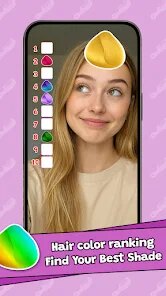



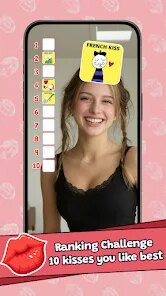
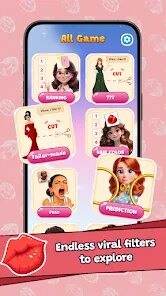
editor reviews
Mini Quiz Filter Challenge is a casual brain-teaser from developer GjangHa, sitting squarely in the puzzle and trivia category on Google Play and the App Store. You download and install it for free, and the app has seen a modest number of installs, though nothing blockbuster. After launching it, the first impression is that it's a no-nonsense little game: you get a simple question on screen, and a set of filters below it. The idea is to tap the correct filter to match the answer. There's no registration, no tutorial pop-ups, and at least when I started, no ads bombarding me within the first few seconds. That honestly felt refreshing, because so many free puzzle apps push you into an ad before you even understand what's happening.
Once you start playing, the experience is straightforward. The interface is clean, almost minimalist: a question appears at the top, and below it, a grid of filters labeled with different answers or categories. You swipe through these filters by flicking left or right, and tap the one you think fits. The onboarding is basically nonexistent, but honestly, the concept is so simple that you figure it out in under ten seconds. Some questions are dead easy, like “What color is the sky?” with filters for blue, red, and green. Others get trickier, and you might find yourself re-reading the question or tapping the wrong filter by accident. There's a small feedback buzz when you get one wrong, and a satisfying checkmark when you're right. One practical tip: take your time swiping through the filters before tapping, because some answers look similar and the filters scroll quickly.
After spending some time with it, I think Mini Quiz Filter Challenge is a decent way to kill five or ten minutes when you're waiting in line or bored on the couch. It's not going to blow your mind, but it has a certain addictive quality because each round is short and you want to beat your own streak. People who enjoy quick trivia without deep strategy will probably keep it installed. On the other hand, if you're someone who needs complex puzzles or narrative-driven gameplay, this isn't for you. Compared to something like Quizoid or Trivia Crack, which offer tons of categories and social features, this is much more stripped down, which can be a plus if you just want to zone out. I can see why some users uninstall it after a while, but for a free app with no sign-up, it does exactly what it promises.
features
- 🧠 The core mechanic of swiping through filters to match a question is genuinely unique. Most trivia apps just give you multiple choice buttons. Here, you literally scroll through filter-like cards, which makes each tap feel more interactive, like you're sorting through options physically rather than just ticking a box.
- ⚡ The speed of play is outstanding. There are no loading screens, no animations wasting time, no unskippable cutscenes. You finish one question, and the next one appears instantly. This keeps the flow tight and makes it easy to play in short bursts without getting frustrated.
- 🎯 The difficulty curve is unpredictable in a good way. Sometimes you get a ridiculously easy question, and then the next one stumps you completely. This variety keeps your brain engaged because you can never fully relax, unlike apps like Brain Test that follow a predictable ramp-up.
- 📊 The filter layout visually organizes answers better than text lists. When you have four or five filters on screen, you can scan them more naturally than reading a vertical list, which feels more like a game and less like a test. It's a small design win that makes the whole experience feel fresh compared to classic trivia apps such as QuizUp.
pros
- 🎮 The no-fuss, no-registration entry is a major plus. Apps like Trivia Crack force you to sign up or connect social media. Here, you open and play immediately, which lowers the barrier for casual users who just want a quick game.
- 🚫 Ads are minimal and non-intrusive. Many free puzzle apps (think Wordscapes or Brain Test) shove a video ad after every round. Mini Quiz Filter Challenge shows ads infrequently, and they don't interrupt gameplay mid-question, which keeps the experience smooth.
- 🕹 The single-tap gameplay is perfect for one-handed use. Whether you're on a bus or holding a coffee, you can play with just your thumb swiping and tapping. This is more convenient than apps that require precise typing or dragging, like Quizoid.
cons
- 📉 Question variety is limited. After a few sessions, you notice the same questions repeating, which hurts replayability. Compared to Trivia Crack's massive database, this feels shallow after a week of use.
- 🤷 No categories or difficulty selection. You can't choose topics like history or science, nor can you set the difficulty to easy or hard. Every game is a random mix, which might frustrate users who want to focus on a specific area.
- 🎨 The visual design is basic and could feel outdated. While minimalist has its charm, the filters look like plain text boxes with no icons or color coding. Apps like Quiz Planet offer much more visually engaging interfaces.
- 📱 No offline mode. If you lose connection, the app won't load new questions. For a trivia game that doesn't stream video, this feels unnecessary and limits where you can play, unlike Brainly or similar offline-capable apps.
Articles
![]()
Guide
How to Update Google Play Store on Android 2026
![]()
Guide
How to Download Older Versions of Android Apps
![]()
Guide
How to Download Apps Without Google Play Store
![]()
Guide
What Is an APK File for Android?
If you use an Android phone, you may have seen the term APK while searching for apps or games online. Some websites offer an APK download instead of a Google Play install button. Some users also mention APK files when talking about apps that are not available in their region, older app versions, or Android games downloaded outside the Play Store.
![]()
Guide
How to Install Games from Google Play for Beginners
Installing games on an Android phone is usually simple, but for beginners, the process can still feel confusing at first. You may not know where to search, which button to tap, whether the game is safe, or why Google Play sometimes asks for account settings, storage access, or payment information. If you are using an Android phone for the first time, learning how to install games from Google Play is one of the easiest ways to get started.
![]()
Guide
How Useful Gemini Is for Everyday Questions and Quick Tasks
emini feels different from many AI apps because it is not only trying to be a chatbot. After using it for everyday questions, quick writing, image understanding, and planning, I think its biggest strength is convenience.
![]()
Guide
What to Know Before Downloading APKs
For many Android users, downloading an APK is a common way to install apps and games. Sometimes an app is not available in a certain country.
![]()
Guide
ChatGPT Review: Is It Still the Best AI App in 2026?
![]()
Guide
Seedance 2.0 vs Sora: The Future of AI Video Generation
The AI video race has intensified dramatically over the past two years. Platforms like Sora from OpenAI and Luma Dream Machine pushed the boundaries of text-to-video realism. Yet, despite their impressive outputs, most tools still operate as probabilistic generators—you describe a scene, and the model interprets it. Control remains limited. With the February 2026 release of Seedance 2.0, developed by ByteDance, the paradigm shifted. Internally known as Jimeng 2.0, Seedance does not position itself as just another video model. It positions itself as an AI Director. Rather than guessing what you want, Seedance 2.0 allows you to direct what happens. This distinction defines everything that follows.









Recommended Apps
![]()
Home Design 3D
Anuman4.2
![]()
Truth or Dare Game - Party App
Chouic4.8
![]()
Photo Collage Maker
Scoompa4.7![]()
Learn to Draw Flower
Creative APPS4.2![]()
FIFA World Cup 2026™
FIFA2.8![]()
Mirror Plus: Mirror with Light
Digitalchemy, LLC4.4![]()
Meitu- Photo Editor & AI Art
Meitu (China) Limited4.5![]()
Perplexity - Ask Anything
PerplexityAI4.7![]()
GhostTube SLS Camera Alternate
GhostTube4![]()
Boom Chip Blast: 2-Player
Black Pyramid 3D Games Studio0![]()
Healthy Benefits+
Solutran, Inc.4.5![]()
Deepcheck AI Search Assistant
rohe.ai4![]()
Idol Prank Video Call & Chat
LightCode Solutions4![]()
Face Shape - Pretty Scale
GlintTec Apps3.9![]()
Plant App - Plant Identifier
ScaleUp4.6











































