
Reverse Voice - Voice Changer

100K+
Installs
Hammad67
Developer
-
Entertainment
Category
-
Everyone
Content Rating
-
voicechanger995@gmail.com
Developer Email
-
https://voicechangerappprivacypolicy.blogspot.com/2025/11/privacy-policy-of-prank-voice-voice.html
Privacy Policy
Screenshots
editor reviews
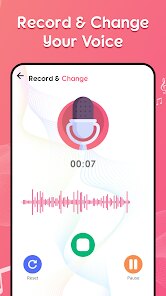
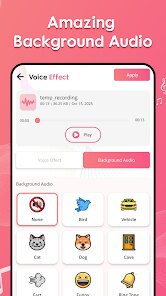
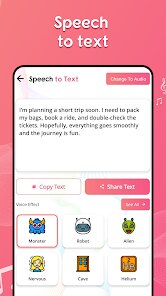
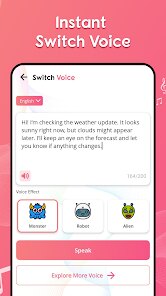
So Reverse Voice is basically this quirky little app that flips your voice around. You speak into the phone, and it plays your words back in reverse, like a scrambled audio puzzle. It's not a full-on audio editor or a professional voice changer with fancy effects, more like a single-purpose novelty tool you'd grab for a laugh or to mess with friends on voice notes. I found it on Google Play with a modest number of installs, probably under 50k, and it's free to download with no forced registration. After installing and launching it, my first impression was that it looks incredibly basic, almost like a prototype. The interface is just a record button, a play button, and a small file list, nothing more. No tutorials, no flashy graphics. You just tap record, say something, and tap play to hear the reversed version. If there are in-app purchases or ads, they're not obvious at all, which is kind of refreshing but also makes you wonder how the dev plans to keep it alive.
Using this app feels a lot like a bare-bones science project. You open it, hit the red record button, speak a few words, and then hit stop. The app instantly renders a reversed audio clip and adds it to a simple list below. You tap on that clip to play it back. That's basically it. There's no way to save files to a proper folder, no pitch adjustment, no reverb, no sharing button, nothing like that. The reversed audio comes out sounding scrambled and warbly, which is the whole point. The first time I tried it, I said "hello there" and heard something that sounded like "ereht olleh" but in a totally alien, backwards cadence. It's fun for about five minutes, especially if you're with a friend and you make each other guess what the original phrase was. The app runs smoothly without crashes, but the audio quality is just okay, not crisp, and there's a slight delay between recording and playback that feels a bit clumsy. A practical tip: short phrases work way better than long sentences, because longer recordings just turn into unintelligible gibberish that's hard to even identify as reversed speech.
After playing around with it for a while, I honestly think this app is only for someone who wants a one-trick pony for a quick laugh. If you're into audio modification or voice effects for fun or for content creation, you'll be bored fast. It does one thing and does it fine, but there's no depth. Compared to something like Voice Changer with Effects or even a simple audio editor, Reverse Voice feels like a throwaway diversion. The app doesn't offer any way to layer effects, adjust speed, or export in different formats. You can't even rename the recordings. I can see someone keeping it if they have a young kid who thinks hearing their own voice backwards is hilarious, or if they want a weird party trick. But for anyone wanting actual utility or creative control, it would get uninstalled after one session. It's not bad for what it is, but "what it is" is extremely limited.
features
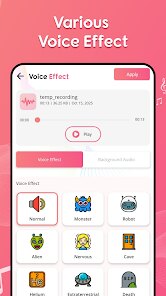
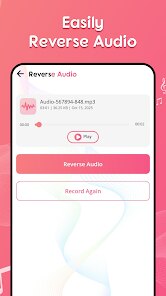
- :one: Basic Core Function – The app does exactly one thing: reverse audio playback. You record, it flips the sound, and you listen. No speed controls, no pitch shift, no effects layer. It's about as stripped down as an audio tool can get. Compare this to Voice Changer with Effects, which offers dozens of real-time voice presets like robot, chipmunk, and alien, plus background sounds and recording studio features. Reverse Voice doesn't even compete on that field.
- :two: No Audio Management – Recordings are dumped into a flat list with no naming, no folder support, no tagging, and no batch delete. You can't even see the file size or duration properly. In contrast, basic voice recorder apps like Smart Recorder or Voice Memos give you timestamps, search, and playlist sorting. This app offers zero organizational tools.
- :three: Zero Sharing or Export Options – There's no built-in share button, no export to file, no integration with messaging apps, and no way to save your reversed clips to your phone's music folder. You could technically save the audio by using a screen recorder or other workaround, but that's clunky. Other similar apps like MagicMic or Voicemod at least let you share clips directly to social media or save them to a gallery.
- :four: Visual Design is Minimal – The interface looks like a proof-of-concept from a coding tutorial. It's functional but ugly, with tiny buttons, no color theming, and no help menu. There's no onboarding flow, no sample clips to try, and no settings panel. For a user used to polished apps like AudioLab or LeA Editor, this feels unfinished.
pros
- :star: Completely Free with No Ads – The biggest strength is that there are no pop-up ads, no banner clutter, and no paywalled features. You get the full reverse function without any interruptions, which is rare for any utility app on Google Play. Other free voice changers like VoiceFX often show ads after every recording.
- :star: No Registration Required – You literally tap download, install, and start recording. There's no email signup, no phone number verification, no Google login. This is a huge time-saver compared to apps like Voicemod which push account creation before you can do anything useful.
- :star: Instant Processing – Once you stop recording, the reversed version is ready in under a second. There's no loading bar, no compression wait, no preview delay. Apps like Reverse Recorder sometimes lag when processing longer audio, but this one stays snappy even on a mid-range phone.
- :star: Tiny App Size – It's under 5 MB to download. That's almost nothing compared to feature-heavy apps like Audio Evolution Mobile which take up 30-50 MB. Great for people with limited storage or older devices.
cons
- :x: Only One Effect – The app literally does nothing except reverse audio. You can't add reverb, echo, distortion, or speed up/down. If you want variety beyond reverse, you'll need to install a second app. Competitors like FX Voice Changer offer 10+ effects in one interface.
- :x: No Background Recording – You cannot record while the app is minimized or the screen is off. If you switch to another app, the recording stops immediately. This makes it useless for longer voice notes or podcast snippets. Apps like Parrot Recorder handle background audio without issue.
- :x: Poor Audio Quality for Long Clips – On recordings over 30 seconds, the reversed output gets noticeably muffled and robotic. The original clarity seems compressed or lost during processing. For simple 5-second clips it's fine, but anything longer sounds distorted compared to Voice Saver or RecForge II.
- :x: No Waveform Visual – There is no waveform display, no peak meter, and no visual feedback during recording or playback. You have no idea if your audio is clipping or too quiet. Even basic voice changers like Voice Masker show a real-time sound graph to help you adjust volume.
Articles
![]()
Guide
How to Update Google Play Store on Android 2026
![]()
Guide
How to Download Older Versions of Android Apps
![]()
Guide
How to Download Apps Without Google Play Store
![]()
Guide
What Is an APK File for Android?
If you use an Android phone, you may have seen the term APK while searching for apps or games online. Some websites offer an APK download instead of a Google Play install button. Some users also mention APK files when talking about apps that are not available in their region, older app versions, or Android games downloaded outside the Play Store.
![]()
Guide
How to Install Games from Google Play for Beginners
Installing games on an Android phone is usually simple, but for beginners, the process can still feel confusing at first. You may not know where to search, which button to tap, whether the game is safe, or why Google Play sometimes asks for account settings, storage access, or payment information. If you are using an Android phone for the first time, learning how to install games from Google Play is one of the easiest ways to get started.
![]()
Guide
How Useful Gemini Is for Everyday Questions and Quick Tasks
emini feels different from many AI apps because it is not only trying to be a chatbot. After using it for everyday questions, quick writing, image understanding, and planning, I think its biggest strength is convenience.
![]()
Guide
What to Know Before Downloading APKs
For many Android users, downloading an APK is a common way to install apps and games. Sometimes an app is not available in a certain country.
![]()
Guide
ChatGPT Review: Is It Still the Best AI App in 2026?
![]()
Guide
Seedance 2.0 vs Sora: The Future of AI Video Generation
The AI video race has intensified dramatically over the past two years. Platforms like Sora from OpenAI and Luma Dream Machine pushed the boundaries of text-to-video realism. Yet, despite their impressive outputs, most tools still operate as probabilistic generators—you describe a scene, and the model interprets it. Control remains limited. With the February 2026 release of Seedance 2.0, developed by ByteDance, the paradigm shifted. Internally known as Jimeng 2.0, Seedance does not position itself as just another video model. It positions itself as an AI Director. Rather than guessing what you want, Seedance 2.0 allows you to direct what happens. This distinction defines everything that follows.









Recommended Apps
![]()
Home Design 3D
Anuman4.2
![]()
Truth or Dare Game - Party App
Chouic4.8
![]()
Photo Collage Maker
Scoompa4.7![]()
Learn to Draw Flower
Creative APPS4.2![]()
FIFA World Cup 2026™
FIFA2.8![]()
Mirror Plus: Mirror with Light
Digitalchemy, LLC4.4![]()
Meitu- Photo Editor & AI Art
Meitu (China) Limited4.5![]()
Perplexity - Ask Anything
PerplexityAI4.7![]()
GhostTube SLS Camera Alternate
GhostTube4![]()
Boom Chip Blast: 2-Player
Black Pyramid 3D Games Studio0![]()
Healthy Benefits+
Solutran, Inc.4.5![]()
Deepcheck AI Search Assistant
rohe.ai4![]()
Idol Prank Video Call & Chat
LightCode Solutions4![]()
Face Shape - Pretty Scale
GlintTec Apps3.9![]()
Plant App - Plant Identifier
ScaleUp4.6











































