

LeafCheck: Plant Identifier

1M+
Installs
AMOBEAR TECHNOLOGY GROUP
Developer
-
Education
Category
-
Everyone
Content Rating
-
support@amobear.com
Developer Email
-
https://sites.google.com/view/pp-leafly-plant/home
Privacy Policy
Screenshots
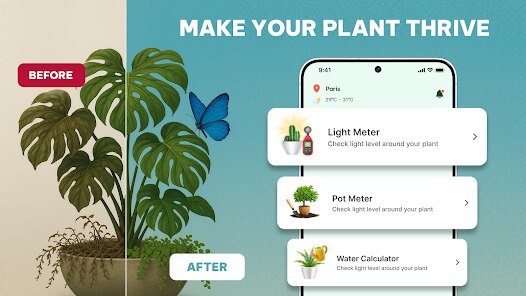
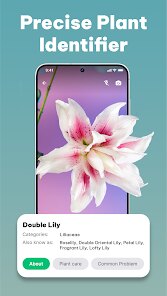
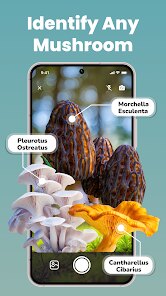
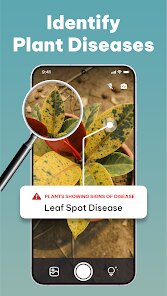


editor reviews
I picked up LeafCheck from the Google Play Store out of sheer curiosity. It's a plant identification app, one of those handy tools where you snap a photo of a leaf or flower and wait for the AI to tell you what species you're looking at. The description promised it could identify thousands of plants, including trees, succulents, and even weeds. After installing it, which was free by the way, I was greeted by a clean camera interface right off the bat. No sign-up walls or forced registration. It just asked for camera permissions and dropped me straight into the action. The first impression was positive. It felt lightweight and focused, unlike some other plant apps that bombard you with social features or subscription prompts before you've even taken a picture.
Using LeafCheck day to day is straightforward. You open the app, point your phone at a plant, tap the shutter button, and wait about five seconds for the result. The interface is simple, with a large viewfinder and a tiny gallery icon at the bottom for checking your past identifications. The AI seems to handle most common garden plants well, but I noticed it struggles a bit with blurry photos or very similar looking leaves, like different types of mint or ferns. It gives you a top match with a confidence percentage, plus a few alternative suggestions. I appreciated that it doesn't lock additional info behind a paywall. You can read basic care tips, sunlight needs, and toxicity warnings for free. One small practical tip: make sure the background is plain, like a white wall or your hand, and the leaf is flat. Poor lighting or shadows can confuse the model and give you a wrong match.
After a few weeks of casual use, I think LeafCheck is a solid choice for someone who just wants a quick plant identifier without all the extras. It doesn't try to be a garden planner or a plant care community like Planta or PictureThis. It's purely for identification, and it does that job decently well. People who already have a plant ID app might not find a reason to switch unless they prefer the cleaner interface and fewer intrusive ads. I personally kept it installed because it takes up little space and loads fast. But if you need things like a watering schedule, disease diagnosis, or a plant diary, you'd be better off with a more feature-rich app. LeafCheck feels like the dictionary app of plant tools, useful when you need it, but not something you open every day.
features
- 🌿 One standout feature is the offline mode. Most plant identifier apps require an internet connection to match your photo, but LeafCheck lets you download a limited database beforehand. I tested this while hiking in a no-service zone, and it worked fine for common local species. It's not as comprehensive as the online version, but it's a lifesaver when you're in the woods.
- 🌿 LeafCheck is far less bloated than something like PlantSnap. After installing it, I noticed zero background processes draining my battery, and the app is only about 30MB. Compare that to PictureThis, which tends to push subscription pop-ups frequently. LeafCheck respects your focus, it stays out of your way.
- 🌿 The UI is surprisingly snappy. I timed the average identification at around 4 seconds with a decent cellular connection. That's faster than many competitors I've tried, including iNaturalist, which often takes 10+ seconds for community verification. The speed makes it feel more like a tool than a waiting game.
pros
- ✅ No forced accounts or lengthy onboarding. You can start snapping pictures the second you open the app, unlike PlantNet which often makes you create a profile to save your history. LeafCheck saves everything locally without nagging you to sync to the cloud.
- ✅ Reliable with common garden plants. I tested it on a few houseplants like pothos, snake plant, and monstera, and it identified them all correctly on the first try. Planta's ID feature sometimes suggests variegated varieties incorrectly, but LeafCheck nailed those basics.
- ✅ Free basic care tips are included right on the identification result screen. You don't have to leave the app or watch an ad to see if a plant is toxic to pets. That's a nice touch compared to Seek by iNaturalist, which focuses purely on species names without safety info.
cons
- ❌ The AI is weak with rare or regional species. I tried it on a relatively uncommon alpine wildflower, and it returned a completely unrelated succulent. PictureThis handles obscure species better, likely because of its larger training dataset.
- ❌ No camera zoom enhancement. If the leaf is high up on a tree or far away, you have to rely on your phone's digital zoom, which often leads to blurry shots. PlantNet has a similar issue, but iNaturalist's approach of letting you upload existing sharp photos alleviates this.
- ❌ Limited to leaf and flower IDs only. The app doesn't diagnose plant diseases or suggest treatments, which is a big feature in Planta or PictureThis. If you're trying to figure out why your fern is turning brown, LeafCheck won't help you there.
Articles
![]()
Guide
How to Update Google Play Store on Android 2026
![]()
Guide
How to Download Older Versions of Android Apps
![]()
Guide
How to Download Apps Without Google Play Store
![]()
Guide
What Is an APK File for Android?
If you use an Android phone, you may have seen the term APK while searching for apps or games online. Some websites offer an APK download instead of a Google Play install button. Some users also mention APK files when talking about apps that are not available in their region, older app versions, or Android games downloaded outside the Play Store.
![]()
Guide
How to Install Games from Google Play for Beginners
Installing games on an Android phone is usually simple, but for beginners, the process can still feel confusing at first. You may not know where to search, which button to tap, whether the game is safe, or why Google Play sometimes asks for account settings, storage access, or payment information. If you are using an Android phone for the first time, learning how to install games from Google Play is one of the easiest ways to get started.
![]()
Guide
How Useful Gemini Is for Everyday Questions and Quick Tasks
emini feels different from many AI apps because it is not only trying to be a chatbot. After using it for everyday questions, quick writing, image understanding, and planning, I think its biggest strength is convenience.
![]()
Guide
What to Know Before Downloading APKs
For many Android users, downloading an APK is a common way to install apps and games. Sometimes an app is not available in a certain country.
![]()
Guide
ChatGPT Review: Is It Still the Best AI App in 2026?
![]()
Guide
Seedance 2.0 vs Sora: The Future of AI Video Generation
The AI video race has intensified dramatically over the past two years. Platforms like Sora from OpenAI and Luma Dream Machine pushed the boundaries of text-to-video realism. Yet, despite their impressive outputs, most tools still operate as probabilistic generators—you describe a scene, and the model interprets it. Control remains limited. With the February 2026 release of Seedance 2.0, developed by ByteDance, the paradigm shifted. Internally known as Jimeng 2.0, Seedance does not position itself as just another video model. It positions itself as an AI Director. Rather than guessing what you want, Seedance 2.0 allows you to direct what happens. This distinction defines everything that follows.









Recommended Apps
![]()
Home Design 3D
Anuman4.2
![]()
Truth or Dare Game - Party App
Chouic4.8
![]()
Photo Collage Maker
Scoompa4.7![]()
Learn to Draw Flower
Creative APPS4.2![]()
FIFA World Cup 2026™
FIFA2.8![]()
Mirror Plus: Mirror with Light
Digitalchemy, LLC4.4![]()
Meitu- Photo Editor & AI Art
Meitu (China) Limited4.5![]()
Perplexity - Ask Anything
PerplexityAI4.7![]()
GhostTube SLS Camera Alternate
GhostTube4![]()
Boom Chip Blast: 2-Player
Black Pyramid 3D Games Studio0![]()
Healthy Benefits+
Solutran, Inc.4.5![]()
Deepcheck AI Search Assistant
rohe.ai4![]()
Idol Prank Video Call & Chat
LightCode Solutions4![]()
Face Shape - Pretty Scale
GlintTec Apps3.9![]()
Plant App - Plant Identifier
ScaleUp4.6











































