

Seekee - Ai Search & Assistant

50M+
Installs
Seekee Ltd
Developer
-
Generative AI
Category
-
Teen
Content Rating
-
info@seekee.ai
Developer Email
-
https://h5.seekee.ai/in/art/Seekeeai_Android_Privacy_Policy
Privacy Policy
Screenshots

editor reviews
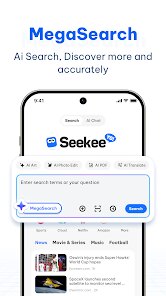
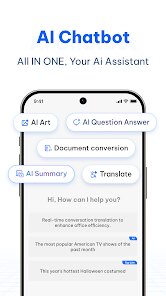
Seekee is an AI-powered search and assistant app, basically a mix of a smart browser helper and a chatbot you can talk to on your phone. You download it from Google Play or the App Store, launch it, and the first thing you see is a clean chat-style interface with a keyboard and a microphone button. It doesn't ask you to sign up right away, so you can just start typing questions or speaking them out loud. People download this app because they want a faster, more natural way to find answers without needing to open a regular search engine. My first impression was that it felt like a stripped-down version of ChatGPT but with a search focus, and the loading speed after install was decent, no ads popping up immediately. It's free to download, and there's no forced registration, which makes the initial experience pretty smooth.
After using Seekee for a bit, I noticed the interface is minimal, almost too minimal. You type your question, it thinks for a second, and then gives you a response with links to sources or a short summary. The onboarding is just a quick overlay that shows you can type or use voice. Common actions include asking for facts, getting definitions, or even having it summarize a topic. One thing that tripped me up was that it doesn't show the source links unless you tap on a small icon, so I missed that at first. A practical tip is to use the voice function when you're cooking or driving, it works well for short queries but not so much for long ones. The flow is straightforward, but sometimes the replies feel too short and generic, like it's pulling from the web but not adding much extra value. It handles simple requests neatly, but for deeper research, it leaves you wanting more context.
I'd say this app is good for people who want quick answers without digging through search results, like someone checking a fact or getting a quick definition. But if you need detailed comparisons or multi-step research, you might be better off with a standard search engine or a more robust AI tool like Perplexity. What makes Seekee different is its simplicity and no-login approach, but that also limits its usefulness for power users. I could see someone keeping it installed as a voice-based search helper, but likely uninstalling it if they rely on more complex tasks like writing or planning. It's fine for what it is, but it doesn't fully replace your go-to tools.
features
- 🤖 Direct Question Answering: Seekee shines when you ask straightforward questions and want a concise answer. Compared to Google Assistant, which often gives multiple links, Seekee just gives you a short response with optional sources. It's faster for simple queries like "What's the capital of France?" but falls short for more complex searches where you need multiple perspectives.
- 🔍 No Registration Needed: Unlike many assistant apps that force you to sign up with an email or Google account, Seekee lets you start asking questions immediately. ChatGPT requires a login, but here you're free to test it out without commitment. This makes it feel more private and less pushy, but you miss out on personalized features or history tracking.
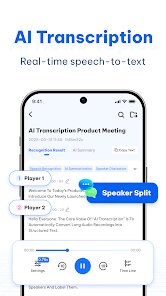
- 🎤 Voice Recognition: The voice input works surprisingly well for basic phrases. It's better than Siri for picking up casual speech, but not as advanced at understanding context or following up. For example, you can ask "What's the weather?" and then say "And tomorrow?" but it won't connect the dots, so it's still a one-shot tool.
- 📎 Source Linking: Seekee includes clickable source links in its replies, which is a nice touch for verifying info. In comparison, Perplexity does this more comprehensively with inline citations, but Seekee's approach is simpler and less cluttered. It's useful for students checking homework facts, but the links are often to generic sites rather than primary sources.
pros
- 👍 Fast and Lightweight: The app loads quickly, takes up little storage space, and doesn't drain battery. It's much lighter than Google Assistant, which is heavy because of all its integrations. For low-end phones, this is a big plus.
- 👍 No Account Required: You can use it instantly without creating an account or sharing personal info. This puts it ahead of ChatGPT or Bing Chat, which both want you to log in. It feels less "creepy" for one-off use.
- 👍 Free with No Ads: Unlike some apps that shove in ads after a few queries, Seekee remains clean. Compared to DuckDuckGo's AI, which has a similar feel, Seekee is more straightforward and less bloated.
cons
- 👎 Limited Context Handling: The app can't remember previous questions in a conversation, which makes it feel disconnected. ChatGPT and Perplexity both keep a thread of chat, but Seekee forgets everything after one query. It's like talking to a goldfish.
- 👎 Shallow Responses: It often gives short, surface-level answers without nuance. For instance, asking "Explain quantum computing" will get you a few sentences, not the depth you'd get from Wolfram Alpha or even a quick Google search's featured snippet.
- 👎 No Personalization: Since there's no login, the app can't save preferences, history, or settings. Other assistants like Alexa or Google Assistant can customize replies based on your location or past behavior, but Seekee treats every query as brand new.
- 👎 Inconsistent Source Quality: The linked sources sometimes are just generic blog posts or outdated pages. Compared to Perplexity, which favors academic and recent sources, Seekee's citations feel less trustworthy for research needs.
Articles
![]()
Guide
How to Update Google Play Store on Android 2026
![]()
Guide
How to Download Older Versions of Android Apps
![]()
Guide
How to Download Apps Without Google Play Store
![]()
Guide
What Is an APK File for Android?
If you use an Android phone, you may have seen the term APK while searching for apps or games online. Some websites offer an APK download instead of a Google Play install button. Some users also mention APK files when talking about apps that are not available in their region, older app versions, or Android games downloaded outside the Play Store.
![]()
Guide
How to Install Games from Google Play for Beginners
Installing games on an Android phone is usually simple, but for beginners, the process can still feel confusing at first. You may not know where to search, which button to tap, whether the game is safe, or why Google Play sometimes asks for account settings, storage access, or payment information. If you are using an Android phone for the first time, learning how to install games from Google Play is one of the easiest ways to get started.
![]()
Guide
How Useful Gemini Is for Everyday Questions and Quick Tasks
emini feels different from many AI apps because it is not only trying to be a chatbot. After using it for everyday questions, quick writing, image understanding, and planning, I think its biggest strength is convenience.
![]()
Guide
What to Know Before Downloading APKs
For many Android users, downloading an APK is a common way to install apps and games. Sometimes an app is not available in a certain country.
![]()
Guide
ChatGPT Review: Is It Still the Best AI App in 2026?
![]()
Guide
Seedance 2.0 vs Sora: The Future of AI Video Generation
The AI video race has intensified dramatically over the past two years. Platforms like Sora from OpenAI and Luma Dream Machine pushed the boundaries of text-to-video realism. Yet, despite their impressive outputs, most tools still operate as probabilistic generators—you describe a scene, and the model interprets it. Control remains limited. With the February 2026 release of Seedance 2.0, developed by ByteDance, the paradigm shifted. Internally known as Jimeng 2.0, Seedance does not position itself as just another video model. It positions itself as an AI Director. Rather than guessing what you want, Seedance 2.0 allows you to direct what happens. This distinction defines everything that follows.









Recommended Apps
![]()
Home Design 3D
Anuman4.2
![]()
Truth or Dare Game - Party App
Chouic4.8
![]()
Photo Collage Maker
Scoompa4.7![]()
Learn to Draw Flower
Creative APPS4.2![]()
FIFA World Cup 2026™
FIFA2.8![]()
Mirror Plus: Mirror with Light
Digitalchemy, LLC4.4![]()
Meitu- Photo Editor & AI Art
Meitu (China) Limited4.5![]()
Perplexity - Ask Anything
PerplexityAI4.7![]()
GhostTube SLS Camera Alternate
GhostTube4![]()
Boom Chip Blast: 2-Player
Black Pyramid 3D Games Studio0![]()
Healthy Benefits+
Solutran, Inc.4.5![]()
Deepcheck AI Search Assistant
rohe.ai4![]()
Idol Prank Video Call & Chat
LightCode Solutions4![]()
Face Shape - Pretty Scale
GlintTec Apps3.9![]()
Plant App - Plant Identifier
ScaleUp4.6











































