
Blood Pressure Log

1M+
Installs
Sharon Evans
Developer
-
Health & Fitness
Category
-
Everyone
Content Rating
-
teamore.wonton@gmail.com
Developer Email
-
https://www.sharon-apps.com/privacy_policy.html
Privacy Policy
Screenshots
editor reviews
Blood pressure tracking apps have become increasingly common on Google Play, and Blood Pressure Log is one of the more straightforward options available. Developed by Sharon Evans, this application focuses specifically on recording blood pressure readings along with pulse rates and weight, if users choose to log those as well. The app is free to download and install, though it does contain advertisements and offers optional in-app purchases for those who want to remove them or unlock additional features. It's designed for anyone who needs to monitor their blood pressure regularly, whether for personal health awareness or as part of a doctor-recommended routine.
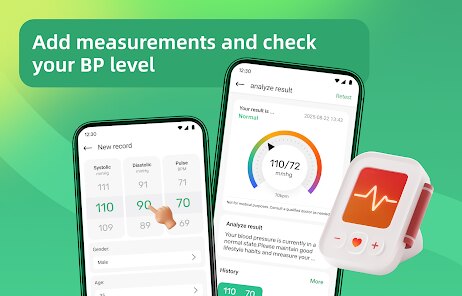
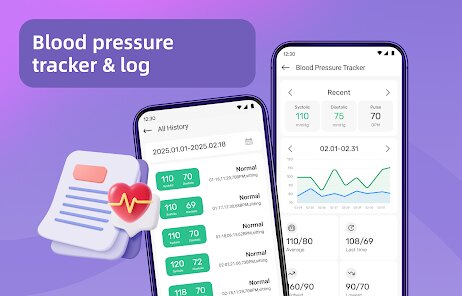
The interface operates in a practical, data-entry style. Upon opening the app after installation, users are presented with a simple dashboard where new readings can be added by tapping a clearly marked button. Each entry asks for systolic and diastolic numbers, pulse, and an optional note or tag like "morning" or "medication taken." The app automatically timestamps entries and organizes them chronologically. Navigating between the log view, charts, and settings is straightforward, though the design feels functional rather than polished. The charts display trends effectively, showing weekly or monthly averages, which gives a useful overview without requiring much effort from the user.
Compared to more comprehensive health apps like My BP Lab or SmartBP, this one sticks to the essentials. My BP Lab, for instance, integrates stress tracking and guided breathing exercises, which can feel cluttered if someone only wants to log numbers. Blood Pressure Log avoids that extra noise. On the other hand, SmartBP offers more export options and cloud syncing right from the start. This app feels a bit more basic in that regard, but for users who prefer simplicity and don't need to analyze data across multiple platforms, it serves its core purpose well. The trade-off seems to be less flexibility versus a cleaner, more focused experience.
features
- Data entry remains uncomplicated. Each field is labeled, and the process takes maybe thirty seconds from opening the app to saving a reading. This encourages consistent logging without becoming a chore.
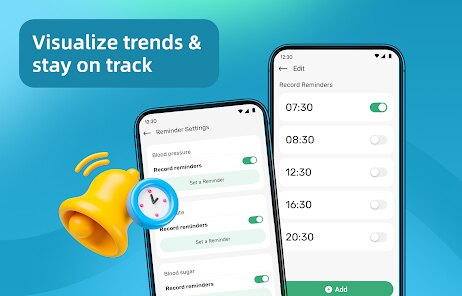
- The charting feature shows trends over customizable time periods. Unlike some apps that require navigating multiple menus to see progress, this one displays averages right on the main dashboard after just a few taps.
- Tagging entries with customizable labels is useful for identifying patterns. For example, users can distinguish between pre- and post-exercise readings, which is a feature that similar apps like Blood Pressure Diary handle with more rigid preset categories.
- Exporting data as a PDF or CSV is available, though not as seamless as in dedicated medical logging apps. Still, it works well enough for sharing records with a healthcare provider during appointments.
pros
- Helps maintain a consistent log without needing to carry a paper notebook or remember values until later.
- The simple layout reduces the mental effort required to record readings, making daily tracking more sustainable.
- Seeing average trends over weeks provides a clearer picture of blood pressure changes than individual readings alone.
cons
- The app displays ads fairly frequently, which can interrupt the flow when reviewing past entries or checking charts.
- Cloud backup requires the paid version, meaning data stays only on the device unless the user upgrades.
- Occasionally the app takes a couple of seconds to load the chart view, particularly when many entries are stored. It's not a major delay, but it's noticeable.
Articles
![]()
Guide
How to Update Google Play Store on Android 2026
![]()
Guide
How to Download Older Versions of Android Apps
![]()
Guide
How to Download Apps Without Google Play Store
![]()
Guide
What Is an APK File for Android?
If you use an Android phone, you may have seen the term APK while searching for apps or games online. Some websites offer an APK download instead of a Google Play install button. Some users also mention APK files when talking about apps that are not available in their region, older app versions, or Android games downloaded outside the Play Store.
![]()
Guide
How to Install Games from Google Play for Beginners
Installing games on an Android phone is usually simple, but for beginners, the process can still feel confusing at first. You may not know where to search, which button to tap, whether the game is safe, or why Google Play sometimes asks for account settings, storage access, or payment information. If you are using an Android phone for the first time, learning how to install games from Google Play is one of the easiest ways to get started.
![]()
Guide
How Useful Gemini Is for Everyday Questions and Quick Tasks
emini feels different from many AI apps because it is not only trying to be a chatbot. After using it for everyday questions, quick writing, image understanding, and planning, I think its biggest strength is convenience.
![]()
Guide
What to Know Before Downloading APKs
For many Android users, downloading an APK is a common way to install apps and games. Sometimes an app is not available in a certain country.
![]()
Guide
ChatGPT Review: Is It Still the Best AI App in 2026?
![]()
Guide
Seedance 2.0 vs Sora: The Future of AI Video Generation
The AI video race has intensified dramatically over the past two years. Platforms like Sora from OpenAI and Luma Dream Machine pushed the boundaries of text-to-video realism. Yet, despite their impressive outputs, most tools still operate as probabilistic generators—you describe a scene, and the model interprets it. Control remains limited. With the February 2026 release of Seedance 2.0, developed by ByteDance, the paradigm shifted. Internally known as Jimeng 2.0, Seedance does not position itself as just another video model. It positions itself as an AI Director. Rather than guessing what you want, Seedance 2.0 allows you to direct what happens. This distinction defines everything that follows.









Recommended Apps
![]()
Home Design 3D
Anuman4.2
![]()
Truth or Dare Game - Party App
Chouic4.8
![]()
Photo Collage Maker
Scoompa4.7![]()
Learn to Draw Flower
Creative APPS4.2![]()
FIFA World Cup 2026™
FIFA2.8![]()
Mirror Plus: Mirror with Light
Digitalchemy, LLC4.4![]()
Meitu- Photo Editor & AI Art
Meitu (China) Limited4.5![]()
Perplexity - Ask Anything
PerplexityAI4.7![]()
GhostTube SLS Camera Alternate
GhostTube4![]()
Boom Chip Blast: 2-Player
Black Pyramid 3D Games Studio0![]()
Healthy Benefits+
Solutran, Inc.4.5![]()
Deepcheck AI Search Assistant
rohe.ai4![]()
Idol Prank Video Call & Chat
LightCode Solutions4![]()
Face Shape - Pretty Scale
GlintTec Apps3.9![]()
Plant App - Plant Identifier
ScaleUp4.6











































