
Hair Color & Hairstyle Try On

100K+
Installs
Toon Tech Ltd
Developer
-
Generative AI
Category
-
Everyone
Content Rating
-
developer@humptydumptystudio.com
Developer Email
-
https://toontech.uk/ai-hairstyle--colour-changer--privacy-policy
Privacy Policy
Screenshots


editor reviews
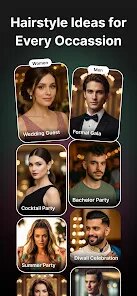
Finding the perfect hair color or style often involves a leap of faith that doesn't always pay off. Hair Color & Hairstyle Try On, developed by Toon Tech Ltd, provides a practical alternative. Available for free download on Google Play, this augmented reality app lets you visualize different looks using your own photo. While the core feature set is accessible without a subscription, it does include ads and offers in-app purchases for unlocking advanced tools and removing commercial interruptions.
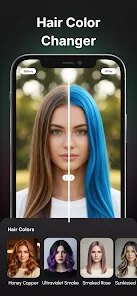
Working with the app is straightforward. You either take a new selfie or select one from your gallery after installing it. The interface presents a selection wheel of natural shades, from subtle brunettes to striking blondes and vibrant fantasy colors. Simply tap a color, and the application maps it onto your hair in the image. You can also explore the haircut library, which overlays various hairstyles onto your selected photo. I found the color mapping on straight hair to be surprisingly accurate, though longer, layered styles can sometimes challenge the detection boundaries, resulting in a slightly uneven application.
Compared to other hairstyle apps I have sampled, this one places a heavier emphasis on color accuracy rather than just an extensive style library. Applications like Style My Hair offer a wider range of brand-specific color recommendations, while YouCam Makeup focuses on a full beauty suite. This title from Toon Tech Ltd carves a specific niche for color experimentation. It feels less like a shopping tool and more like a digital canvas for trying out dramatic transformations before committing to a salon visit, which I find to be its strongest differentiator.
features
- The real-time color rendering is a standout feature. When you select a shade, the app processes your hair texture in the photo. I tested a deep burgundy tone, and the app handled the subtle highlights in my brown hair naturally, avoiding the flat, painted-on look common in simpler editors.
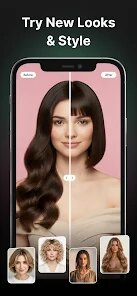
- Its hairstyle library is organized by length and texture, which simplifies browsing. Instead of scrolling endlessly, you can filter for short bobs or long layers. I appreciated that many styles include a brief description of the required hair density, a detail missing from competitors like Perfect Hairstyle.
- The virtual trial tool allows you to compare two looks side-by-side. You can save a color snapshot and a haircut snapshot to a split screen. This feature helped me choose between a blonde balayage and a full platinum look without needing to toggle back and forth in the main editor.
pros
- It significantly reduces the risk of a bad dye job; I felt much more confident choosing a bold copper tone after seeing a realistic preview over a few days.
- The hair length simulation helps with planning haircuts. Trying a pixie cut virtually saved me from a regrettable decision, as I could see how my face shape handled the shorter style.
- Sharing previews with friends via the built-in option makes group decisions or second opinions much easier without leaving the app.
cons
- The color accuracy depends heavily on good lighting in the source photo; dimly lit images often produce a muddy or incorrect final shade.
- Free users face a limited selection of the more realistic, high-definition hairstyles, which are locked behind a paywall.
- Short hair or styles with lots of flyaway strands can confuse the hair detection algorithm, requiring manual adjustments that are not always precise.
Articles
![]()
Guide
How to Update Google Play Store on Android 2026
![]()
Guide
How to Download Older Versions of Android Apps
![]()
Guide
How to Download Apps Without Google Play Store
![]()
Guide
What Is an APK File for Android?
If you use an Android phone, you may have seen the term APK while searching for apps or games online. Some websites offer an APK download instead of a Google Play install button. Some users also mention APK files when talking about apps that are not available in their region, older app versions, or Android games downloaded outside the Play Store.
![]()
Guide
How to Install Games from Google Play for Beginners
Installing games on an Android phone is usually simple, but for beginners, the process can still feel confusing at first. You may not know where to search, which button to tap, whether the game is safe, or why Google Play sometimes asks for account settings, storage access, or payment information. If you are using an Android phone for the first time, learning how to install games from Google Play is one of the easiest ways to get started.
![]()
Guide
How Useful Gemini Is for Everyday Questions and Quick Tasks
emini feels different from many AI apps because it is not only trying to be a chatbot. After using it for everyday questions, quick writing, image understanding, and planning, I think its biggest strength is convenience.
![]()
Guide
What to Know Before Downloading APKs
For many Android users, downloading an APK is a common way to install apps and games. Sometimes an app is not available in a certain country.
![]()
Guide
ChatGPT Review: Is It Still the Best AI App in 2026?
![]()
Guide
Seedance 2.0 vs Sora: The Future of AI Video Generation
The AI video race has intensified dramatically over the past two years. Platforms like Sora from OpenAI and Luma Dream Machine pushed the boundaries of text-to-video realism. Yet, despite their impressive outputs, most tools still operate as probabilistic generators—you describe a scene, and the model interprets it. Control remains limited. With the February 2026 release of Seedance 2.0, developed by ByteDance, the paradigm shifted. Internally known as Jimeng 2.0, Seedance does not position itself as just another video model. It positions itself as an AI Director. Rather than guessing what you want, Seedance 2.0 allows you to direct what happens. This distinction defines everything that follows.









Recommended Apps
![]()
Home Design 3D
Anuman4.2
![]()
Truth or Dare Game - Party App
Chouic4.8
![]()
Photo Collage Maker
Scoompa4.7![]()
Learn to Draw Flower
Creative APPS4.2![]()
FIFA World Cup 2026™
FIFA2.8![]()
Mirror Plus: Mirror with Light
Digitalchemy, LLC4.4![]()
Meitu- Photo Editor & AI Art
Meitu (China) Limited4.5![]()
Perplexity - Ask Anything
PerplexityAI4.7![]()
GhostTube SLS Camera Alternate
GhostTube4![]()
Boom Chip Blast: 2-Player
Black Pyramid 3D Games Studio0![]()
Healthy Benefits+
Solutran, Inc.4.5![]()
Deepcheck AI Search Assistant
rohe.ai4![]()
Idol Prank Video Call & Chat
LightCode Solutions4![]()
Face Shape - Pretty Scale
GlintTec Apps3.9![]()
Plant App - Plant Identifier
ScaleUp4.6












































