
Football Jersey Maker

5M+
Installs
AJ DEVS
Developer
-
Entertainment
Category
-
Everyone
Content Rating
-
ajdevsgroup@gmail.com
Developer Email
-
https://jerseymakr.com/privacy-policy
Privacy Policy
Screenshots
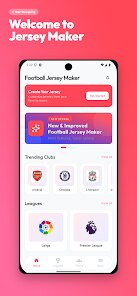
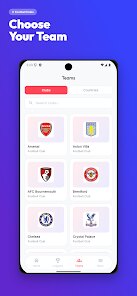
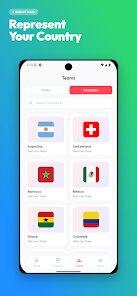
editor reviews
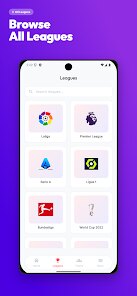
For enthusiasts wanting to create their own designs, Football Jersey Maker by AJ DEVS on Google Play provides a straightforward tool for designing custom sportswear. The app focuses on letting users experiment with different colors, patterns, and sponsor logos to build personalized jerseys from scratch. It is free to download on the Google Play Store, though it includes ads and optional in-app purchases for unlocking additional templates and elements. While the exact number of installs fluctuates, it has maintained a steady user base among fans and hobbyists looking for an easy design platform on their phones.
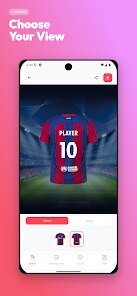
Getting started is fairly simple: you choose a base template, then adjust the colors for the body, sleeves, and collar individually. The library of patterns and logos is organized well, so browsing through options doesn't feel cluttered. I found the drag-and-drop feature for placing sponsor badges and numbers to be quite responsive, even on a mid-range device. The app also provides a 3D preview, which gives a better sense of how the finished jersey will look from different angles, rather than just a flat image.
What sets Football Jersey Maker apart from other design apps like Custom Sports Gear is its narrower focus on soccer kits. Many similar tools try to cover multiple sports, which often results in a less refined interface for each specific type. AJ DEVS has kept the design process streamlined here, leaving out extra clutter that isn't needed for football jerseys. However, this also means there is less variety in non-soccer sport templates, which could be a limitation for some users who want versatility.
features
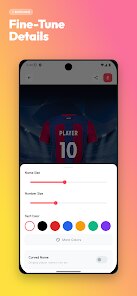
- The color palette customization is genuinely robust. You can adjust nearly every section of the jersey independently, from the main body down to the cuff trim. This level of control makes it easy to recreate real club kits or dream up entirely original designs without feeling limited by preset options.
- Sponsor logo placement works better than I expected. The app includes a decent selection of generic badges, and you can import your own images to overlay onto the design. Unlike a competing app called Kit Creator, this one allows resizing and rotating the logos freely, so positioning feels less restrictive.
- The 3D preview makes a noticeable difference in final output quality. While some apps only show a flat mockup, this feature lets you rotate the model to see the jersey from the back and sides, which helps catch alignment issues before you finalize a design.
- Saving and sharing designs is straightforward. You can export high-resolution images directly from the app, and even set them as wallpapers or share on social media without watermarks, which is a nice touch compared to apps that lock exporting behind a paywall.
pros
- I found it useful for quickly visualizing team kit ideas before ordering from a manufacturer, saving time and potential design mistakes.
- Creating matching sets for casual pickup games becomes easier since you can save multiple designs and compare them side by side.
- The app helped me settle color disagreements with teammates without needing expensive software, just by showing different versions on the phone screen.
cons
- The free version has a limited template selection, so unlocking more requires in-app purchases that can add up if you want variety.
- Ads appear between editing steps occasionally, which interrupts the flow when you are focused on fine details.
- Importing custom images sometimes crops them oddly if the aspect ratio does not match the template area, requiring extra manual adjustment.
Articles
![]()
Guide
How to Update Google Play Store on Android 2026
![]()
Guide
How to Download Older Versions of Android Apps
![]()
Guide
How to Download Apps Without Google Play Store
![]()
Guide
What Is an APK File for Android?
If you use an Android phone, you may have seen the term APK while searching for apps or games online. Some websites offer an APK download instead of a Google Play install button. Some users also mention APK files when talking about apps that are not available in their region, older app versions, or Android games downloaded outside the Play Store.
![]()
Guide
How to Install Games from Google Play for Beginners
Installing games on an Android phone is usually simple, but for beginners, the process can still feel confusing at first. You may not know where to search, which button to tap, whether the game is safe, or why Google Play sometimes asks for account settings, storage access, or payment information. If you are using an Android phone for the first time, learning how to install games from Google Play is one of the easiest ways to get started.
![]()
Guide
How Useful Gemini Is for Everyday Questions and Quick Tasks
emini feels different from many AI apps because it is not only trying to be a chatbot. After using it for everyday questions, quick writing, image understanding, and planning, I think its biggest strength is convenience.
![]()
Guide
What to Know Before Downloading APKs
For many Android users, downloading an APK is a common way to install apps and games. Sometimes an app is not available in a certain country.
![]()
Guide
ChatGPT Review: Is It Still the Best AI App in 2026?
![]()
Guide
Seedance 2.0 vs Sora: The Future of AI Video Generation
The AI video race has intensified dramatically over the past two years. Platforms like Sora from OpenAI and Luma Dream Machine pushed the boundaries of text-to-video realism. Yet, despite their impressive outputs, most tools still operate as probabilistic generators—you describe a scene, and the model interprets it. Control remains limited. With the February 2026 release of Seedance 2.0, developed by ByteDance, the paradigm shifted. Internally known as Jimeng 2.0, Seedance does not position itself as just another video model. It positions itself as an AI Director. Rather than guessing what you want, Seedance 2.0 allows you to direct what happens. This distinction defines everything that follows.









Recommended Apps
![]()
Home Design 3D
Anuman4.2
![]()
Truth or Dare Game - Party App
Chouic4.8
![]()
Photo Collage Maker
Scoompa4.7![]()
Learn to Draw Flower
Creative APPS4.2![]()
FIFA World Cup 2026™
FIFA2.8![]()
Mirror Plus: Mirror with Light
Digitalchemy, LLC4.4![]()
Meitu- Photo Editor & AI Art
Meitu (China) Limited4.5![]()
Perplexity - Ask Anything
PerplexityAI4.7![]()
GhostTube SLS Camera Alternate
GhostTube4![]()
Boom Chip Blast: 2-Player
Black Pyramid 3D Games Studio0![]()
Healthy Benefits+
Solutran, Inc.4.5![]()
Deepcheck AI Search Assistant
rohe.ai4![]()
Idol Prank Video Call & Chat
LightCode Solutions4![]()
Face Shape - Pretty Scale
GlintTec Apps3.9![]()
Plant App - Plant Identifier
ScaleUp4.6











































