

Allergy Plus by Pollen.com

100K+
Installs
IQVIA Inc.
Developer
-
Health & Fitness
Category
-
Everyone
Content Rating
-
imsmobileapp@gmail.com
Developer Email
-
https://www.pollen.com/help/privacy
Privacy Policy
Screenshots
editor reviews
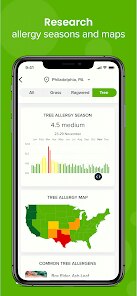
For those dealing with seasonal allergies, finding a reliable tracking tool can make a real difference in managing symptoms. Allergy Plus by Pollen.com, developed by IQVIA Inc., is a free health monitoring application available on Google Play designed to help users stay ahead of local pollen conditions. The app provides current and forecasted pollen counts for trees, grasses, and weeds, along with weather data that influences allergy triggers. Since its download numbers continue to grow steadily, it's clear many people find value in having this information at their fingertips. While the app is free to install and use, it does contain advertisements and offers optional in-app purchases for an ad-free experience and additional features.
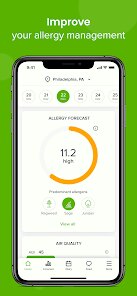
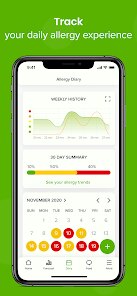
Getting started is straightforward after you install the app. Once opened, it immediately requests location access to deliver localized pollen data, which I found to be reasonably accurate for my area. The main interface displays a clean daily breakdown with specific pollen types and their severity levels, color-coded for quick scanning. Users can also view a five-day forecast, which I've found helpful for planning outdoor activities. The app includes a symptom tracker that lets you log your allergy reactions daily, though I noticed this feature requires consistent manual input to build meaningful patterns over time.
When comparing Allergy Plus to similar apps like WebMD Allergy or Zyrtec AllergyCast, the main difference lies in its data source and presentation style. While AllergyCast focuses heavily on community-reported symptoms and WebMD offers broader health integration, Allergy Plus sticks closely to scientific pollen counts from monitored stations. This makes it feel more objective and less reliant on user-reported data, which I personally prefer for accuracy. The trade-off is that the interface feels slightly less polished than some competitors, but the information itself appears more grounded in measured data rather than aggregated opinions.
features
- The pollen breakdown by type is more detailed than most competitors. Instead of a single generic rating, you can see separate values for trees, grasses, and weeds. This granularity helped me realize my symptoms weren't triggered by all pollen, but specifically by grass levels in late spring.
- Navigation between screens works smoothly, though the app occasionally reloads location data when switching tabs. I found this minor delay acceptable considering the amount of localized information it processes.
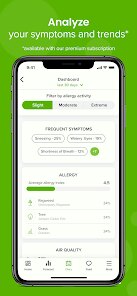
- The symptom tracking interface feels a bit dated compared to modern health apps. Logging daily symptoms requires several taps, and the journal view lacks visual trends or charts that would make the data more actionable.
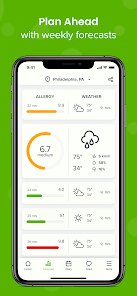
- Unlike many allergy apps that only provide today's data, this one includes a reliable five-day forecast. I've cross-checked it with local weather stations and found the predictions reasonably consistent, though not perfect during rapidly changing seasons.
pros
- Knowing exact pollen levels before heading out has reduced my surprise allergy attacks significantly. I can now decide whether to take medication or avoid certain areas based on real data.
- The app works well for planning outdoor events. I checked forecasts before scheduling a weekend barbecue and managed to pick a day with low grass pollen counts.
- Having historical symptom logs helped me identify patterns with specific pollen types, which made discussions with my doctor more productive than vague descriptions of my symptoms.
cons
- Advertisements occasionally interrupt the experience, appearing as banner ads and full-screen interstitials. The paid upgrade removes them, but the cost may not feel justified for occasional users.
- Location services drain battery noticeably when the app runs in the background for automatic updates. I've started manually refreshing data instead of keeping the feature always active.
- The symptom tracker lacks offline functionality, so forgetting to log on days without service means losing data for that period. This seems like a missed opportunity for better user experience.
Articles
![]()
Guide
How to Update Google Play Store on Android 2026
![]()
Guide
How to Download Older Versions of Android Apps
![]()
Guide
How to Download Apps Without Google Play Store
![]()
Guide
What Is an APK File for Android?
If you use an Android phone, you may have seen the term APK while searching for apps or games online. Some websites offer an APK download instead of a Google Play install button. Some users also mention APK files when talking about apps that are not available in their region, older app versions, or Android games downloaded outside the Play Store.
![]()
Guide
How to Install Games from Google Play for Beginners
Installing games on an Android phone is usually simple, but for beginners, the process can still feel confusing at first. You may not know where to search, which button to tap, whether the game is safe, or why Google Play sometimes asks for account settings, storage access, or payment information. If you are using an Android phone for the first time, learning how to install games from Google Play is one of the easiest ways to get started.
![]()
Guide
How Useful Gemini Is for Everyday Questions and Quick Tasks
emini feels different from many AI apps because it is not only trying to be a chatbot. After using it for everyday questions, quick writing, image understanding, and planning, I think its biggest strength is convenience.
![]()
Guide
What to Know Before Downloading APKs
For many Android users, downloading an APK is a common way to install apps and games. Sometimes an app is not available in a certain country.
![]()
Guide
ChatGPT Review: Is It Still the Best AI App in 2026?
![]()
Guide
Seedance 2.0 vs Sora: The Future of AI Video Generation
The AI video race has intensified dramatically over the past two years. Platforms like Sora from OpenAI and Luma Dream Machine pushed the boundaries of text-to-video realism. Yet, despite their impressive outputs, most tools still operate as probabilistic generators—you describe a scene, and the model interprets it. Control remains limited. With the February 2026 release of Seedance 2.0, developed by ByteDance, the paradigm shifted. Internally known as Jimeng 2.0, Seedance does not position itself as just another video model. It positions itself as an AI Director. Rather than guessing what you want, Seedance 2.0 allows you to direct what happens. This distinction defines everything that follows.









Recommended Apps
![]()
Home Design 3D
Anuman4.2
![]()
Truth or Dare Game - Party App
Chouic4.8
![]()
Photo Collage Maker
Scoompa4.7![]()
Learn to Draw Flower
Creative APPS4.2![]()
FIFA World Cup 2026™
FIFA2.8![]()
Mirror Plus: Mirror with Light
Digitalchemy, LLC4.4![]()
Meitu- Photo Editor & AI Art
Meitu (China) Limited4.5![]()
Perplexity - Ask Anything
PerplexityAI4.7![]()
GhostTube SLS Camera Alternate
GhostTube4![]()
Boom Chip Blast: 2-Player
Black Pyramid 3D Games Studio0![]()
Healthy Benefits+
Solutran, Inc.4.5![]()
Deepcheck AI Search Assistant
rohe.ai4![]()
Idol Prank Video Call & Chat
LightCode Solutions4![]()
Face Shape - Pretty Scale
GlintTec Apps3.9![]()
Plant App - Plant Identifier
ScaleUp4.6












































