

Tripo - AI 3D Model Generator

500K+
Installs
Tripo AI
Developer
-
Art & Design
Category
-
Everyone
Content Rating
-
contact@holymolly.ai
Developer Email
-
https://www.tripo3d.ai/privacy
Privacy Policy
Screenshots
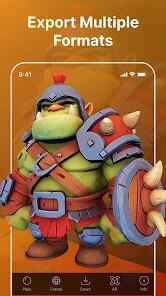
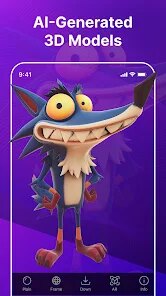
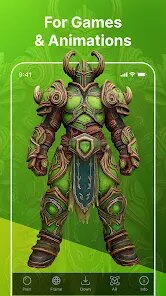
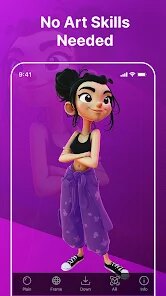
editor reviews
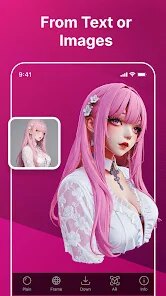
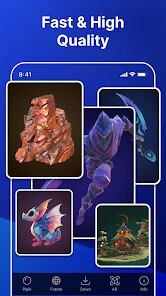
Tripo - AI 3D Model Generator, developed by Tripo AI, offers a straightforward solution for anyone needing three-dimensional assets without mastering complex modeling software. The application is available for download on Google Play, and the installation process is quick, taking up only a modest amount of device storage. It operates on a freemium model; the core functionality is accessible without charge, though optional in-app purchases unlock higher resolution exports and priority processing. Advertising appears intermittently, but it does not disrupt the workflow significantly.
Upon launching the app, you are greeted with a clean interface centered around a single input field. You type a text description of the object you envision, or upload a reference image, and the system generates a textured 3D model within seconds. Navigation feels intuitive; the generated models appear in a gallery where you can inspect them from every angle, rotate them, and download them in standard formats compatible with other software. From personal observation, the speed of generation is particularly impressive, with most requests completing in under thirty seconds, even on a mid-range device.
Compared to other mobile 3D generation tools, Tripo distinguishes itself through its emphasis on speed and immediate results. Some competitors require lengthy processing queues or offer fewer customization options. In contrast, Tripo feels more responsive and direct, though it does sacrifice some granular control over fine details that more advanced applications provide. This trade-off seems acceptable for a mobile app aimed at quick prototyping and creative exploration rather than professional-grade production work.
features
- The text-to-model conversion is remarkably accurate for common objects. Descriptions like “a wooden chair” or “a ceramic mug” produce results with convincing geometry and texture placement, which makes brainstorming ideas fast and effortless. A similar feature exists in some desktop tools, but the mobile execution here feels smoother.
- Image-to-3D functionality allows you to upload a photo and receive a model based on it. The likeness is generally good for simple subjects, such as a toy or a shoe, though complex backgrounds can sometimes confuse the algorithm. It still provides a helpful starting point for further refinement.
- The built-in viewer is well designed, offering smooth rotation controls and zoom capabilities. This makes it easy to examine your model from different perspectives before deciding to download or regenerate, adding a layer of convenience not always found in competing apps.
- Export options support several common file types, including OBJ and GLB. This flexibility ensures the generated assets integrate readily into game engines or 3D printing workflows, covering a broad range of user needs without extra steps.
pros
- It significantly lowers the barrier to entry for 3D creation, allowing anyone to produce usable models without prior technical knowledge or expensive desktop software.
- The quick turnaround time lets you iterate on ideas rapidly, testing multiple concepts in minutes rather than hours, which speeds up the creative process considerably.
- Using it as a base for further sculpting or detailing in other applications works well, saving time on initial blocking and layout stages of a project.
cons
- The free tier limits download resolution, which somewhat reduces the quality of the exported models for close-up inspection or printing.
- Occasionally, complex geometry in the input text yields results with slight deformations or merged parts that require manual correction later.
- In-app purchase prompts appear frequently, which can feel a little pushy after several uses, although they are easy to dismiss with a tap.
Articles
![]()
Guide
How to Update Google Play Store on Android 2026
![]()
Guide
How to Download Older Versions of Android Apps
![]()
Guide
How to Download Apps Without Google Play Store
![]()
Guide
What Is an APK File for Android?
If you use an Android phone, you may have seen the term APK while searching for apps or games online. Some websites offer an APK download instead of a Google Play install button. Some users also mention APK files when talking about apps that are not available in their region, older app versions, or Android games downloaded outside the Play Store.
![]()
Guide
How to Install Games from Google Play for Beginners
Installing games on an Android phone is usually simple, but for beginners, the process can still feel confusing at first. You may not know where to search, which button to tap, whether the game is safe, or why Google Play sometimes asks for account settings, storage access, or payment information. If you are using an Android phone for the first time, learning how to install games from Google Play is one of the easiest ways to get started.
![]()
Guide
How Useful Gemini Is for Everyday Questions and Quick Tasks
emini feels different from many AI apps because it is not only trying to be a chatbot. After using it for everyday questions, quick writing, image understanding, and planning, I think its biggest strength is convenience.
![]()
Guide
What to Know Before Downloading APKs
For many Android users, downloading an APK is a common way to install apps and games. Sometimes an app is not available in a certain country.
![]()
Guide
ChatGPT Review: Is It Still the Best AI App in 2026?
![]()
Guide
Seedance 2.0 vs Sora: The Future of AI Video Generation
The AI video race has intensified dramatically over the past two years. Platforms like Sora from OpenAI and Luma Dream Machine pushed the boundaries of text-to-video realism. Yet, despite their impressive outputs, most tools still operate as probabilistic generators—you describe a scene, and the model interprets it. Control remains limited. With the February 2026 release of Seedance 2.0, developed by ByteDance, the paradigm shifted. Internally known as Jimeng 2.0, Seedance does not position itself as just another video model. It positions itself as an AI Director. Rather than guessing what you want, Seedance 2.0 allows you to direct what happens. This distinction defines everything that follows.









Recommended Apps
![]()
Home Design 3D
Anuman4.2
![]()
Truth or Dare Game - Party App
Chouic4.8
![]()
Photo Collage Maker
Scoompa4.7![]()
Learn to Draw Flower
Creative APPS4.2![]()
FIFA World Cup 2026™
FIFA2.8![]()
Mirror Plus: Mirror with Light
Digitalchemy, LLC4.4![]()
Meitu- Photo Editor & AI Art
Meitu (China) Limited4.5![]()
Perplexity - Ask Anything
PerplexityAI4.7![]()
GhostTube SLS Camera Alternate
GhostTube4![]()
Boom Chip Blast: 2-Player
Black Pyramid 3D Games Studio0![]()
Healthy Benefits+
Solutran, Inc.4.5![]()
Deepcheck AI Search Assistant
rohe.ai4![]()
Idol Prank Video Call & Chat
LightCode Solutions4![]()
Face Shape - Pretty Scale
GlintTec Apps3.9![]()
Plant App - Plant Identifier
ScaleUp4.6












































