

FunVid: Funny Face Filters

Installs
Vibe Filter Club
Developer
-
Video Players & Editors
Category
-
Everyone
Content Rating
-
mobileinovatex@gmail.com
Developer Email
-
https://sites.google.com/view/innovatex-privacy-policy/home
Privacy Policy
Screenshots
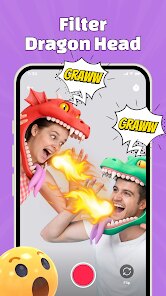

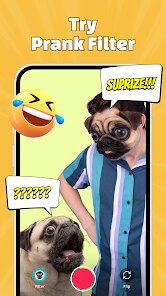
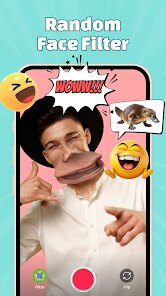
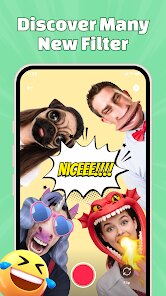
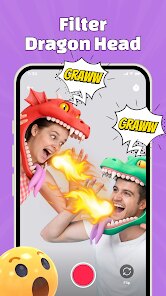
editor reviews
FunVid: Funny Face Filters brings a playful approach to photo editing, offering a large collection of amusing face effects that transform ordinary selfies into something far more entertaining. The app is available for free on Google Play, with the download size remaining quite manageable for most devices. While the installation process is straightforward, users should be aware that the app includes ads and optional in-app purchases for unlocking the complete filter library. Its primary purpose centers on casual entertainment, giving people a quick way to generate shareable, humorous images without needing any editing expertise.
Getting started with the app is refreshingly simple. After opening it, you can either snap a new photo or pull one from your gallery, and the interface immediately presents a scrolling row of filter thumbnails at the bottom. Tapping each one applies the effect in real time, which makes experimenting feel effortless. The filters range from animal faces and exaggerated expressions to distorting effects that stretch or shrink facial features. What I found particularly engaging is how the app detects facial movements, allowing the effects to track your expressions as you move your head. The layout stays clean and uncluttered, so even someone unfamiliar with editing tools can navigate it without confusion.
Compared to similar face filter applications, FunVid distinguishes itself through its emphasis on pure silliness rather than beauty enhancements. Apps like Snapchat or Instagram tend to focus on polished, flattering filters or social media integration, whereas FunVid leans heavily into comedic absurdity. The effects here feel less refined but intentionally so, favoring exaggerated humor over subtlety. One noticeable difference is the lack of video recording support, which some competitors offer, but for still images, the variety feels more extensive than what you typically find in mainstream platforms. It occupies a niche for those moments when you want absurd results delivered fast.
features
- Real-time preview functionality stands out because it shows the filter applied directly on your live camera feed before capturing, letting you adjust angles and expressions to get the best shot. Many other apps force you to snap first and edit later, which often wastes time.
- The automatic face tracking technology works reliably even in moderate lighting conditions. It locks onto facial features quickly and maintains the effect as you move, which makes the experience feel responsive and fluid rather than laggy or frustrating.
- An extensive effect library spans over one hundred filters, covering everything from cartoon overlays to head-swapping illusions. This breadth exceeds what most similar tools offer, and new additions appear periodically through updates.
- The sharing feature integrates directly with social platforms, allowing you to send your creations to friends or post them online within a couple of taps. Compared to apps that require saving and manually uploading, this streamlined approach reduces friction noticeably.
pros
- Quick entertainment value makes it perfect for killing time or breaking the ice at gatherings, as the filters generate laughs with minimal effort.
- No learning curve means you can produce funny images within seconds of installing, which suits users who prefer immediate results over reading tutorials.
- It serves as a creative icebreaker for social situations, giving you ready-made content to share with friends or family without needing any artistic skill.
cons
- Frequent advertisements interrupt the experience, and while they are skippable in most cases, they still break the flow when you are in the middle of experimenting.
- High-quality filters remain locked behind the premium version, which can feel limiting once you have cycled through the free options and want more variety.
- Occasionally, face detection struggles with certain angles or when wearing glasses, causing the effects to jump or misalign for a second or two.
- Photo resolution caps out lower than the original camera output, meaning images lose some sharpness when saved, which matters if you plan to print them later.
Articles
![]()
Guide
How to Update Google Play Store on Android 2026
![]()
Guide
How to Download Older Versions of Android Apps
![]()
Guide
How to Download Apps Without Google Play Store
![]()
Guide
What Is an APK File for Android?
If you use an Android phone, you may have seen the term APK while searching for apps or games online. Some websites offer an APK download instead of a Google Play install button. Some users also mention APK files when talking about apps that are not available in their region, older app versions, or Android games downloaded outside the Play Store.
![]()
Guide
How to Install Games from Google Play for Beginners
Installing games on an Android phone is usually simple, but for beginners, the process can still feel confusing at first. You may not know where to search, which button to tap, whether the game is safe, or why Google Play sometimes asks for account settings, storage access, or payment information. If you are using an Android phone for the first time, learning how to install games from Google Play is one of the easiest ways to get started.
![]()
Guide
How Useful Gemini Is for Everyday Questions and Quick Tasks
emini feels different from many AI apps because it is not only trying to be a chatbot. After using it for everyday questions, quick writing, image understanding, and planning, I think its biggest strength is convenience.
![]()
Guide
What to Know Before Downloading APKs
For many Android users, downloading an APK is a common way to install apps and games. Sometimes an app is not available in a certain country.
![]()
Guide
ChatGPT Review: Is It Still the Best AI App in 2026?
![]()
Guide
Seedance 2.0 vs Sora: The Future of AI Video Generation
The AI video race has intensified dramatically over the past two years. Platforms like Sora from OpenAI and Luma Dream Machine pushed the boundaries of text-to-video realism. Yet, despite their impressive outputs, most tools still operate as probabilistic generators—you describe a scene, and the model interprets it. Control remains limited. With the February 2026 release of Seedance 2.0, developed by ByteDance, the paradigm shifted. Internally known as Jimeng 2.0, Seedance does not position itself as just another video model. It positions itself as an AI Director. Rather than guessing what you want, Seedance 2.0 allows you to direct what happens. This distinction defines everything that follows.









Recommended Apps
![]()
Home Design 3D
Anuman4.2
![]()
Truth or Dare Game - Party App
Chouic4.8
![]()
Photo Collage Maker
Scoompa4.7![]()
Learn to Draw Flower
Creative APPS4.2![]()
FIFA World Cup 2026™
FIFA2.8![]()
Mirror Plus: Mirror with Light
Digitalchemy, LLC4.4![]()
Meitu- Photo Editor & AI Art
Meitu (China) Limited4.5![]()
Perplexity - Ask Anything
PerplexityAI4.7![]()
GhostTube SLS Camera Alternate
GhostTube4![]()
Boom Chip Blast: 2-Player
Black Pyramid 3D Games Studio0![]()
Healthy Benefits+
Solutran, Inc.4.5![]()
Deepcheck AI Search Assistant
rohe.ai4![]()
Idol Prank Video Call & Chat
LightCode Solutions4![]()
Face Shape - Pretty Scale
GlintTec Apps3.9![]()
Plant App - Plant Identifier
ScaleUp4.6











































