

Prank Call: Fake Video Prank

1M+
Installs
MoranJiyounge
Developer
-
Video Players & Editors
Category
-
Everyone
Content Rating
-
basaramorane@gmail.com
Developer Email
-
https://moranjiyoungestudiokr.web.app/privacy-policy
Privacy Policy
Screenshots



editor reviews
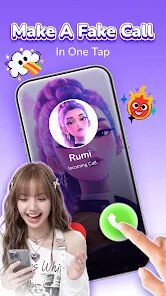
Finding a reliable prank call app on Google Play often involves sifting through a lot of mediocre options, but Prank Call: Fake Video Prank from developer MoranJiyounge manages to stand out. It's a free-to-install application designed to simulate authentic incoming video calls and messages from a contact you customize. The premise is simple: you configure a fake caller ID, select a pre-recorded video or image, and then trigger the fake call whenever you need a clever escape from an awkward situation. It's available for direct download and install from the Google Play Store, and while it does include ads, they're not overly intrusive. In-app purchases exist for accessing the full library of pre-loaded videos and some advanced features.
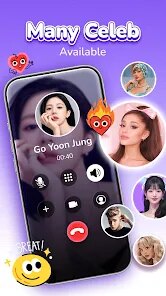
Upon launching the app, users are greeted with a straightforward interface where you can either use a contact from your phonebook or create a new, entirely fictional identity. You can then assign a video from your own gallery or choose from the app's in-built collection. The core interaction is just as seamless; a floating button appears on your screen, ready to launch the fake call at a moment's notice. I was quite surprised by the quality of the simulation. The full-screen video call interface with a timer and the ability to pause or play the "caller's" video feels convincing, which is the whole point. The app doesn't overcomplicate the process, making it very practical for last-minute use.
Compared to other similar apps, its biggest strength is the integration of live video. Many alternatives only offer a static image or a poorly rendered fake interface. This one, however, uses an actual looping video, which creates a much more believable effect. Some competitors offer more granular control over audio schedules or pre-recorded voice messages, but they often lack this core visual authenticity. While the design is functional, it isn't the most modern-looking app on the market, and its reliance on a floating overlay might confuse new users initially. Still, in terms of the core prank experience, it outshines many of its peers by focusing on what actually matters: the realism of the call.
features
- The realism of the fake video call is by far the app's most impressive feature. When you trigger the call, it takes over the entire screen with a polished interface that includes a live video feed of your chosen contact, a running call timer, and even a stable video connection status. I found this level of detail makes the prank far more effective than simple simulated call screens.
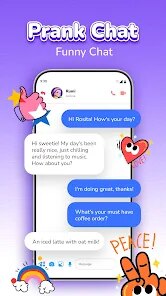
- Customization is another key aspect. Beyond just picking a photo, you can choose between your own video files and the app's built-in options. There's also a setting to fake an incoming SMS, which adds another layer of functionality. This flexibility ensures the prank can be tailored to the specific scenario you are in.
- The in-call controls are cleverly designed to enhance practicality. Once the "call" is active, you can still see and use your phone's other functions, letting you interact with your "caller" through the speaker while the screen displays the video feed of them. This is a much better experience than a static image blocking your full screen, which many similar apps implement.
pros
- It provides a nearly perfect, instant excuse to exit any conversation or meeting without having to explain yourself. The fake call starts with just a tap on the overlay button.
- It's a fun and harmless way to prank friends who might not be aware of the app's existence, especially since the video call looks so convincing.
- Because you can customize the caller's name and video, you can create different alibis for different situations, making the app quite versatile for social scenarios.
cons
- The app can occasionally be slow to respond when triggered from the launcher, but this isn't a consistent issue. The floating overlay is most reliable, though it may need to be enabled in phone settings.
- While the app is free, the pre-loaded video library is limited, and accessing the best clips requires a one-time in-app purchase. You could use your own videos, but this requires a bit of preparation.
- The design feels somewhat dated, lacking the polish of more modern apps. The icons and menus appear a bit basic, which is a noticeable contrast to the app's high-quality video simulation.
Articles
![]()
Guide
How to Update Google Play Store on Android 2026
![]()
Guide
How to Download Older Versions of Android Apps
![]()
Guide
How to Download Apps Without Google Play Store
![]()
Guide
What Is an APK File for Android?
If you use an Android phone, you may have seen the term APK while searching for apps or games online. Some websites offer an APK download instead of a Google Play install button. Some users also mention APK files when talking about apps that are not available in their region, older app versions, or Android games downloaded outside the Play Store.
![]()
Guide
How to Install Games from Google Play for Beginners
Installing games on an Android phone is usually simple, but for beginners, the process can still feel confusing at first. You may not know where to search, which button to tap, whether the game is safe, or why Google Play sometimes asks for account settings, storage access, or payment information. If you are using an Android phone for the first time, learning how to install games from Google Play is one of the easiest ways to get started.
![]()
Guide
How Useful Gemini Is for Everyday Questions and Quick Tasks
emini feels different from many AI apps because it is not only trying to be a chatbot. After using it for everyday questions, quick writing, image understanding, and planning, I think its biggest strength is convenience.
![]()
Guide
What to Know Before Downloading APKs
For many Android users, downloading an APK is a common way to install apps and games. Sometimes an app is not available in a certain country.
![]()
Guide
ChatGPT Review: Is It Still the Best AI App in 2026?
![]()
Guide
Seedance 2.0 vs Sora: The Future of AI Video Generation
The AI video race has intensified dramatically over the past two years. Platforms like Sora from OpenAI and Luma Dream Machine pushed the boundaries of text-to-video realism. Yet, despite their impressive outputs, most tools still operate as probabilistic generators—you describe a scene, and the model interprets it. Control remains limited. With the February 2026 release of Seedance 2.0, developed by ByteDance, the paradigm shifted. Internally known as Jimeng 2.0, Seedance does not position itself as just another video model. It positions itself as an AI Director. Rather than guessing what you want, Seedance 2.0 allows you to direct what happens. This distinction defines everything that follows.









Recommended Apps
![]()
Home Design 3D
Anuman4.2
![]()
Truth or Dare Game - Party App
Chouic4.8
![]()
Photo Collage Maker
Scoompa4.7![]()
Learn to Draw Flower
Creative APPS4.2![]()
FIFA World Cup 2026™
FIFA2.8![]()
Mirror Plus: Mirror with Light
Digitalchemy, LLC4.4![]()
Meitu- Photo Editor & AI Art
Meitu (China) Limited4.5![]()
Perplexity - Ask Anything
PerplexityAI4.7![]()
GhostTube SLS Camera Alternate
GhostTube4![]()
Boom Chip Blast: 2-Player
Black Pyramid 3D Games Studio0![]()
Healthy Benefits+
Solutran, Inc.4.5![]()
Deepcheck AI Search Assistant
rohe.ai4![]()
Idol Prank Video Call & Chat
LightCode Solutions4![]()
Face Shape - Pretty Scale
GlintTec Apps3.9![]()
Plant App - Plant Identifier
ScaleUp4.6











































