

GigaBody: AI Muscle filter

100K+
Installs
Bellential Inc.
Developer
-
Video Players & Editors
Category
-
Everyone
Content Rating
-
+15145531615
Developer Email
-
https://www.gigabody.app/privacy
Privacy Policy
Screenshots
editor reviews
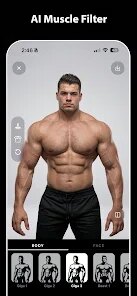
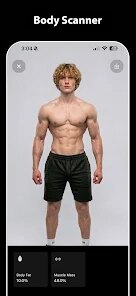
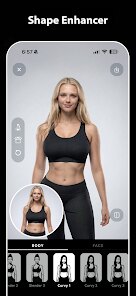
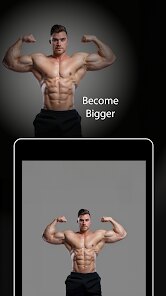
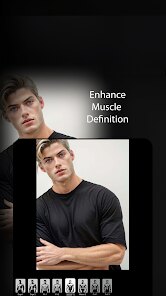
GigaBody: AI Muscle filter lands on Google Play as a playful image editing tool from Bellential Inc. The app uses artificial intelligence to add realistic muscle definition to photos, transforming ordinary selfies into dramatic fitness transformations. It is free to download and install, though the experience includes occasional ads and optional in-app purchases for those who want advanced editing features. Available through both Google Play and the App Store, it has seen a decent number of installations since launch, making it a recognizable name among novelty photo apps.
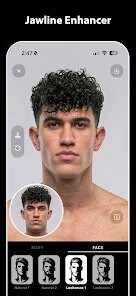
Opening the app presents a straightforward workflow. You pick a photo from your gallery or take a new one, then select a preset body type from a handful of options. The processing takes a few seconds, and the result is layered directly onto the original image. Adjusting the intensity slider lets you fine-tune how pronounced the effect appears, which is nice when you want something subtle rather than cartoonish. I found the face detection to be quite reliable; it keeps your head intact while modifying the body area, which is the core mechanic here.
Compared to other face-swap or body-editing apps, GigaBody focuses narrowly on musculature rather than offering a broad suite of retouching tools. Apps like FaceApp provide a wider range of filters, but they often dilute the quality of any single effect. GigaBody's specialization means the muscle rendering looks noticeably better than what I have seen in multi-purpose editors. The tradeoff is that you get little else, so users looking for comprehensive editing might feel limited by the singular focus.
features
- The muscle rendering itself is the standout feature. It does not just paste a texture on top; it adjusts lighting and contours to match the original photo's shadows, which makes the final image surprisingly believable in most cases. This level of detail caught me off guard for a free app.
- Preset variety covers lean, athletic, and bulky builds, each with its own anatomical proportions. Switching between them gives a quick sense of how different training outcomes might look, which is fun for experimentation even if you do not intend to share the result.
- Export quality remains high regardless of the free tier, with minimal compression artifacts. Unlike some apps that push low-resolution watermarked exports, GigaBody keeps the full-quality output available, which feels generous.
- The interface is minimal and responsive. There are no confusing menus or hidden settings, so the whole process from selection to save takes less than a minute once you are familiar with it. That efficiency matters when you are just messing around with friends' photos.
pros
- It is a great icebreaker for group chats; sending a friend's photo with an unexpected athletic build always gets a reaction, and the realistic look makes it more convincing.
- For fitness enthusiasts, it offers a rough visual benchmark. Seeing how different muscle sizes alter your silhouette can inform training goals, even if the results are purely fictional.
- It works well for social media content creation, letting you mock up transformation posts without needing expensive editing software or professional skills.
cons
- Ads appear frequently between edits, which can interrupt the flow when you are working through multiple photos in one session. They are skippable, but the frequency is noticeable.
- The free version limits access to some newer presets, locking them behind a premium unlock. This feels a bit restrictive if you are not ready to pay.
- Older or lower-resolution photos sometimes produce distorted results, especially if the body is angled oddly. The algorithm still struggles with side-profile shots in dim lighting.
- There is no batch processing option, so editing a series of images requires repeating the same steps manually each time, which becomes tedious quickly.
Articles
![]()
Guide
How to Update Google Play Store on Android 2026
![]()
Guide
How to Download Older Versions of Android Apps
![]()
Guide
How to Download Apps Without Google Play Store
![]()
Guide
What Is an APK File for Android?
If you use an Android phone, you may have seen the term APK while searching for apps or games online. Some websites offer an APK download instead of a Google Play install button. Some users also mention APK files when talking about apps that are not available in their region, older app versions, or Android games downloaded outside the Play Store.
![]()
Guide
How to Install Games from Google Play for Beginners
Installing games on an Android phone is usually simple, but for beginners, the process can still feel confusing at first. You may not know where to search, which button to tap, whether the game is safe, or why Google Play sometimes asks for account settings, storage access, or payment information. If you are using an Android phone for the first time, learning how to install games from Google Play is one of the easiest ways to get started.
![]()
Guide
How Useful Gemini Is for Everyday Questions and Quick Tasks
emini feels different from many AI apps because it is not only trying to be a chatbot. After using it for everyday questions, quick writing, image understanding, and planning, I think its biggest strength is convenience.
![]()
Guide
What to Know Before Downloading APKs
For many Android users, downloading an APK is a common way to install apps and games. Sometimes an app is not available in a certain country.
![]()
Guide
ChatGPT Review: Is It Still the Best AI App in 2026?
![]()
Guide
Seedance 2.0 vs Sora: The Future of AI Video Generation
The AI video race has intensified dramatically over the past two years. Platforms like Sora from OpenAI and Luma Dream Machine pushed the boundaries of text-to-video realism. Yet, despite their impressive outputs, most tools still operate as probabilistic generators—you describe a scene, and the model interprets it. Control remains limited. With the February 2026 release of Seedance 2.0, developed by ByteDance, the paradigm shifted. Internally known as Jimeng 2.0, Seedance does not position itself as just another video model. It positions itself as an AI Director. Rather than guessing what you want, Seedance 2.0 allows you to direct what happens. This distinction defines everything that follows.









Recommended Apps
![]()
Home Design 3D
Anuman4.2
![]()
Truth or Dare Game - Party App
Chouic4.8
![]()
Photo Collage Maker
Scoompa4.7![]()
Learn to Draw Flower
Creative APPS4.2![]()
FIFA World Cup 2026™
FIFA2.8![]()
Mirror Plus: Mirror with Light
Digitalchemy, LLC4.4![]()
Meitu- Photo Editor & AI Art
Meitu (China) Limited4.5![]()
Perplexity - Ask Anything
PerplexityAI4.7![]()
GhostTube SLS Camera Alternate
GhostTube4![]()
Boom Chip Blast: 2-Player
Black Pyramid 3D Games Studio0![]()
Healthy Benefits+
Solutran, Inc.4.5![]()
Deepcheck AI Search Assistant
rohe.ai4![]()
Idol Prank Video Call & Chat
LightCode Solutions4![]()
Face Shape - Pretty Scale
GlintTec Apps3.9![]()
Plant App - Plant Identifier
ScaleUp4.6












































