
Google Meet

5,000,000,000+
Installs
Google LLC
Developer
-
Social
Category
-
Rated for 3+
Content Rating
-
apps-help@google.com
Developer Email
-
http://www.google.com/policies/privacy
Privacy Policy
Screenshots



editor reviews
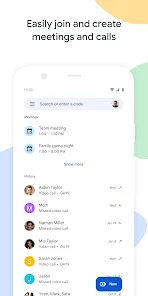
Google Meet is Google's video conferencing app, designed for both personal chats and professional meetings. You can use it for one-on-one calls or group sessions with up to 100 participants on the free plan, making it a go-to for remote work, online classes, or catching up with family. I downloaded it from the Google Play Store mainly because it comes pre-installed on many Android phones, so I already had it. After launching it for the first time, my immediate impression was how clean and minimal the interface is. There's no clutter, just a simple list of upcoming meetings and a big "New Meeting" button. It's free to download and use, though you need a Google account to sign in, which is almost automatic if you own an Android device. I didn't notice any annoying ads during setup, which was a relief compared to other free apps.
When I actually started using Google Meet for a call, the experience was pretty straightforward. I tapped "New Meeting" and chose to send an invite link to a friend via text. The onboarding was smooth, though it did ask for camera and microphone permissions right away, which is expected. During the call, the main controls are all at the bottom: mute, camera toggle, screen share, and a three-dot menu for captions or adjusting settings. I found the interface intuitive, but I did hit a confusing moment when I tried to add someone mid-call - it took me a minute to find the "Add people" option hidden in that menu. For daily use, a practical tip is to use the "Blur background" feature to hide messy rooms; it worked perfectly even on my older phone. The call quality was solid overall, but I noticed occasional lag during a group meeting with four people, though it wasn't deal-breaking.
After sticking with Google Meet for a few weeks, I think it's a reliable option for people already deep in Google's ecosystem - like if you use Gmail or Google Calendar daily, the integration is seamless. Those who don't need fancy features might enjoy it, but power users looking for things like breakout rooms or extensive recording options may feel limited. What sets it apart from similar apps like Zoom is its simplicity; there's no learning curve, and it feels less bloated. However, I'd consider uninstalling it for heavy work meetings because the free plan caps calls at 60 minutes, which can be frustrating. I kept it installed mainly for quick chats, but I still reach for Discord or Signal for gaming sessions, since Meet lacks that casual, always-on vibe.
features
- 🛡️ Google Meet integrates directly with Google Calendar, so scheduling a meeting is just a few clicks away. Unlike Zoom, which requires a separate extension or manual link sharing, Meet automatically generates a link when you create an event, saving time for busy users.
- 🛡️ Real-time captions powered by AI are a standout feature. While Microsoft Teams also offers captions, Meet's are more accurate and available on the free tier, helping users in noisy environments or those with hearing impairments follow along easily.
- 🛡️ No software installation is needed for participants joining via a browser. Unlike Skype, which often pushes desktop downloads, Meet lets anyone click a link and join instantly from Chrome or Edge, reducing friction for guests.
- 🛡️ The "Noise cancellation" feature filters background sounds like typing or street noise. This works better than Zoom's basic noise suppression, making calls clearer in less-than-ideal settings without extra hardware.
pros
- 👍 Seamless integration with Google Workspace apps like Gmail and Google Calendar is a huge plus. For daily users of these tools, scheduling and joining meetings feels automatic, whereas apps like Zoom require more manual setup and syncing.
- 👍 Smart reply suggestions in the chat window help you respond quickly during meetings. Competitors like Cisco Webex don't offer this, making Meet more efficient for multitaskers who want to stay engaged without typing much.
- 👍 Free tier allows up to 100 participants for 60 minutes, which is generous compared to Zoom's 40-minute limit. This makes Meet a better choice for larger, longer casual gatherings like virtual family reunions.
cons
- 👎 No breakout rooms in the free plan restricts its use for interactive workshops or classes. Zoom excels here by allowing hosts to split participants into groups easily, while Meet users have to rely on third-party workarounds.
- 👎 Call duration limit of 60 minutes on free accounts can be a pain for longer meetings. You'll need to restart, which interrupts flow, while Jitsi Meet offers unlimited calls without a paid tier.
- 👎 Limited recording options on mobile devices compared to desktop. Zoom lets you record to the cloud or locally on any device, but Meet only records via paid Google Workspace, forcing free users to find external apps.
- 👎 Occasional performance issues with older devices during group calls. While Microsoft Teams optimizes better for low-end hardware, Meet can stutter or drop frames when more than five participants join on a less powerful phone.
Articles
![]()
Guide
How to Update Google Play Store on Android 2026
![]()
Guide
How to Download Older Versions of Android Apps
![]()
Guide
How to Download Apps Without Google Play Store
![]()
Guide
What Is an APK File for Android?
If you use an Android phone, you may have seen the term APK while searching for apps or games online. Some websites offer an APK download instead of a Google Play install button. Some users also mention APK files when talking about apps that are not available in their region, older app versions, or Android games downloaded outside the Play Store.
![]()
Guide
How to Install Games from Google Play for Beginners
Installing games on an Android phone is usually simple, but for beginners, the process can still feel confusing at first. You may not know where to search, which button to tap, whether the game is safe, or why Google Play sometimes asks for account settings, storage access, or payment information. If you are using an Android phone for the first time, learning how to install games from Google Play is one of the easiest ways to get started.
![]()
Guide
How Useful Gemini Is for Everyday Questions and Quick Tasks
emini feels different from many AI apps because it is not only trying to be a chatbot. After using it for everyday questions, quick writing, image understanding, and planning, I think its biggest strength is convenience.
![]()
Guide
What to Know Before Downloading APKs
For many Android users, downloading an APK is a common way to install apps and games. Sometimes an app is not available in a certain country.
![]()
Guide
ChatGPT Review: Is It Still the Best AI App in 2026?
![]()
Guide
Seedance 2.0 vs Sora: The Future of AI Video Generation
The AI video race has intensified dramatically over the past two years. Platforms like Sora from OpenAI and Luma Dream Machine pushed the boundaries of text-to-video realism. Yet, despite their impressive outputs, most tools still operate as probabilistic generators—you describe a scene, and the model interprets it. Control remains limited. With the February 2026 release of Seedance 2.0, developed by ByteDance, the paradigm shifted. Internally known as Jimeng 2.0, Seedance does not position itself as just another video model. It positions itself as an AI Director. Rather than guessing what you want, Seedance 2.0 allows you to direct what happens. This distinction defines everything that follows.









Recommended Apps
![]()
Home Design 3D
Anuman4.2
![]()
Truth or Dare Game - Party App
Chouic4.8
![]()
Photo Collage Maker
Scoompa4.7![]()
Learn to Draw Flower
Creative APPS4.2![]()
FIFA World Cup 2026™
FIFA2.8![]()
Mirror Plus: Mirror with Light
Digitalchemy, LLC4.4![]()
Meitu- Photo Editor & AI Art
Meitu (China) Limited4.5![]()
Perplexity - Ask Anything
PerplexityAI4.7![]()
GhostTube SLS Camera Alternate
GhostTube4![]()
Boom Chip Blast: 2-Player
Black Pyramid 3D Games Studio0![]()
Healthy Benefits+
Solutran, Inc.4.5![]()
Deepcheck AI Search Assistant
rohe.ai4![]()
Idol Prank Video Call & Chat
LightCode Solutions4![]()
Face Shape - Pretty Scale
GlintTec Apps3.9![]()
Plant App - Plant Identifier
ScaleUp4.6











































