

Shazam: Find Music & Concerts

500M+
Installs
Apple Inc.
Developer
-
Entertainment
Category
-
Teen
Content Rating
-
support@apple.com
Developer Email
-
https://www.apple.com/legal/privacy/
Privacy Policy
Screenshots

editor reviews
Shazam is one of those apps that feels almost magical the first time you use it. It's a music recognition tool that lets you identify any song playing around you in just a few seconds. You've probably seen people tapping their phones against a speaker at a party or in a coffee shop. That's Shazam. It belongs to the utility and lifestyle category, and its main job is simple: hear a tune, name that tune. I first downloaded it from the App Store years ago, and it was free, with no registration required. You just install, launch, and tap that big button in the center. The first impression is clean and minimal. No clutter. No begging you to create an account. Just a single button and a blank canvas. It feels like a tool that respects your time.
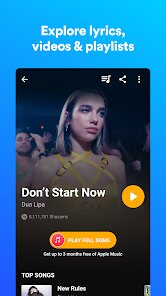
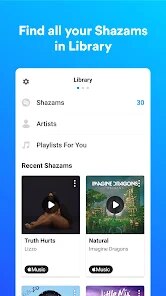
Using Shazam in everyday life is as straightforward as it gets. You open the app, tap the Shazam button, and within seconds it spits out the song title, artist, and album art. There is no onboarding tutorial because there's nothing to teach. The interface is basically one screen. After you identify a song, you can save it to your library, add it to a Spotify or Apple Music playlist, or share it with friends. A small thing I like is that it works even when your phone is locked. You can enable Auto Shazam from the settings, and it will keep listening in the background. That's super handy when you're in a taxi or at a bar and don't want to keep pulling out your phone. The only confusing moment I've had is when it fails to recognize a very obscure track. But honestly, that's rare. For 90% of pop, rock, electronic, or hip-hop playing in public, it nails it.
After using Shazam for years, I'd say it's the kind of app you keep installed because it solves a very specific problem instantly. Music lovers, casual listeners, DJs, or anyone who's ever been annoyed by an unidentified earworm will love it. It's hard to find a direct competitor because Shazam is basically synonymous with music recognition. Apps like SoundHound exist, but Shazam feels faster and more accurate in my experience. The integration with Apple Music (since Apple bought it) is seamless. If you're an Apple Music subscriber, you can just tap to add any identified song to a playlist. That alone makes it worth keeping. On the flip side, if you rarely find yourself in situations with unknown songs, you probably don't need it. I've never felt the urge to uninstall it because it's lightweight, uses virtually no storage, and doesn't spam notifications. It just sits there, ready when you need it.
features
- 🎵 Instant music recognition: Shazam can identify songs in seconds, even with background noise. SoundHound also does this, but Shazam is noticeably faster and more reliable with less clear audio. It rarely fails on mainstream tracks.
- 📱 Auto Shazam mode: This feature lets the app continuously listen without you tapping the button every time. Great for parties or road trips. SoundHound requires manual initiation each time, which feels clunky in comparison.
- 🔗 Deep integration with streaming services: Shazam connects directly to Apple Music and Spotify. You can save identified songs to playlists with one tap. SoundHound has this too, but the Apple Music integration feels more native and responsive.
- 📺 TV and ad recognition: Shazam can identify songs playing in TV shows, movies, or ads. Just hold your phone near the speaker. That's a standout feature SoundHound doesn't emphasize as much.
pros
- ✅ Lightning-fast recognition: Shazam identifies songs in under five seconds most of the time. SoundHound takes a bit longer, especially with live recordings. For quick use, Shazam wins every time.
- ✅ No account needed: You can use Shazam fully without signing up. SoundHound forces you to create an account for saving history. That's a big plus for privacy-conscious users.
- ✅ Apple ecosystem synergy: If you own an iPhone or use Apple Music, Shazam feels like a natural extension. It syncs across devices via iCloud. SoundHound lacks that same level of seamless integration.
cons
- ❌ Limited offline capability: Shazam needs an internet connection to work. SoundHound can identify songs offline and then match them later. If you're in a subway or a remote area, Shazam is useless.
- ❌ No lyrics display during recognition: Shazam only shows lyrics after you identify a song and tap a separate button. SoundHound shows live scrolling lyrics as the song plays, which is nicer for singing along.
- ❌ History management is basic: Shazam's history view is just a chronological list. SoundHound lets you tag, filter, and organize your history better, which is useful if you Shazam a lot.
Articles
![]()
Guide
How to Update Google Play Store on Android 2026
![]()
Guide
How to Download Older Versions of Android Apps
![]()
Guide
How to Download Apps Without Google Play Store
![]()
Guide
What Is an APK File for Android?
If you use an Android phone, you may have seen the term APK while searching for apps or games online. Some websites offer an APK download instead of a Google Play install button. Some users also mention APK files when talking about apps that are not available in their region, older app versions, or Android games downloaded outside the Play Store.
![]()
Guide
How to Install Games from Google Play for Beginners
Installing games on an Android phone is usually simple, but for beginners, the process can still feel confusing at first. You may not know where to search, which button to tap, whether the game is safe, or why Google Play sometimes asks for account settings, storage access, or payment information. If you are using an Android phone for the first time, learning how to install games from Google Play is one of the easiest ways to get started.
![]()
Guide
How Useful Gemini Is for Everyday Questions and Quick Tasks
emini feels different from many AI apps because it is not only trying to be a chatbot. After using it for everyday questions, quick writing, image understanding, and planning, I think its biggest strength is convenience.
![]()
Guide
What to Know Before Downloading APKs
For many Android users, downloading an APK is a common way to install apps and games. Sometimes an app is not available in a certain country.
![]()
Guide
ChatGPT Review: Is It Still the Best AI App in 2026?
![]()
Guide
Seedance 2.0 vs Sora: The Future of AI Video Generation
The AI video race has intensified dramatically over the past two years. Platforms like Sora from OpenAI and Luma Dream Machine pushed the boundaries of text-to-video realism. Yet, despite their impressive outputs, most tools still operate as probabilistic generators—you describe a scene, and the model interprets it. Control remains limited. With the February 2026 release of Seedance 2.0, developed by ByteDance, the paradigm shifted. Internally known as Jimeng 2.0, Seedance does not position itself as just another video model. It positions itself as an AI Director. Rather than guessing what you want, Seedance 2.0 allows you to direct what happens. This distinction defines everything that follows.









Recommended Apps
![]()
Home Design 3D
Anuman4.2
![]()
Truth or Dare Game - Party App
Chouic4.8
![]()
Photo Collage Maker
Scoompa4.7![]()
Learn to Draw Flower
Creative APPS4.2![]()
FIFA World Cup 2026™
FIFA2.8![]()
Mirror Plus: Mirror with Light
Digitalchemy, LLC4.4![]()
Meitu- Photo Editor & AI Art
Meitu (China) Limited4.5![]()
Perplexity - Ask Anything
PerplexityAI4.7![]()
GhostTube SLS Camera Alternate
GhostTube4![]()
Boom Chip Blast: 2-Player
Black Pyramid 3D Games Studio0![]()
Healthy Benefits+
Solutran, Inc.4.5![]()
Deepcheck AI Search Assistant
rohe.ai4![]()
Idol Prank Video Call & Chat
LightCode Solutions4![]()
Face Shape - Pretty Scale
GlintTec Apps3.9![]()
Plant App - Plant Identifier
ScaleUp4.6











































